Pushbuild

Your sales, shop and CRM data, in the books.

We connect QuickBooks Online, Xero, HubSpot, Salesforce and Zoho to the systems around them through their APIs: invoices raised from won deals, daily sales posted from your shop, and customer records kept the same everywhere.

Tell us what you needSee typical projects

You see it working at every milestone, not a status report.

Sound familiar?

What we hear from businesses before a project like this starts.

  • Our bookkeeper copies every Shopify and Stripe sale into QuickBooks by hand.
  • A deal is marked won in HubSpot, and then someone has to remember to raise the invoice.
  • The customer's address is different in the CRM, the books and the shop.
  • We have a backlog of months that never reconciled after we changed payment provider.
  • The off-the-shelf connector posts every order as its own line, and month-end takes days.

What buyers usually need

The requests that come up most often for this kind of work, and what each one takes to work properly.

01

Shopify, Stripe or Revolut reconciled in Xero or QuickBooks

Payouts split into sales, fees and refunds, posted so they match the bank line, plus a clean-up of the backlog.

02

An invoice the moment a deal is won

The customer matched or created in the books, the invoice built from the deal's line items, and payment status written back.

03

Two-way CRM sync with another system

A written rule for every field that can change on both sides, so the two systems never fight.

04

Accounting data in a database or report

Hourly or nightly pulls from QuickBooks or Xero into Postgres or Sheets for reporting.

05

A CRM set up for the way you sell

HubSpot, Zoho or Salesforce pipelines, properties and workflows configured, with data imported cleanly.

06

Accounting data available to your other tools

Read-only access to invoices and customers for a dashboard, a portal or an assistant, with the least permissions possible.

Tools that come up most: HubSpot, QuickBooks Online, Xero, Salesforce, Zoho CRM, Stripe, Shopify, n8n, Make, Zapier, Postgres.

What you get

Concrete pieces, each one something you can open and check when it's done.

HubSpot dealsQuickBooks or XeroShopify or StripePayment statusBank payoutsSync logSync servicebuilt by Pushbuild

Shop and payment data into the books

Daily or per-order postings from Shopify, Stripe, Square or your own system, summarised the way your accountant wants them.

QuickBooks Online API, Xero API, Stripe, Shopify

Invoices from your CRM

When a deal is won, the invoice is created in QuickBooks or Xero with the right customer, items and terms.

HubSpot deals and line items, QuickBooks, Xero

Two-way CRM sync

Contacts, companies and deals kept in step between HubSpot, Salesforce or Zoho and another system, with clear rules about which side wins.

HubSpot, Salesforce and Zoho APIs, webhooks

Payment status back to sales

Invoice and payment status written back to the CRM record, so sales sees who has paid.

CRM properties, QuickBooks and Xero webhooks

Accounting data for reporting

Scheduled pulls of invoices, payments and customers into a database or sheet your reports can read.

Postgres, Google Sheets, scheduled jobs

A sync log you can read

Every record sent, skipped or failed, in a sheet or table your bookkeeper can check without asking us.

Google Sheets, a small database, email alerts

Typical projects

Example packages to show the shape of the work. These are examples, not past clients; yours gets its own written scope.

Example package

Daily sales into QuickBooks or Xero

One summarised journal or sales receipt per day from your shop or payment processor, split by tax, shipping, fees and refunds.

You get

  • Account mapping agreed with your bookkeeper
  • A daily posting that matches the payout
  • Refunds and fees handled
  • A sync log and a failure alert email

Example package

Invoice when a HubSpot deal is won

Moving a deal to Closed Won creates the customer and the invoice in your accounting system, and payment status flows back to HubSpot.

You get

  • Customer match or create, without duplicates
  • Invoice built from the deal's line items
  • Paid and overdue status written back to the deal
  • Handling for edits and voided invoices

Example package

Two-way CRM sync with another system

Contacts and companies kept the same in your CRM and your other CRM, ERP or app, with a written rule for every conflict.

You get

  • Field-by-field mapping and conflict rules
  • Initial match and de-duplication
  • Ongoing sync in both directions
  • A log of every change it made

Example package

Backlog import and clean-up

Months of past orders, payouts or invoices brought into the books in one controlled run, checked against your totals before it is posted.

You get

  • A dry run you review before anything is posted
  • Totals reconciled against your source
  • A list of records that need a human decision
  • The import run and a final report

Example projects

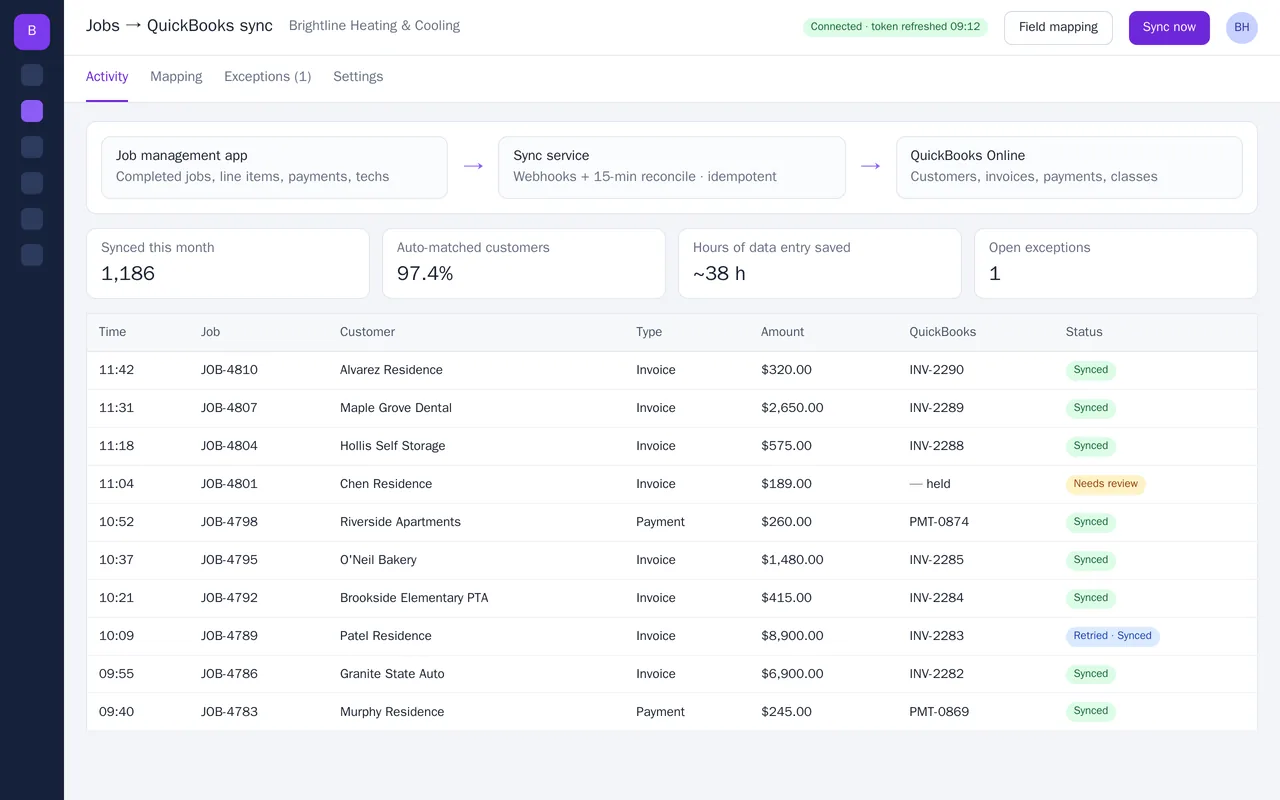
Job management to QuickBooks Online sync for an HVAC company

Job management to QuickBooks Online sync for an HVAC company

Brightline Heating & Cooling's office manager was re-typing every completed job into QuickBooks. We built a sync service that turns each finished job into a QuickBooks invoice, with labor, parts and maintenance plans mapped to the right income accounts. It matches or creates the customer, tags the technician as a class for job costing, and records card payments against the invoice. Anything ambiguous, such as two customers with the same phone number, is held in an exceptions queue instead of guessed.

  • Webhook-driven sync plus a 15-minute reconcile, idempotent so nothing is double-posted
  • Customer matching on email, then phone, then name, with an exceptions queue
  • Field mapping screen: items, income accounts, classes, departments, sales tax
  • Payments recorded to Undeposited Funds and matched to invoices

Python, FastAPI, QuickBooks Online API (OAuth 2.0), webhooks, PostgreSQL, Docker

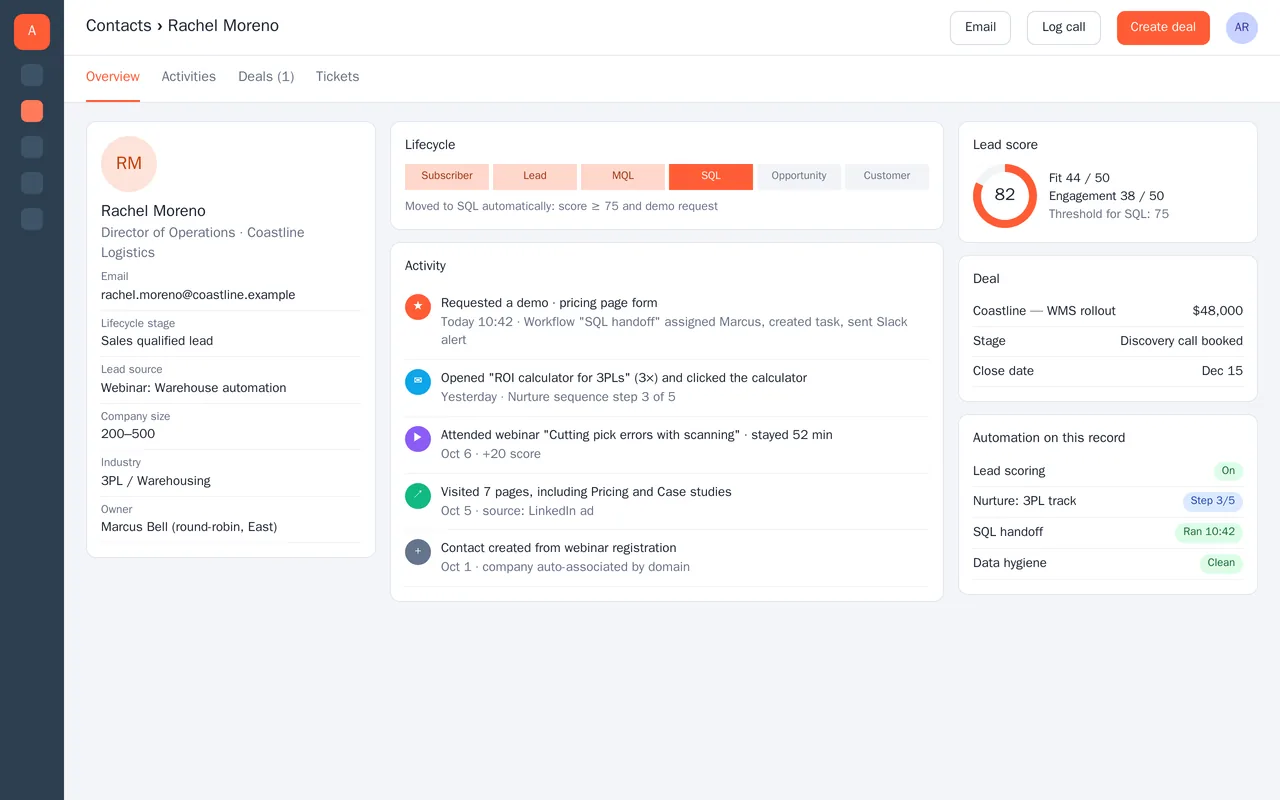
HubSpot lead scoring and sales handoff for a B2B software company

HubSpot lead scoring and sales handoff for a B2B software company

A warehouse-software company had thousands of webinar and ad leads in HubSpot, and sales couldn't tell which ones to call. We rebuilt their HubSpot setup around a scoring model and clean handoffs. Every contact gets a fit score (role, company size, industry) and an engagement score (webinars, emails, pricing-page visits). Lifecycle stages update automatically, and when a lead crosses the SQL threshold or requests a demo, it is round-robined to the right rep with a task and a Slack alert.

  • Custom properties, lifecycle stages and pipeline cleaned up and documented
  • Fit + engagement lead scoring with an SQL threshold
  • Workflows: nurture tracks by industry, SQL handoff, round-robin by territory
  • Data hygiene: deduplication, company association by domain, required fields

HubSpot Marketing and Sales Hub, workflows, lead scoring, sequences, custom properties, Slack integration


Sample build

A working example we built to show this kind of work. It is a demonstration, not a client project.

HubSpot closed-won deals to QuickBooks invoices

Sample build

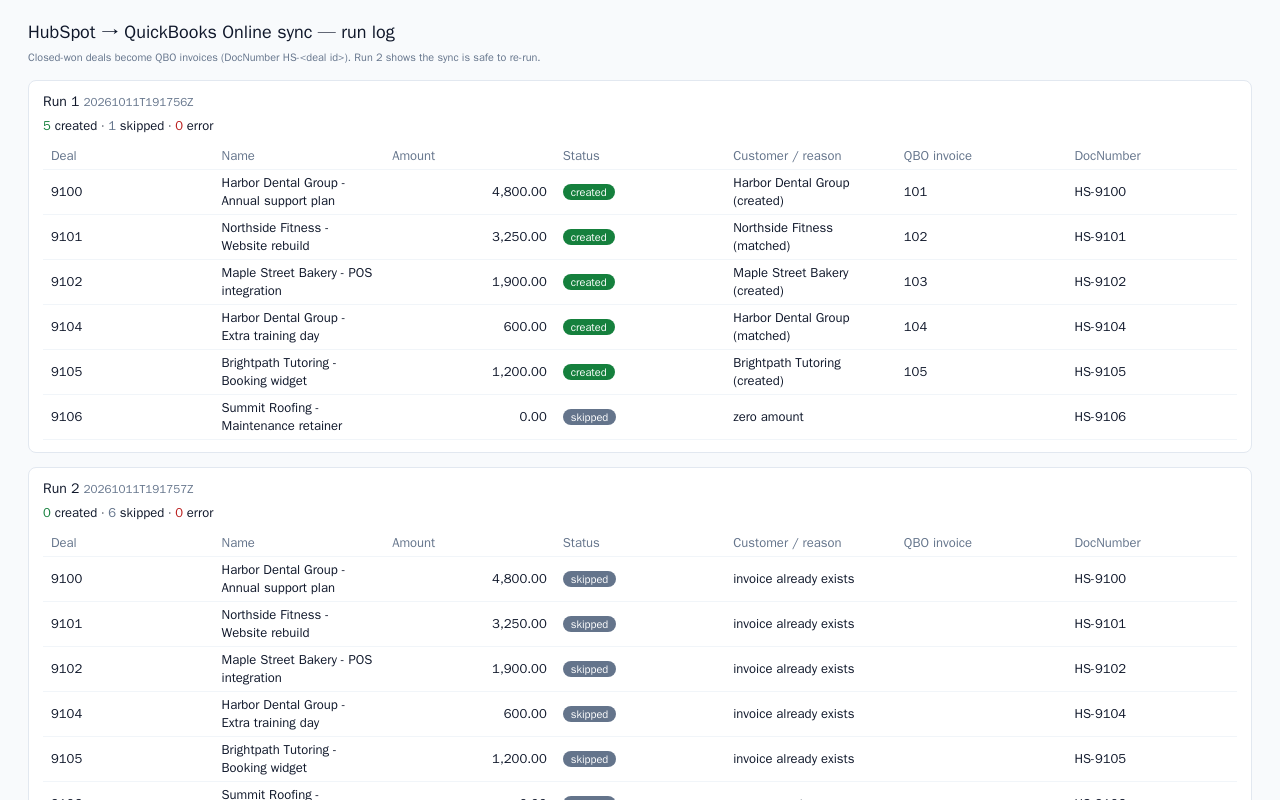
HubSpot closed-won deals to QuickBooks invoices

Python sync that matches or creates QuickBooks Online customers and invoices each closed-won HubSpot deal, then writes the invoice id back to the deal. Re-runs are safe because it dedupes by deal id, and every outcome goes to a run log. Demo runs against mock APIs.

Python 3.12, HubSpot CRM v3 API, QuickBooks Online Accounting API, Docker

About the screenshot: The run log from a sync run against mock HubSpot and QuickBooks APIs with demo data.

How we approach it

The habits that keep this kind of project from going wrong.

1

Agree the mapping with your accountant

Which account, tax code and class each line goes to is decided with your bookkeeper, in writing, before anything is posted.

2

Dry runs before real postings

Every integration runs first in a sandbox or as a report you check. Nothing touches the live books until you sign it off.

3

Idempotent by design

Each record carries the source ID, so a retry or a re-run never creates a duplicate invoice.

4

Not bookkeeping

We build the connection; your bookkeeper keeps doing the books. If you need bookkeeping itself, we will say so rather than take it on.

How we work

A written scope first, then working progress you can check, then a proper handover.

  1. You describe it

    Tell us what you need in your own words, and which tools you already use. A few lines is plenty to start.

  2. A written scope

    We reply with a short written scope: what gets built, what is out of scope, which accounts we need, and how we'll both know it works. You know what you're getting before work begins.

  3. Milestones you review

    The work is split into milestones. At each one you see it working in your own account and sign it off before we go on.

  4. Handover and a 30-day fix window

    You get the working system, its documentation and a walkthrough. If anything we built breaks in the next 30 days, we fix it at no charge.

What shapes the scope

  • How many systems and record types are involved
  • One-way or two-way sync
  • How much history needs to be brought across
  • How your accountant wants things summarised

Always included

  • A written scope before work starts
  • Milestones you review and sign off
  • Documentation and a walkthrough at handover
  • A 30-day window for fixes, at no charge

Pushbuild has built software for businesses since 2010, for more than 40 clients. Every project is led by a former public-company CTO, from Groton, Massachusetts. See products we've built.

Questions people ask first

Do you need access to our accounting file?

We need an app connection, which you approve through QuickBooks, Xero or the CRM's own sign-in screen, and usually a user invite so we can check results. Both can be removed at any time.

Are you replacing our bookkeeper?

No. We build the connection your bookkeeper or accountant asks for, agree the mapping with them, and they keep doing the books.

Who owns the integration?

You do. The code goes into a repository you own and runs in a hosting account in your name, and the app connections are made from your accounts.

How long does it take?

Most integrations take one to three weeks from the signed scope. The longest part is usually agreeing the mapping, not writing the code.

What if we want changes later?

Small adjustments inside the agreed scope are included. Anything new, such as another record type or another system, is scoped in writing before we start it.

What happens if something fails to sync?

The integration logs it and emails whoever you choose. In the 30 days after handover we fix any fault in what we built at no charge; after that, they are scoped and agreed with you before we start.

Tell us what you need built.

Email a few lines about what you want and which tools you use, or call. We reply with questions or a written scope.

hello@pushbuild.com

(617) 299-8887