Pushbuild

Google Sheets that run part of the business for you.

We build systems in Google Sheets with Apps Script: order and booking forms that feed a sheet, inventory and allocation tools, automatic emails and reminders, and reports that build themselves. Your team keeps working in Sheets.

Tell us what you needSee typical projects

You see it working at every milestone, not a status report.

Sound familiar?

What we hear from businesses before a project like this starts.

  • We run the business out of six separate spreadsheets and they never agree.
  • Orders come in through a Google Form and someone retypes them into the order sheet.
  • We need an email to go out when a row changes, and we're doing it by hand.
  • The sheet works until someone sorts it the wrong way.
  • The weekly numbers take an afternoon to put together.

What buyers usually need

The requests that come up most often for this kind of work, and what each one takes to work properly.

01

An order form feeding a sheet

A Google Form or web form whose answers land in the order sheet in the right format, with a confirmation email.

02

Several files consolidated into one system

Booking, operations and finance tabs in one workbook, with data entered once.

03

Inventory and allocation

Stock reserved against orders, shortfalls flagged, and purchase suggestions calculated.

04

Leads from Facebook or a CRM into Sheets

New leads and their status written into a sheet automatically for tracking.

05

A KPI or finance dashboard in Sheets or Looker Studio

Totals, charts and a summary tab, refreshed on a schedule.

06

Ongoing changes to an existing sheet system

Someone else's Apps Script read, repaired and extended.

Tools that come up most: Google Sheets, Apps Script, Google Forms, Gmail, Google Calendar, Google Drive, Looker Studio, Make, n8n, Facebook Lead Ads.


What you get

Concrete pieces, each one something you can open and check when it's done.

Google FormsEmailsSheets dataReportsOther toolsCalendar eventsApps Scriptbuilt by Pushbuild

Forms to sheets

Google Forms or web forms that write clean rows, with confirmation emails.

Google Forms, Apps Script triggers

Sheet systems

Multi-tab systems for orders, bookings, inventory or projects, with data entered once.

Google Sheets, Apps Script

Automatic emails and reminders

Emails, calendar events and reminders sent when rows change or dates arrive.

Gmail, Google Calendar, time triggers

Reports and dashboards

Summary tabs, charts and Looker Studio pages that refresh on a schedule.

Sheets, Looker Studio

Connections

Data pulled into Sheets from other tools, or pushed out of Sheets to them.

UrlFetch, webhooks, APIs, Make, n8n

Custom menus and sidebars

Buttons and sidebars inside the sheet for the actions your team repeats.

Apps Script UI

Typical projects

Example packages to show the shape of the work. These are examples, not past clients; yours gets its own written scope.

Example package

Order form to order sheet

A form for customers or staff whose entries go straight into your order sheet.

You get

  • Form with your fields and validation
  • Rows written in the right format
  • Confirmation email to the customer
  • A summary tab of open orders

Example package

Consolidated operations workbook

Several separate sheets combined into one workbook where data is entered once.

You get

  • One workbook with linked tabs
  • Existing data moved in and checked
  • Protected formulas and input areas
  • A guide for the team

Example package

Inventory allocation sheet

Stock reserved against orders, with shortfalls and reorder suggestions.

You get

  • Stock, orders and allocation tabs
  • Reservation logic in Apps Script
  • Shortfall and reorder report
  • A daily refresh

Example package

Weekly KPI report

Your weekly numbers calculated and emailed automatically.

You get

  • Data pulled into a source tab
  • KPI tab with your definitions
  • Scheduled email with the summary
  • Optional Looker Studio page

Example projects

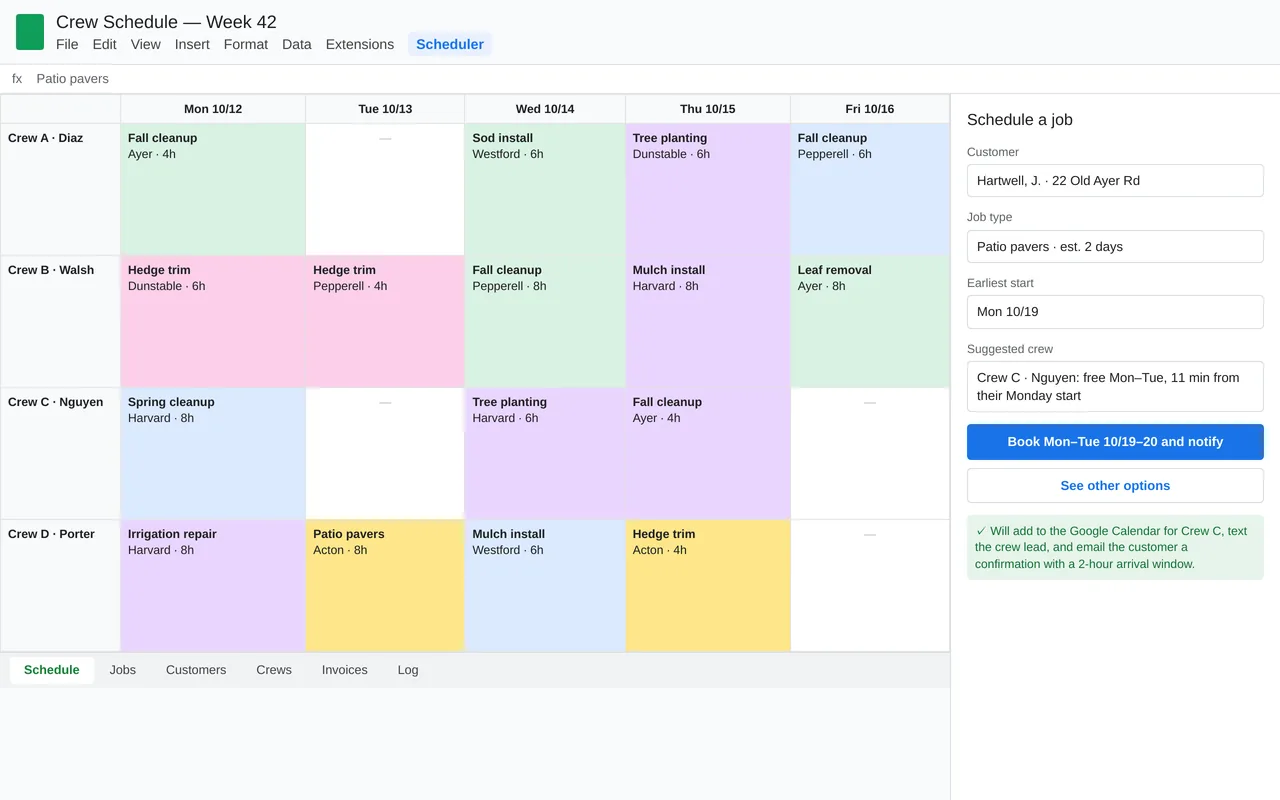
Crew scheduling in Google Sheets for a landscaping company (Apps Script)

Crew scheduling in Google Sheets for a landscaping company (Apps Script)

A landscaping company ran four crews from a shared Google Sheet and spent every evening texting crews and calling customers. We kept the sheet they already knew and added a Scheduler menu built in Apps Script. A sidebar books new jobs and suggests the crew with free days that is closest to its other jobs. Crews get tomorrow's jobs by text each evening, customers get an arrival window by email, and completed jobs turn into invoices.

  • Custom Scheduler menu and booking sidebar in Google Sheets
  • Crew suggestion from availability and drive time
  • Sync to each crew's Google Calendar
  • Evening crew texts, customer arrival-window emails, and a weekly summary to the owner

Google Apps Script, Google Sheets, Calendar and Gmail APIs, Google Maps distance matrix, Twilio SMS, time-driven triggers

Sample build

A working example we built to show this kind of work. It is a demonstration, not a client project.

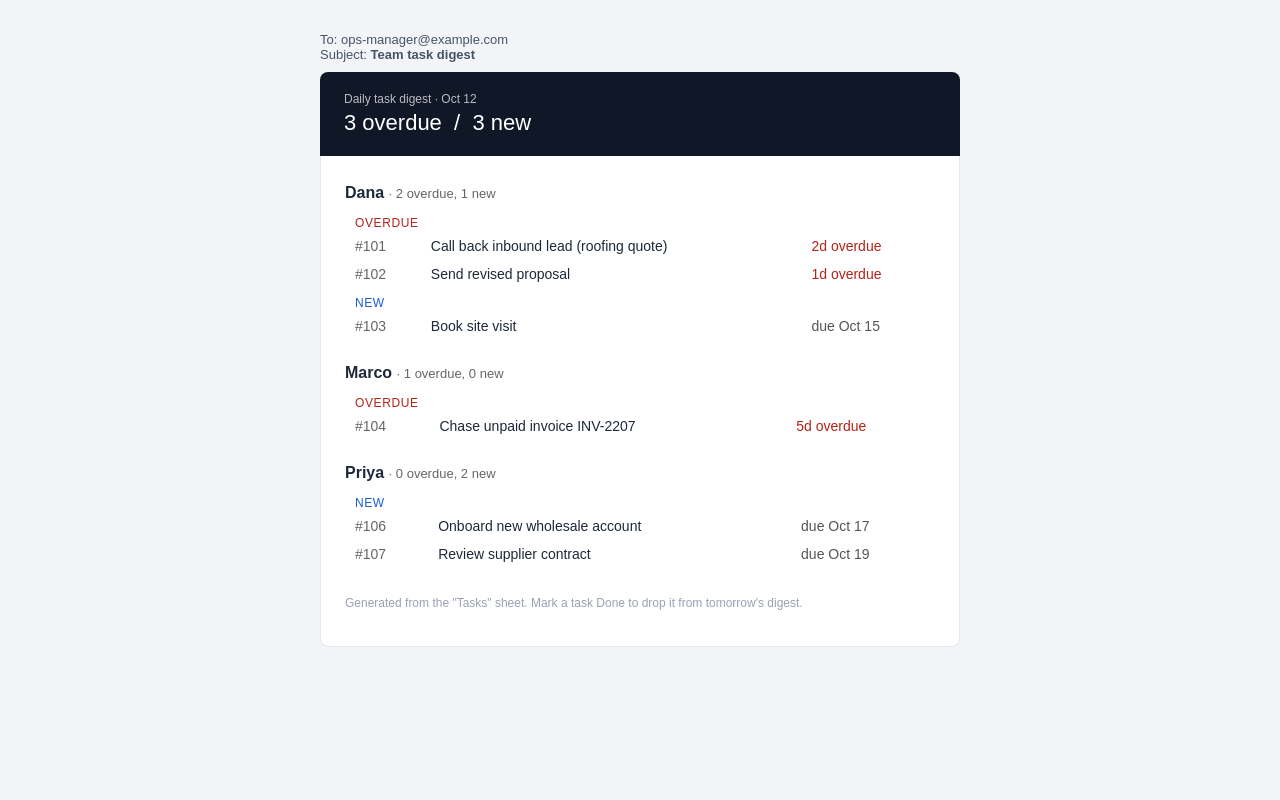
Google Sheet to daily email digest (Apps Script)
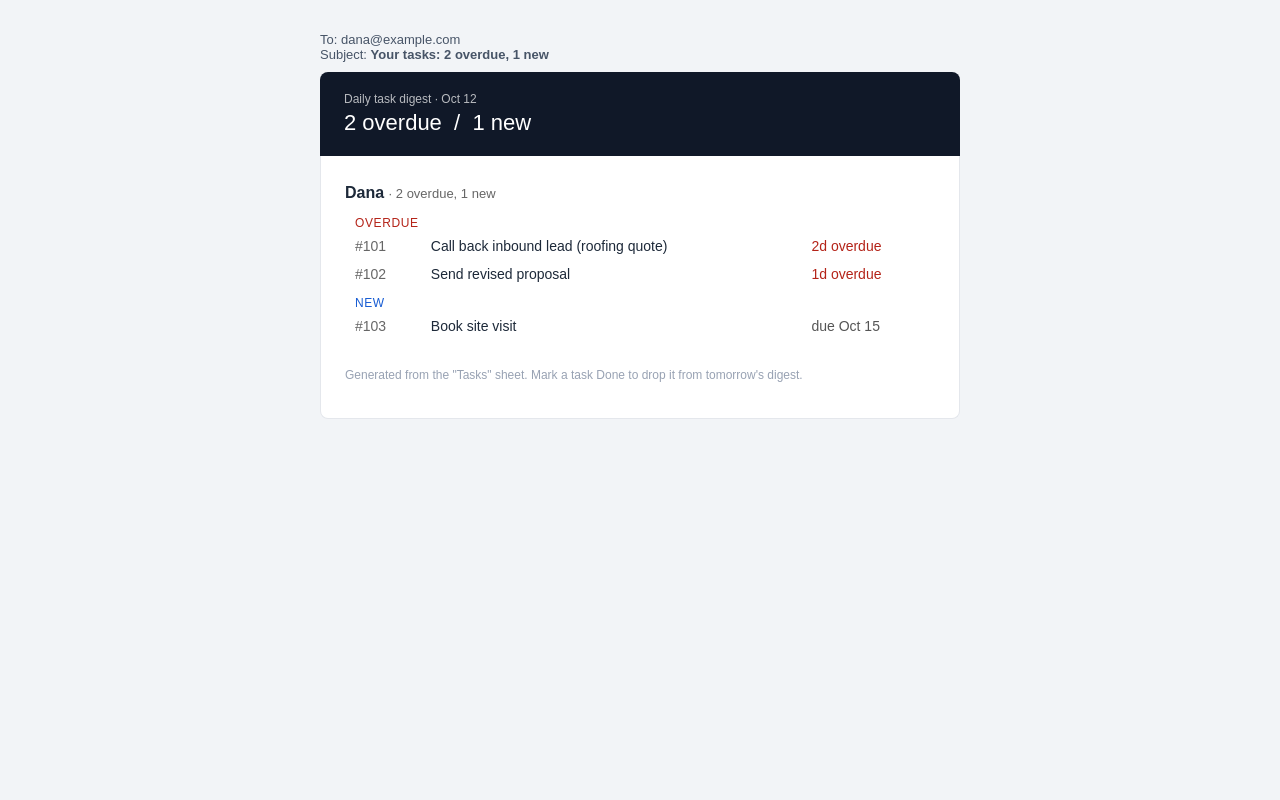
Google Sheet to daily email digest (Apps Script), second view

Sample build

Google Sheet to daily email digest (Apps Script)

Reads a Tasks sheet each morning, groups overdue and new items by owner, emails each owner an HTML digest and sends the manager a team roll-up. Adds a sheet menu with Send now and Install daily trigger.

Google Apps Script (V8), SpreadsheetApp, MailApp, Time-driven triggers, Node.js test harness

About the screenshots: Digest emails rendered by a local test harness from a sample Tasks sheet.

How we approach it

The habits that keep this kind of project from going wrong.

1

Keep it in Sheets where possible

If your team works in Sheets, we build there, so they can still see and edit everything.

2

Enter data once

Each piece of information has one home; other tabs read from it rather than copying it.

3

Protect what matters

Formulas and scripts are protected, and input areas are clearly marked.

4

Know the limits

Apps Script has quotas and run-time limits. We tell you in the scope if your volume needs a database instead.

How we work

A written scope first, then working progress you can check, then a proper handover.

  1. You describe it

    Tell us what you need in your own words, and which tools you already use. A few lines is plenty to start.

  2. A written scope

    We reply with a short written scope: what gets built, what is out of scope, which accounts we need, and how we'll both know it works. You know what you're getting before work begins.

  3. Milestones you review

    The work is split into milestones. At each one you see it working in your own account and sign it off before we go on.

  4. Handover and a 30-day fix window

    You get the working system, its documentation and a walkthrough. If anything we built breaks in the next 30 days, we fix it at no charge.

What shapes the scope

  • How many sheets and tabs are involved
  • How many automatic actions and emails
  • Connections to tools outside Google
  • How much existing data has to move

Always included

  • A written scope before work starts
  • Milestones you review and sign off
  • Documentation and a walkthrough at handover
  • A 30-day window for fixes, at no charge

Pushbuild has built software for businesses since 2010, for more than 40 clients. Every project is led by a former public-company CTO, from Groton, Massachusetts. See products we've built.

Questions people ask first

Do we need a paid Google account?

Most of this works on free accounts. Google Workspace gives higher email and run-time quotas, which matters at higher volume. We say which you need in the scope.

Whose account does the script run under?

Yours. Scripts are created in your Google account or shared drive, so nothing depends on ours.

Can you work on our existing sheets?

Yes. We take a copy first and make changes there before touching the live sheet.

Who owns it?

You do. The sheets and scripts live in your Google account.

How long does it take?

Most sheet systems take a few days to two weeks from the signed scope.

What happens after handover?

For 30 days we fix anything we built that does not work as the scope describes, at no charge. After that, any further work is agreed in writing before we touch it.

Tell us what you need built.

Email a few lines about what you want and which tools you use, or call. We reply with questions or a written scope.

hello@pushbuild.com

(617) 299-8887