Example package
Bug-fix batch
A list of bugs in your existing application repaired in one pass.
You get
- Each bug reproduced and repaired
- Tests added for each fix
- Deployed to a staging copy for your review
- Released on your approval

We take over existing Laravel and PHP applications: fix the bugs, add the features your team is waiting for, upgrade old PHP and framework versions, and move the app to a server you control.
Tell us what you needSee typical projectsA written scope before we start, so you know what you're getting before work begins.
What we hear from businesses before a project like this starts.
The requests that come up most often for this kind of work, and what each one takes to work properly.
Each bug reproduced, repaired and tested, without rewriting the parts that work.
The feature added in the style of the existing code, with a migration plan for the database.
Upgraded step by step, with dependencies updated and the app tested at each step.
The app, database, queues and scheduled jobs moved to a fresh Ubuntu server, with backups and HTTPS.
Tenant setup, domains and configuration finished so the platform can take its first customers.
Older frameworks maintained as they are, or moved to Laravel in stages when that makes sense.
Tools that come up most: Laravel, PHP 7 and 8, CakePHP, CodeIgniter, MySQL, MariaDB, Vue, React, Livewire, Ubuntu, Nginx, Docker.
Concrete pieces, each one something you can open and check when it's done.
Bugs reproduced, repaired and covered by a test so they stay solved.
PHPUnit, Pest, logs and error trackingFeatures added in the style of the existing code, with database migrations and permissions.
Laravel, Eloquent, queues, Livewire, VuePHP and framework versions upgraded in steps, with deprecated code replaced.
Composer, Rector, Laravel Shift where usefulServers set up with HTTPS, backups, queue workers and scheduled jobs, in an account you own.
Ubuntu, Nginx, MySQL, Docker, Forge or plain serversSlow pages traced to their queries and sped up with indexes, caching or eager loading.
Query logs, Telescope, DebugbarA written map of the application: how it is built, how to deploy it, and where things live.
README, run bookExample packages to show the shape of the work. These are examples, not past clients; yours gets its own written scope.
Example package
A list of bugs in your existing application repaired in one pass.
You get
Example package
A single feature added to a live Laravel or PHP application.
You get
Example package
Your application moved from an old PHP or Laravel version to a supported one.
You get
Example package
Your application moved to a fresh server in your own account.
You get
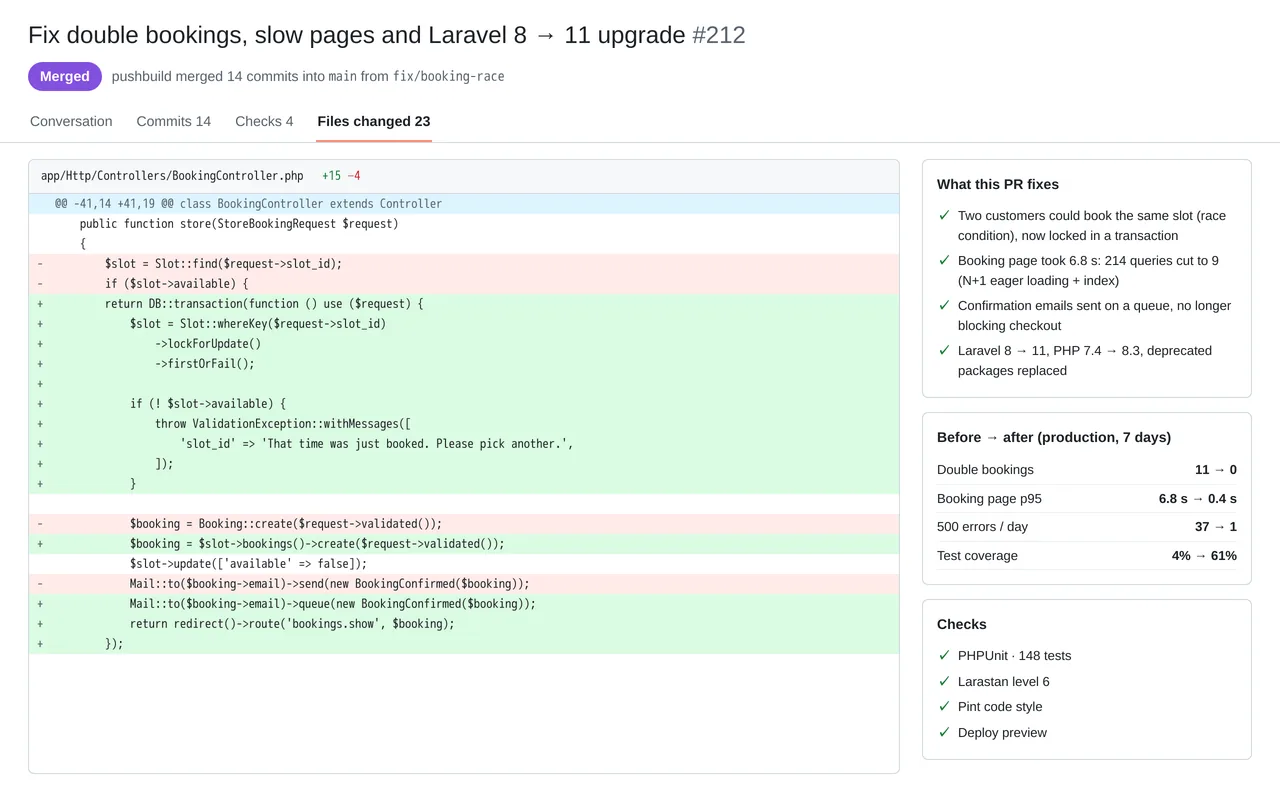
A salon booking platform built on Laravel 8 was double-booking appointments, its booking page took nearly 7 seconds to load, and the original developer was gone. We found and repaired the race condition behind the double bookings, cut the booking page from 214 database queries to 9, moved emails onto a queue, and upgraded the app to Laravel 11 and PHP 8.3. Everything shipped as reviewed pull requests with tests, so the owner's team can maintain it.
PHP 8.3, Laravel 11, MySQL, Redis queues, PHPUnit, Larastan, GitHub Actions
A working example we built to show this kind of work. It is a demonstration, not a client project.
Sample build
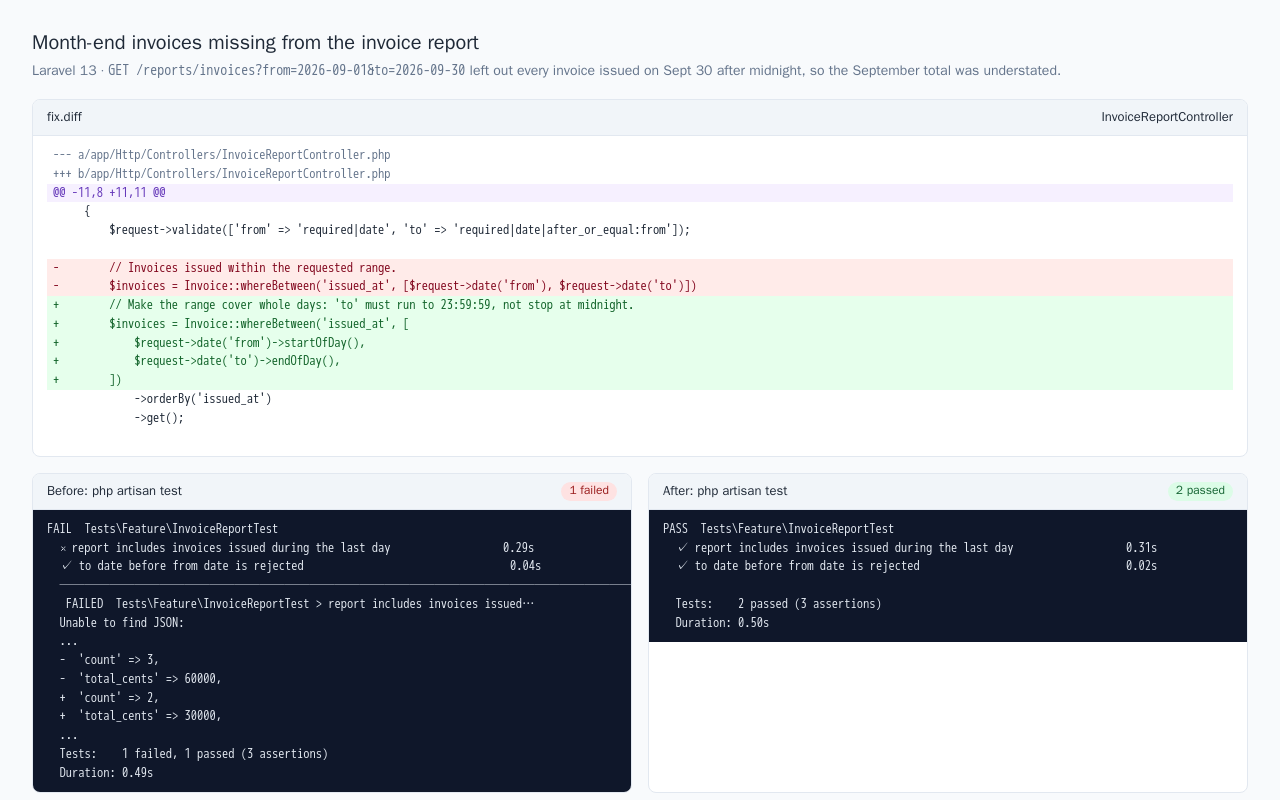
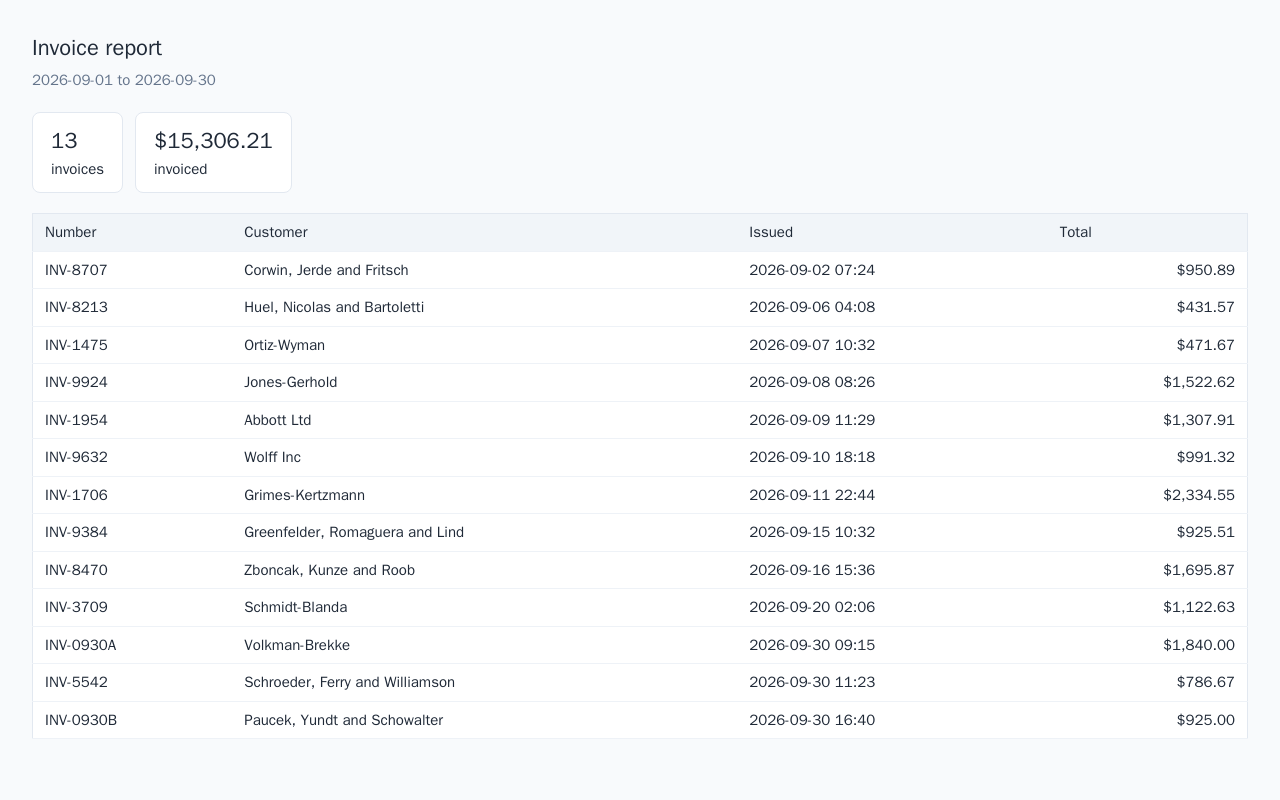
An invoice report left out every invoice issued on the last day of the date range because the end date was compared as midnight. A feature test reproduces it, a small diff makes the range cover whole days, and the test passes afterwards. The before and after test runs and report pages are included.
Laravel 13, PHP 8.5, Eloquent, PHPUnit, SQLite, Docker
About the screenshots: The fix summary and the report before the fix, from a sample Laravel app with demo data.
The habits that keep this kind of project from going wrong.
We start by getting the app running on a staging copy and writing down how it works. Fixes come after we understand it.
We change what needs changing. If we think a rewrite of some part is truly needed, we say so in the scope with the reason.
Every change goes to a staging copy for you to check before it reaches your live system.
Each change is committed with a clear message, and the handover includes the notes the next developer will need.
You describe it. We write it down, build it, and hand it over.
Tell us what you need in your own words, and which tools you already use. A few lines is plenty to start.
We reply with a short written scope: what gets built, what is out of scope, which accounts we need, and how we'll both know it works. You know what you're getting before work begins.
The work is split into milestones. At each one you see it working in your own account and sign it off before we go on.
You get the working system, its documentation and a walkthrough. If anything we built breaks in the next 30 days, we fix it at no charge.
Pushbuild has built software for businesses since 2010, for more than 40 clients. Every project is led by a former public-company CTO, from Groton, Massachusetts. See products we've built.
Yes, that is most of this work. We get it running on a staging copy first, then tell you what we found before quoting the changes.
Access to the code repository, and either a copy of the database or access to a staging server. Production access only when deploying, and only if you want us to do the deploy.
You do, as before. All changes are committed to your repository.
A batch of bug fixes or one feature usually takes one to two weeks from the signed scope; upgrades and server moves one to three weeks.
Not unless you ask, and we would only recommend it with a clear reason. Most applications are better repaired than rewritten.
For 30 days we fix anything we changed that does not work as the scope describes, at no charge. After that, changes are written up and agreed with you before we begin.
Email a few lines about what you want and which tools you use, or call. We reply with questions or a written scope.
hello@pushbuild.com