Pushbuild

The data you check by hand, delivered on a schedule.

We build scrapers that collect public data from the sites you name, clean it, and deliver it to a spreadsheet, a database or your own system on a schedule, with alerts when something changes or stops working.

Tell us what you needSee typical projects

Scoped in writing, built in your accounts, handed over with docs.

Sound familiar?

What we hear from businesses before a project like this starts.

  • Someone spends every Monday copying competitor prices into a spreadsheet.
  • We had a scraper built once. It broke after a month and nobody noticed for weeks.
  • We need to know the day a listing, a price or a document changes, not the week after.
  • The data is public, but it's spread across hundreds of pages and a few supplier portals.
  • We get a CSV, but it's full of duplicates and half-empty rows.

What buyers usually need

The requests that come up most often for this kind of work, and what each one takes to work properly.

01

A full product catalogue with images

Every product, description and image link from the sites you name, in one spreadsheet with consistent columns.

02

Supplier portal data in one place

Data from several supplier accounts you have logins for, collected into one table and shown on a simple dashboard.

03

Documents collected from a public site

PDFs and office files downloaded in bulk with their metadata, named and organised so you can find them.

04

A page-change watch

A cloud job that checks pages on a schedule and tells you what changed, with the old and new text.

05

Business directories turned into lists

Name, address, phone, website and category from public directories, de-duplicated.

06

Prices matched to your own product codes

Results matched to your SKUs or UPCs so each row lines up with your catalogue.

Tools that come up most: Python, Playwright, Selenium, Scrapy, BeautifulSoup, Excel, Google Sheets, CSV, Postgres.

What you get

Concrete pieces, each one something you can open and check when it's done.

Public websitesGoogle SheetsSupplier portalsDatabaseDirectoriesChange alertsScheduled scraperbuilt by Pushbuild

Scheduled scrapers

Jobs that run hourly, daily or weekly, collect exactly the fields you need and skip what you don't.

Python, headless browsers, sitemaps and public APIs where they exist

Clean, structured output

De-duplicated rows, consistent formats and a stable ID per record, delivered where you work.

CSV, Google Sheets, Postgres, Airtable, your API

Change alerts

An email or Slack message when a price, stock level, listing or document changes, with what it was before.

Diff tracking, email, Slack, webhooks

Monitoring

Every run is checked. If a site changes and the scraper returns nothing or nonsense, you hear about it the same day.

Run logs, row-count checks, failure alerts

History

Every run kept, so you can see how a price or listing changed over time, not just today's value.

A small database or dated sheets

A handover you can run

The code, a plain-language run book, and the schedule set up in an account you own.

GitHub, a small cloud server or scheduled job

Typical projects

Example packages to show the shape of the work. These are examples, not past clients; yours gets its own written scope.

Example package

Competitor price tracker

Prices and stock status for a list of products on a handful of competitor sites, collected daily into a Google Sheet.

You get

  • Daily run into a shared Google Sheet
  • Price history kept per product
  • An email when a price moves past your threshold
  • A failure alert if a site stops returning data

Example package

Listings into a database

New and changed listings from a directory or marketplace, collected daily into a database with duplicates removed.

You get

  • Scraper for the agreed list of pages or searches
  • Postgres or Airtable table with a stable ID per listing
  • New, changed and removed listings flagged
  • A CSV export on demand

Example package

Page change monitor

A watch on a set of pages (policies, filings, product pages) that tells you what changed and when.

You get

  • Checks on your chosen schedule
  • Change alerts showing old and new text
  • An archive of every version
  • A simple list to add or remove pages

Example package

Bulk document collection

Every PDF or file published on a public site, downloaded with its title, date and source page, and kept up to date.

You get

  • Files downloaded and named consistently
  • A spreadsheet index with metadata
  • New files picked up on each run
  • Storage in your Drive, Dropbox or bucket

Example projects

Competitor price monitor for an outdoor-gear retailer (web scraping)

Competitor price monitor for an outdoor-gear retailer (web scraping)

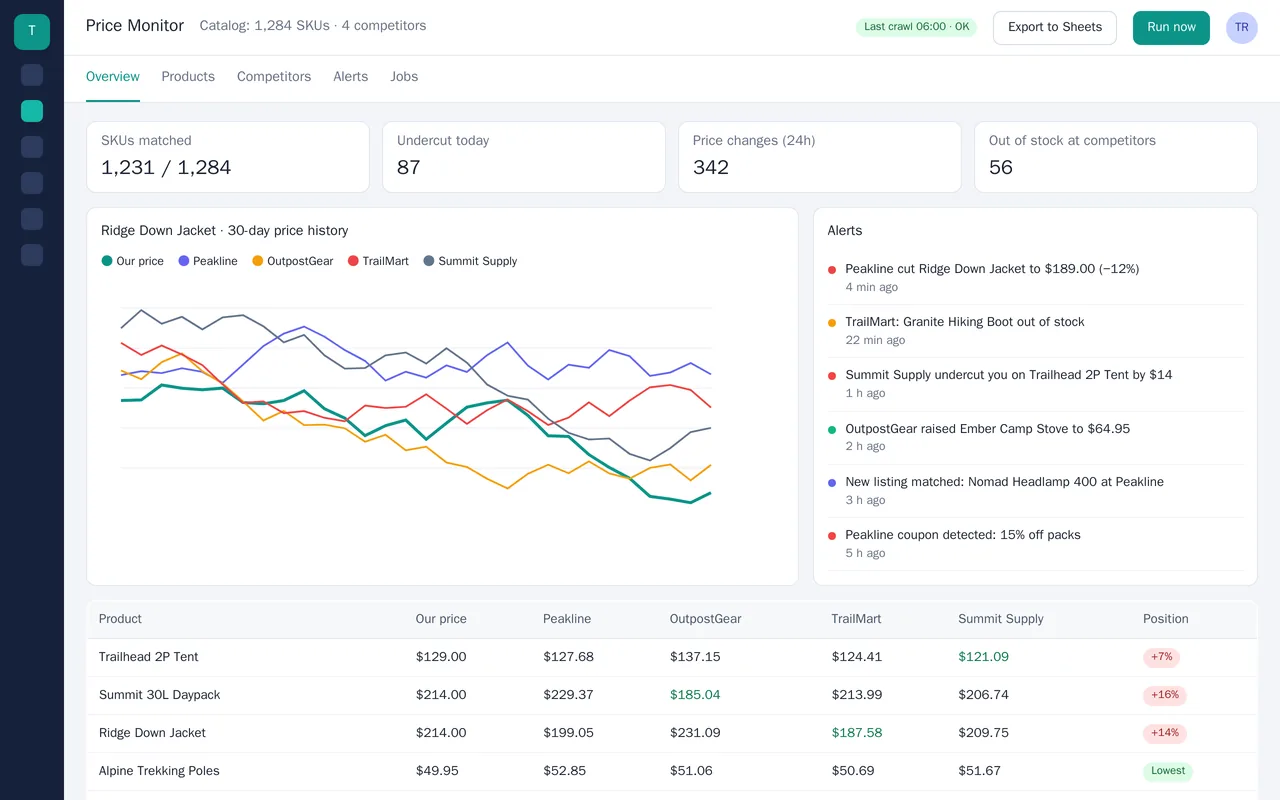
Trailridge Outfitters sells 1,200+ outdoor products and was checking competitor prices by hand. We built a scraper that crawls four competitor sites every 6 hours, matches their products to the store's catalog by GTIN and by title plus brand, and flags undercuts, price changes, coupons and stock-outs. Alerts go to Slack and email, and the full price table syncs to a Google Sheet after every run.

  • Scheduled crawlers for 4 competitor sites, with retries and a rotating proxy pool
  • Product matching against the store's Shopify catalog (GTIN first, then title + brand)
  • Dashboard: price position per SKU, 30-day price history, alerts feed
  • Slack and email alerts for undercuts, price moves, coupons and stock changes

Python, Playwright, Scrapy, PostgreSQL, Shopify Admin API, Google Sheets API, Docker

Sample build

A working example we built to show this kind of work. It is a demonstration, not a client project.

Catalogue scraper to CSV and Excel on a schedule

Sample build

Catalogue scraper to CSV and Excel on a schedule

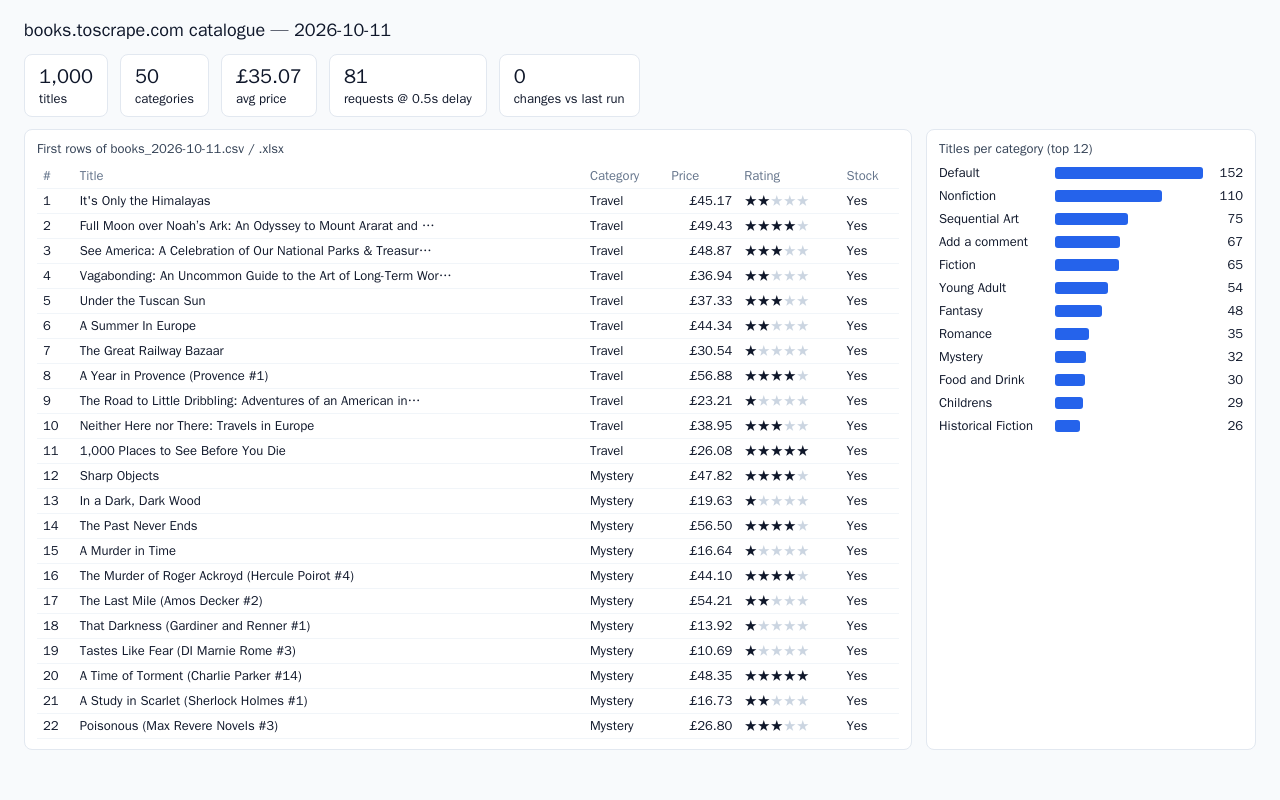
Rate-limited crawler that walks every category and page of a public practice bookstore: 1,000 titles in 81 requests. Outputs a dated CSV and a formatted Excel workbook with category summary and change-tracking sheets. Runs as a Docker job on a cron schedule.

Python 3.12, requests, BeautifulSoup, openpyxl, Docker Compose, cron

About the screenshot: Output from a run against a public practice bookstore site built for scraping practice.

How we approach it

The habits that keep this kind of project from going wrong.

1

Look for an API first

Many sites publish a feed, sitemap or public API. If one exists we use it: it is faster and breaks less.

2

Polite and lawful

We collect public data at a polite rate and read each site's terms before quoting. Data behind a login is only collected from accounts you have the right to use.

3

Monitoring is part of the build

Sites change. Every scraper checks its own output and tells you when it looks wrong, rather than failing quietly.

4

Real data at the first milestone

You see rows from the first site early, so the columns and format are agreed before the rest is built.

How we work

You know what you're getting before work begins, and you see it working at every milestone.

  1. You describe it

    Tell us what you need in your own words, and which tools you already use. A few lines is plenty to start.

  2. A written scope

    We reply with a short written scope: what gets built, what is out of scope, which accounts we need, and how we'll both know it works. You know what you're getting before work begins.

  3. Milestones you review

    The work is split into milestones. At each one you see it working in your own account and sign it off before we go on.

  4. Handover and a 30-day fix window

    You get the working system, its documentation and a walkthrough. If anything we built breaks in the next 30 days, we fix it at no charge.

What shapes the scope

  • How many sites, and how different they are from each other
  • Whether pages need a real browser to load
  • How often it runs and how much history you keep
  • Where the data has to end up

Always included

  • A written scope before work starts
  • Milestones you review and sign off
  • Documentation and a walkthrough at handover
  • A 30-day window for fixes, at no charge

Pushbuild has built software for businesses since 2010, for more than 40 clients. Every project is led by a former public-company CTO, from Groton, Massachusetts. See products we've built.

Questions people ask first

Is this legal?

We collect publicly available data, at a polite rate, and we read each site's terms before we scope the job. If a site forbids it or the data sits behind a login you don't have rights to, we say so in the scope rather than build it.

Do you do one-off data pulls or only scheduled ones?

Both. A one-off pull is delivered as a file; a scheduled one is set up to run in your account.

What happens when the site changes?

Monitoring tells you the same day. In the 30 days after handover we fix it at no charge. After that, a repair is scoped and agreed with you before we do it.

Where does the scraper run, and who pays for it?

In an account in your name, usually a small cloud server or scheduled job. We tell you the expected monthly running cost in the scope, before you agree.

Who owns the code and the data?

You do. The code goes into a repository you own, and the data lands in your sheet, database or storage, not ours.

How long does it take?

Most scrapers take one to three weeks from the signed scope. You see real data from the first site at the first milestone.

Tell us what you need built.

Email a few lines about what you want and which tools you use, or call. We reply with questions or a written scope.

hello@pushbuild.com

(617) 299-8887