Pushbuild

Invoices, forms and statements, turned into rows.

We build pipelines that read your PDFs and scans, pull out the fields you need, and put them in Excel, Google Sheets or a database. Anything the system is not sure about goes to a short review screen for a person to check, instead of quietly going in wrong.

Tell us what you needSee typical projects

You know what you're getting before work begins.

Sound familiar?

What we hear from businesses before a project like this starts.

  • We get hundreds of supplier invoices a month as PDFs, and someone types each one in.
  • Bank statements arrive as PDFs every month and our accountant wants a spreadsheet.
  • Purchase orders come in by email and get keyed into Excel by hand.
  • We tried an OCR tool, and it got the totals wrong without telling us.
  • We have a stack of fillable PDF forms and need every field, checkbox and dropdown in one workbook.

What buyers usually need

The requests that come up most often for this kind of work, and what each one takes to work properly.

01

Bank statements into a categorised sheet

Transactions pulled from each bank's statement layout, balances checked, and spending categorised for a monthly report.

02

Purchase orders from email into Excel

Attachments picked up from an inbox, fields extracted, and only the doubtful ones held for a person.

03

Fillable PDF forms into a workbook

Form fields read directly from the PDF, including checkboxes and dropdowns, which is faster and more accurate than OCR.

04

Scanned documents into a searchable database

Text extracted from scans, stored with the source page, so you can search and filter it later.

05

Product data from supplier catalogues

Product names, codes, prices and specs pulled from PDF catalogues into a sheet ready for import.

06

Paper records digitised

Scans or photos turned into editable files or structured rows, with a check for anything unreadable.

Tools that come up most: OCR, Python, Excel, Google Sheets, Power Automate, Airtable, MySQL, Postgres, CSV.

What you get

Concrete pieces, each one something you can open and check when it's done.

Email inboxExcel or SheetsDrive folderReview queueScans and photosDatabaseExtract and checkbuilt by Pushbuild

Field extraction

The fields you name, from the documents you get: dates, totals, line items, account numbers, names and addresses.

OCR, layout-aware document models, rules per document type

A review step

Each field gets a confidence score. Low-confidence fields go to a review screen with the page beside them; the rest go straight through.

A simple web review screen or a review tab in Sheets

Checks that catch mistakes

Line items that must add up to the total, balances that must carry over, suppliers that must exist. Anything that fails is flagged.

Validation rules agreed in the scope

Delivery where you work

Clean rows in Excel, Google Sheets, a database or an import file for your accounting system.

Excel, Google Sheets, Postgres, QuickBooks and Xero import files

Intake from where documents arrive

Documents picked up from an email inbox, a Drive or Dropbox folder, or an upload page.

Gmail, Outlook, Google Drive, Dropbox, SFTP

An audit trail

Every row linked back to its source file and page, so anyone can check where a number came from.

Source links, run logs

Typical projects

Example packages to show the shape of the work. These are examples, not past clients; yours gets its own written scope.

Example package

Supplier invoices to a spreadsheet

Invoice PDFs from an inbox or folder turned into one row per invoice, plus line items, ready for review and import.

You get

  • Header fields and line items extracted
  • Totals checked against line items
  • Review tab for low-confidence fields
  • An import file for QuickBooks or Xero

Example package

Bank statements to a monthly report

Statement PDFs from your banks turned into one transactions table, categorised, with a monthly summary sheet.

You get

  • Support for the banks you name
  • Opening and closing balances checked
  • Category rules you can edit
  • A monthly summary in Sheets or Excel

Example package

Fillable forms to a workbook

A batch of fillable PDF forms read field by field into one Excel workbook.

You get

  • Every text field, checkbox and dropdown captured
  • One row per form, one column per field
  • A list of forms that could not be read
  • A script you can re-run on the next batch

Example package

Inbox to sheet, hands-off

Purchase orders or remittances that arrive by email extracted automatically, with only the doubtful ones held for a person.

You get

  • Inbox watch for the agreed senders
  • Extraction and validation on arrival
  • Review queue for anything uncertain
  • A daily summary of what was processed

Example projects

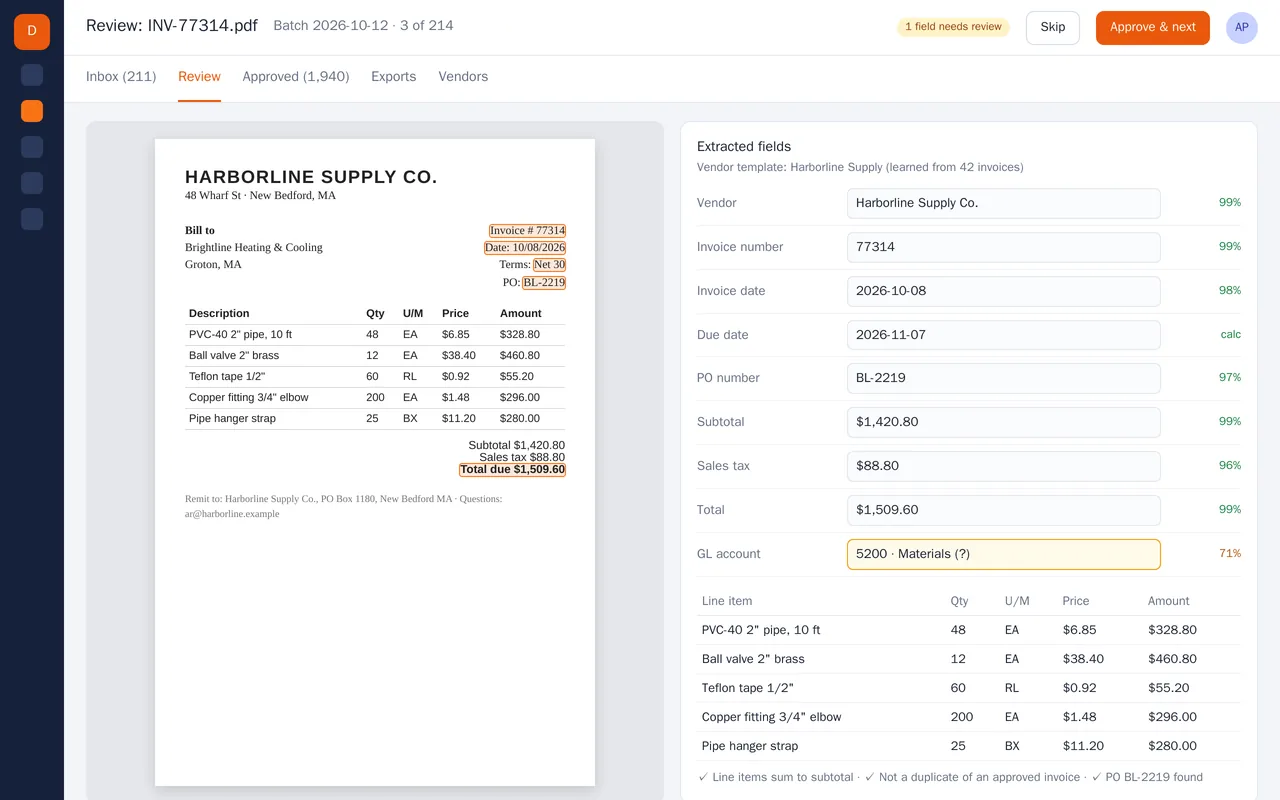
Supplier invoice extraction for an accounts-payable team (PDF to structured data)

Supplier invoice extraction for an accounts-payable team (PDF to structured data)

An accounts-payable team was keying 200+ supplier invoices a week by hand from PDFs and scans. We built an extraction pipeline that reads each invoice, pulls the header fields and every line item, checks the math, catches duplicates and matches the PO. Confident invoices go straight through; anything uncertain lands in a review screen with the source document highlighted next to the extracted values. Approved invoices export to Excel or post to the accounting system.

  • PDF and scan ingestion from a shared inbox and a watched folder
  • Header and line-item extraction with per-field confidence scores
  • Per-vendor templates that improve as invoices are approved
  • Checks: line items vs subtotal, duplicate detection, PO match, GL account suggestion

Python, OCR, layout-aware PDF parsing, LLM extraction with validation rules, PostgreSQL, React

Sample build

A working example we built to show this kind of work. It is a demonstration, not a client project.

Invoice PDFs to Excel
Invoice PDFs to Excel, second view

Sample build

Invoice PDFs to Excel

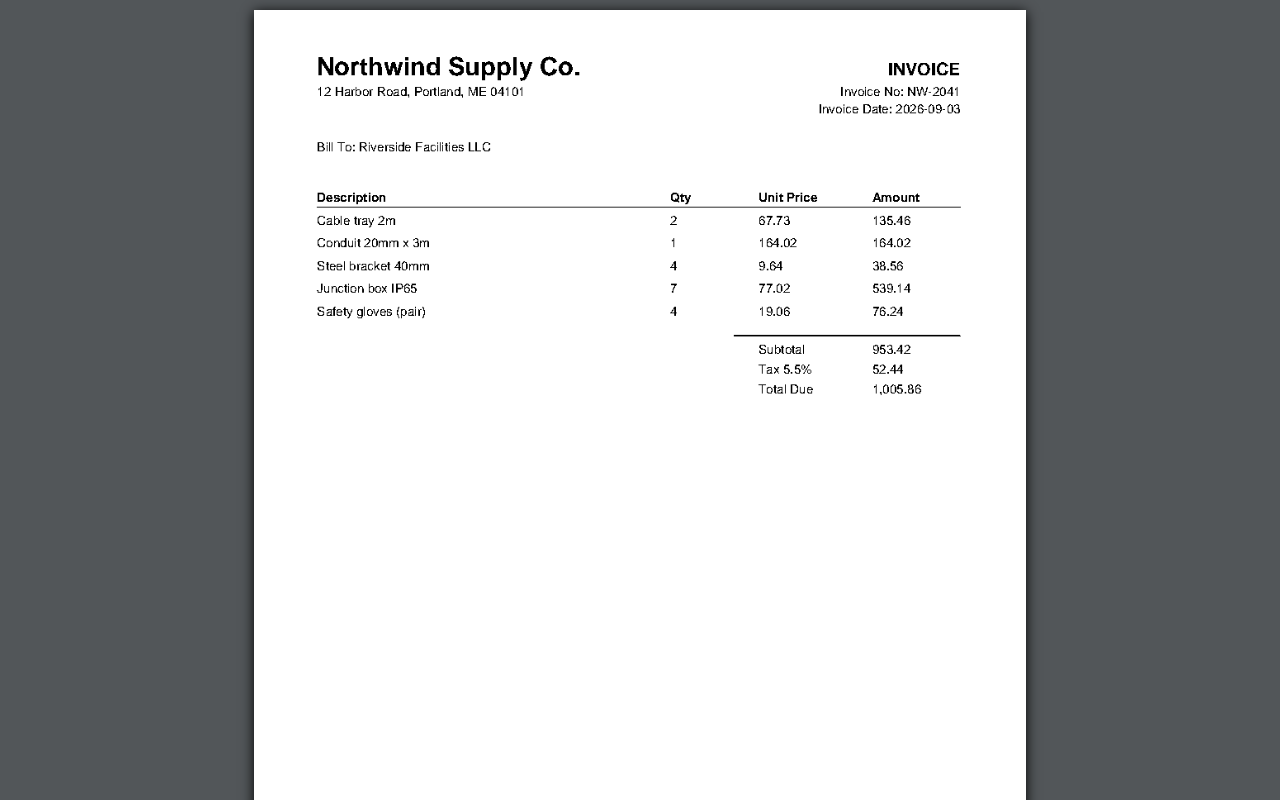
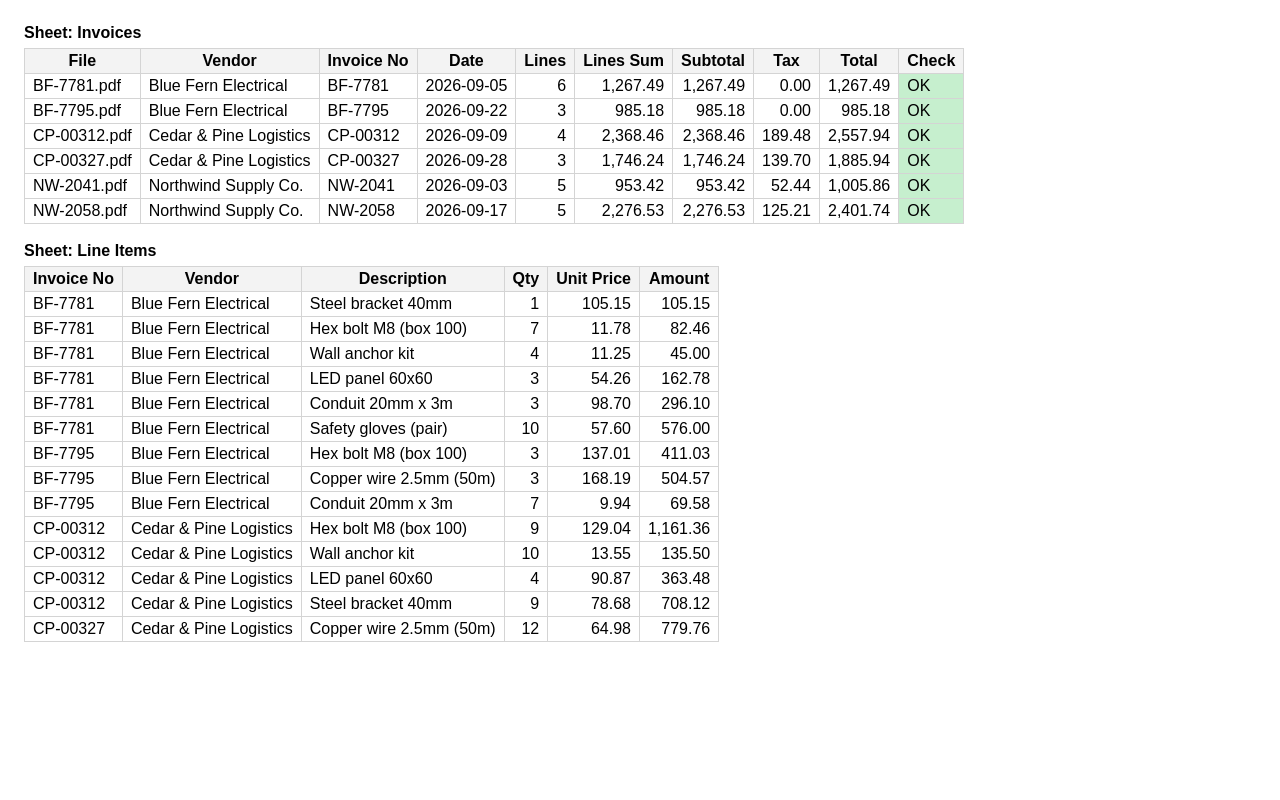
Reads supplier invoice PDFs in three different vendor layouts and writes header fields and every line item to an Excel workbook, with a check column that flags invoices whose lines don't add up to the total.

Python, pdfplumber, openpyxl, reportlab, Docker

About the screenshots: A generated sample invoice and the workbook the extractor wrote from it.

How we approach it

The habits that keep this kind of project from going wrong.

1

Measure on your documents

We run a sample of your real documents at the first milestone and show you field-by-field results before building the rest.

2

Use the cheapest reliable method

Digital PDFs and fillable forms are read directly. OCR and document models are used only where the document is a scan or a photo.

3

Checks, not hope

Totals, balances and dates are cross-checked, so a misread number is caught rather than passed on.

4

A person stays in the loop

Anything uncertain goes to a review step. Nothing is forced through to make the numbers look complete.

How we work

You describe it. We write it down, build it, and hand it over.

  1. You describe it

    Tell us what you need in your own words, and which tools you already use. A few lines is plenty to start.

  2. A written scope

    We reply with a short written scope: what gets built, what is out of scope, which accounts we need, and how we'll both know it works. You know what you're getting before work begins.

  3. Milestones you review

    The work is split into milestones. At each one you see it working in your own account and sign it off before we go on.

  4. Handover and a 30-day fix window

    You get the working system, its documentation and a walkthrough. If anything we built breaks in the next 30 days, we fix it at no charge.

What shapes the scope

  • How many different document layouts
  • Whether documents are digital PDFs or scans and photos
  • How many fields, and whether line items are needed
  • Where documents come from and where data goes

Always included

  • A written scope before work starts
  • Milestones you review and sign off
  • Documentation and a walkthrough at handover
  • A 30-day window for fixes, at no charge

Pushbuild has built software for businesses since 2010, for more than 40 clients. Every project is led by a former public-company CTO, from Groton, Massachusetts. See products we've built.

Questions people ask first

How accurate is it?

It depends on your documents, so we measure it rather than promise a number. At the first milestone we run a sample of your real documents and show you the results. The review step exists so that uncertain fields are checked, not guessed.

Is our data kept private?

Documents are processed in accounts in your name wherever possible, and we tell you in the scope exactly which services see the files. Nothing is kept by us after handover.

Is this data entry?

No. We build a system that does the extraction, so the next batch costs you nothing. If you need a one-off batch typed, we will tell you that a typing service is cheaper.

Who owns the pipeline?

You do. The code goes into a repository you own, it runs in an account in your name, and the data stays in your spreadsheet or database.

How long does it take?

Most projects take one to three weeks from the signed scope. Send us 10 to 20 sample documents with your brief and the scope will be more precise.

What if a supplier changes their invoice layout?

The review step catches it, so bad data does not slip through. In the 30 days after handover we adjust for it at no charge; after that, they are scoped and agreed with you before we start.

Tell us what you need built.

Email a few lines about what you want and which tools you use, or call. We reply with questions or a written scope.

hello@pushbuild.com

(617) 299-8887