Example package
Fix list
Your list of broken things repaired in one pass.
You get
- Each issue reproduced and repaired
- The cause written down for each
- Tested on mobile and desktop
- A backup taken before changes

We fix the problems on existing websites: forms that don't send, pages that break on mobile, broken links, slow pages, email that lands in spam, and errors after an update. You send the list; we fix it and tell you what caused each one.
Tell us what you needSee typical projectsAgreed in writing first, then built and handed over to you.

What we hear from businesses before a project like this starts.
The requests that come up most often for this kind of work, and what each one takes to work properly.
Each one found, repaired and tested, with form submissions checked end to end.
Pages checked on real phone sizes and repaired so nothing overlaps or runs off the screen.
Image replacements, section changes, favicon, spacing and copy updates in the builder you already use.
Measured, then improved with image, caching, plugin and script changes.
SMTP set up properly with SPF, DKIM and DMARC, so form and order emails arrive.
White screens, plugin conflicts and broken pages traced to the cause and repaired.
Tools that come up most: WordPress, Elementor, Divi, WooCommerce, Shopify, Webflow, Squarespace, Wix, SMTP, Cloudflare, Google Search Console.
Concrete pieces, each one something you can open and check when it's done.
Forms that submit, arrive, and go where they should, including CRM and email connections.
Form plugins, SMTP, webhooksPages repaired on phone, tablet and desktop.
Builder settings, CSSImages, caching, scripts and plugins sorted, measured before and after.
Lighthouse, PageSpeed Insights, caching pluginsSMTP and DNS records set up so site emails reach inboxes.
SPF, DKIM, DMARC, SMTP servicesCore, theme and plugin updates done safely, with conflicts repaired.
Staging sites, backupsCopy, images, sections and settings changed in the builder you already use.
Elementor, Divi, Webflow, Squarespace, WixExample packages to show the shape of the work. These are examples, not past clients; yours gets its own written scope.
Example package
Your list of broken things repaired in one pass.
You get
Example package
Every key page made to work properly on phones.
You get
Example package
A measured speed improvement on your most important pages.
You get
Example package
Website and form emails set up to reach inboxes.
You get
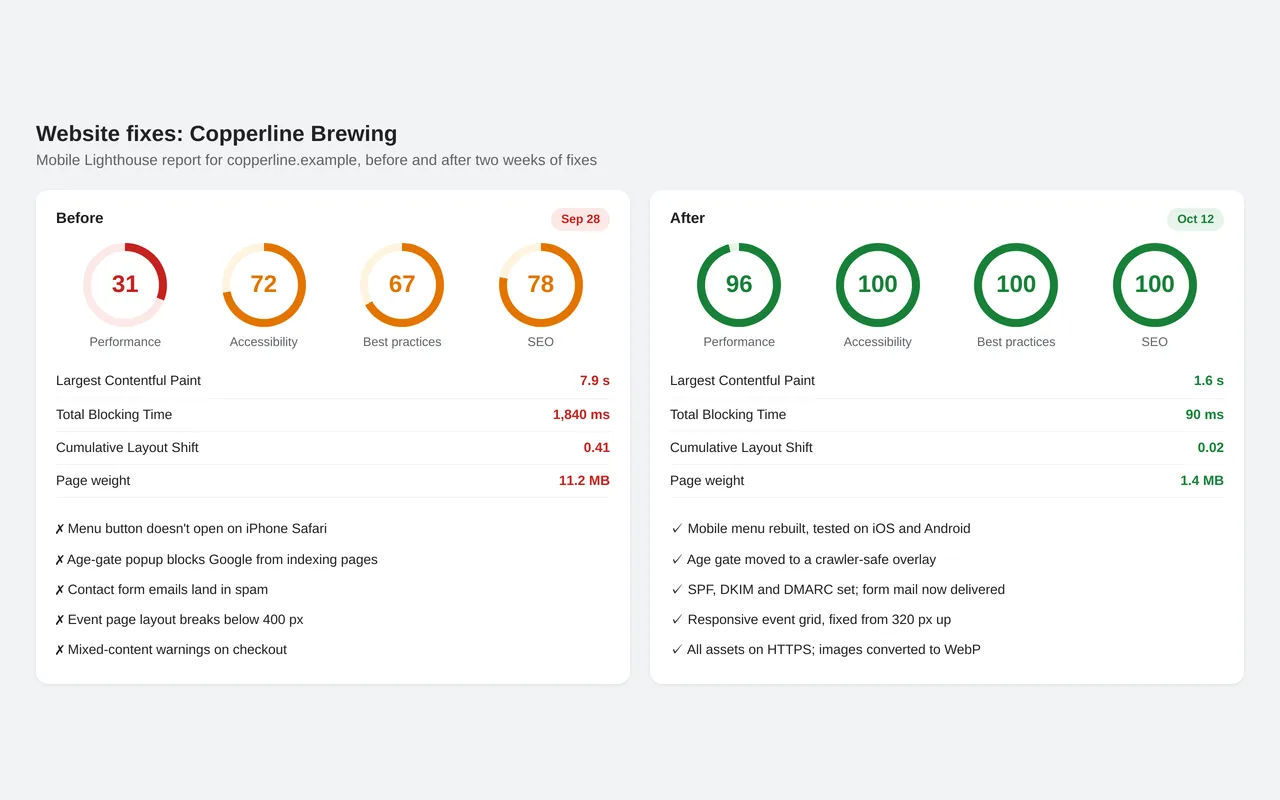
Copperline Brewing's website was slow on phones, its menu didn't open in iPhone Safari, and contact-form emails went to spam. An age-gate popup was also blocking Google from indexing the site. We worked through a fix list over two weeks and took the mobile Lighthouse performance score from 31 to 96. Images were converted and resized, render-blocking scripts were deferred, layout shift was repaired and the site moved fully to HTTPS. Email authentication was set up so form mail gets delivered.
WordPress, PHP, JavaScript, CSS, Cloudflare, Google Search Console, Lighthouse
A working example we built to show this kind of work. It is a demonstration, not a client project.
Sample build
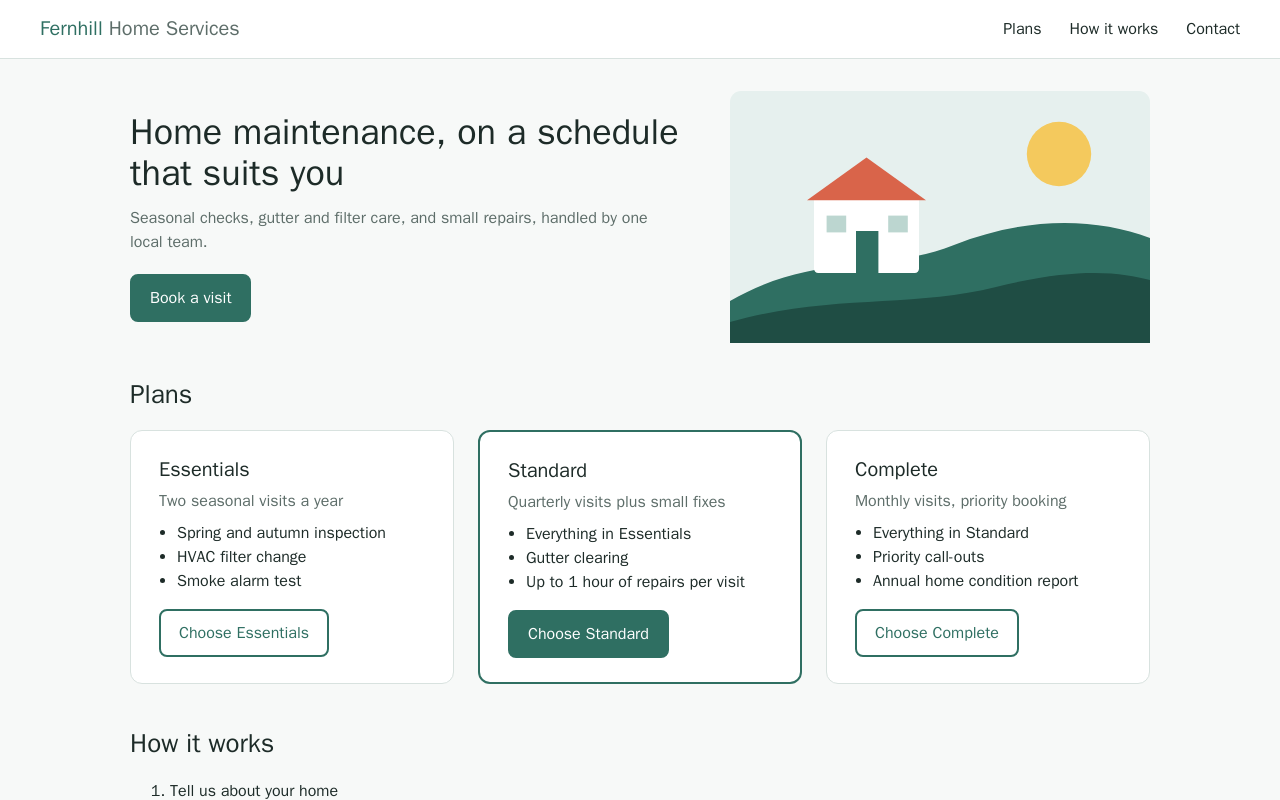
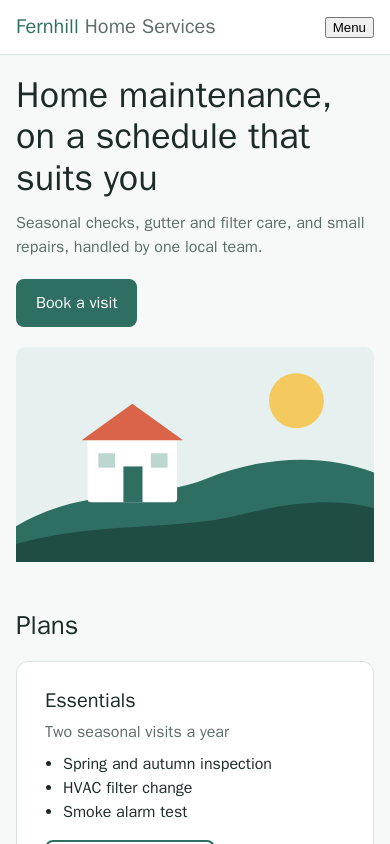
A small business site with four common bugs repaired: plan cards overflowing the layout on desktop and mobile, a mobile menu that throws a JavaScript error, a broken image path and a contact form that silently fails. Each bug is documented with its cause and fix, the full diff is included, and a headless-browser check confirms 0 console errors and 0px sideways overflow after the fix.
HTML, CSS grid / media queries, Vanilla JavaScript, Playwright (Chromium), Docker
About the screenshots: A sample site built for this demonstration, shown after and before the fixes.
The habits that keep this kind of project from going wrong.
A full backup or staging copy is taken before anything is changed.
We fix the cause, not just the symptom, and write down what it was so it doesn't come back.
Fixes are checked on real phone and desktop sizes, and forms are submitted end to end.
Changes are made in the tools your team already uses, so they can keep editing the site.
A written scope first, then working progress you can check, then a proper handover.
Tell us what you need in your own words, and which tools you already use. A few lines is plenty to start.
We reply with a short written scope: what gets built, what is out of scope, which accounts we need, and how we'll both know it works. You know what you're getting before work begins.
The work is split into milestones. At each one you see it working in your own account and sign it off before we go on.
You get the working system, its documentation and a walkthrough. If anything we built breaks in the next 30 days, we fix it at no charge.
Pushbuild has built software for businesses since 2010, for more than 40 clients. Every project is led by a former public-company CTO, from Groton, Massachusetts. See products we've built.
An admin login for the site created for us (not yours), and hosting or DNS access only if the fix needs it. Remove them when we're done.
No. We take a backup first and use a staging copy where the platform allows it.
Yes, that's what this service is for.
We scope each batch of fixes separately and agree it with you before starting. If you need regular work, we can agree a set list at a time.
Most fix lists take a few days to a week from the signed scope.
In the 30 days after handover we fix anything we repaired that breaks again, at no charge.
Email a few lines about what you want and which tools you use, or call. We reply with questions or a written scope.
hello@pushbuild.com