Pushbuild

A Chrome extension for the job your team does in the browser.

We build Chrome extensions that save clicks in the web apps your team uses all day: capture data from a page into your system, fill forms from your records, add a side panel with the information they need, or add features to an existing extension.

Tell us what you needSee typical projects

A written scope before we start, so you know what you're getting before work begins.

Sound familiar?

What we hear from businesses before a project like this starts.

  • Our team copies details from one web app into another all day.
  • We need a button on a website we don't control.
  • Our old extension stopped working after Chrome's Manifest V3 change.
  • We want customers to use our product from inside their browser.
  • We need an internal tool, but nobody wants yet another website to log in to.

What buyers usually need

The requests that come up most often for this kind of work, and what each one takes to work properly.

01

Capture data from a page into your system

Details on a page saved to your CRM, sheet or database with one click.

02

Fill forms from your records

Forms on another site filled from your data, with the person still checking and submitting.

03

A side panel with context

Information from your systems shown next to the page your team is working on.

04

Features added to an existing extension

New features in an extension you already have, without starting over.

05

A Manifest V3 migration

An older extension moved to Manifest V3 so it keeps working in Chrome.

06

Publishing or private rollout

Listed on the Chrome Web Store, or installed privately for your company through Google Workspace.

Tools that come up most: Chrome Extensions Manifest V3, JavaScript, TypeScript, React, Chrome Web Store, Google Workspace admin, your APIs, Google Sheets.

What you get

Concrete pieces, each one something you can open and check when it's done.

Web app pageCRM or SheetYour recordsSide panelTeam clicksFilled formsChrome extensionbuilt by Pushbuild

Page tools

Buttons, menus and overlays added to the web apps your team uses.

Content scripts, Manifest V3

Data capture

Information on a page sent to your CRM, sheet or database.

Your APIs, Google Sheets, webhooks

Side panels and popups

Context from your systems shown beside the current page.

Side panel API, popups

Form filling

Forms filled from your records, with a person reviewing before submitting.

Content scripts, your data

Migration and upkeep

Existing extensions moved to Manifest V3 and updated.

Service workers, Manifest V3

Publishing

Store listing, privacy policy details and review, or a private company rollout.

Chrome Web Store, Google Workspace

Typical projects

Example packages to show the shape of the work. These are examples, not past clients; yours gets its own written scope.

Example package

Page-to-CRM capture

A button on the pages your team uses that saves the details to your CRM or a sheet.

You get

  • Extension with one-click capture
  • Field mapping to your CRM or sheet
  • Duplicate check before saving
  • Private install for your team

Example package

Side panel for your team

A side panel showing data from your system next to the page in use.

You get

  • Side panel with the data you choose
  • Sign-in to your system
  • Works on the sites you name
  • Install guide for the team

Example package

Manifest V3 migration

Your existing extension moved to Manifest V3.

You get

  • Code moved to a service worker model
  • Permissions reviewed and reduced
  • Tested on current Chrome
  • Updated store listing or private package

Example package

Published extension

A simple extension built and taken through Chrome Web Store review.

You get

  • Extension built to the scope
  • Store listing text and images
  • Privacy and permission statements
  • Submission and review handled

Example projects

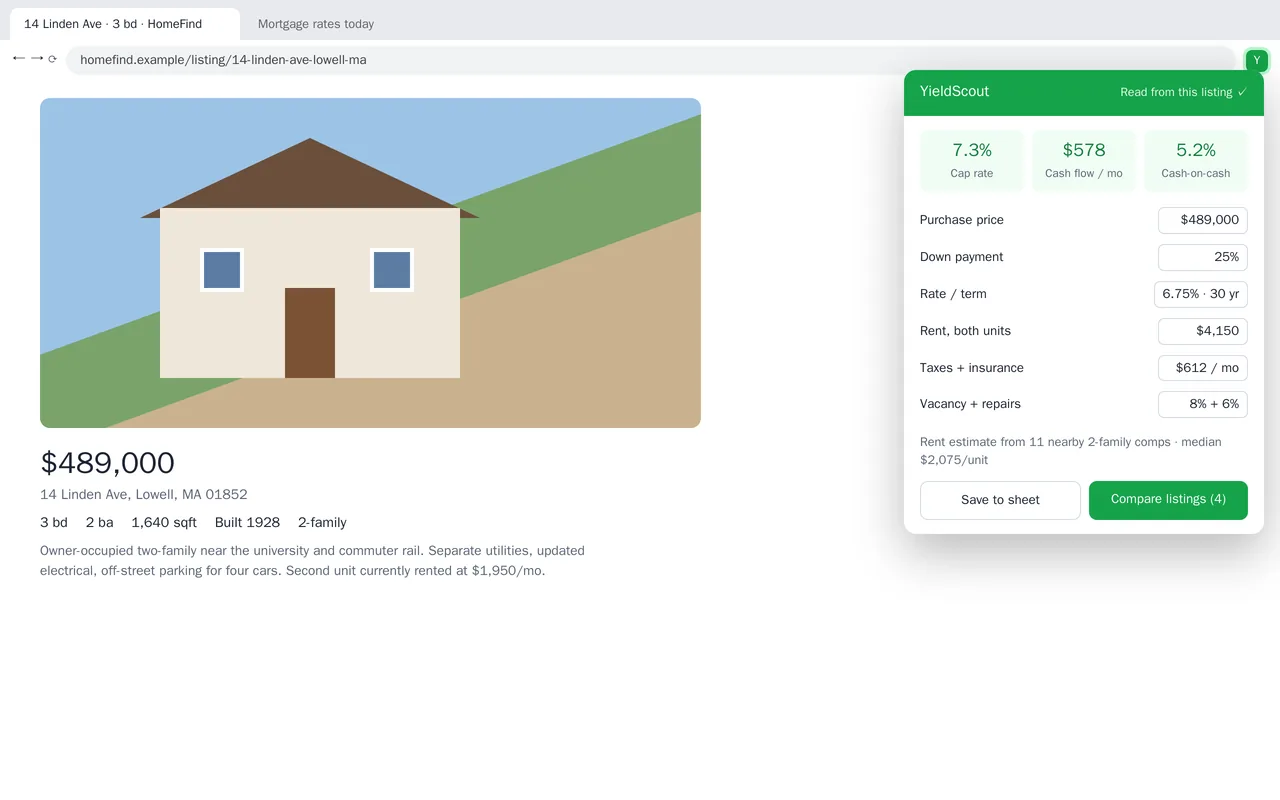
Rental-property analyzer Chrome extension for real-estate investors

Rental-property analyzer Chrome extension for real-estate investors

YieldScout is a Chrome extension for small landlords who browse listing sites. Open a listing and the extension reads the price, unit count and taxes from the page, estimates rent from nearby comparable rentals, and shows cap rate, monthly cash flow and cash-on-cash return. Every assumption (down payment, rate, vacancy, repairs) can be edited, saved per user, and synced. One click saves the deal to a Google Sheet or adds it to a side-by-side comparison.

  • Manifest V3 extension with content scripts for listing pages and a popup calculator
  • Rent estimate from a comparables API, cached per address
  • Editable assumptions with sync across the user's browsers
  • Save to Google Sheets and a multi-listing comparison view

JavaScript/TypeScript, Chrome Extension Manifest V3, chrome.storage sync, Google Sheets API, Vite


Sample build

A working example we built to show this kind of work. It is a demonstration, not a client project.

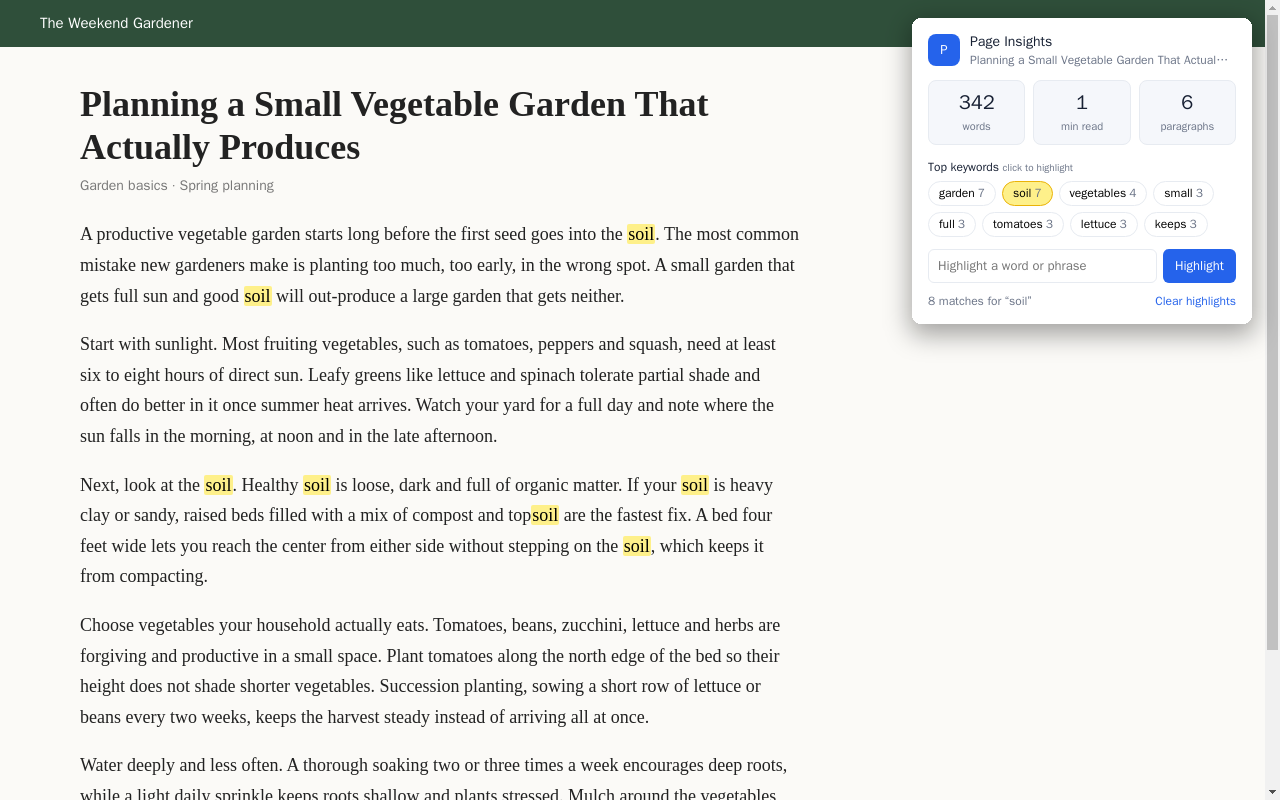
Page Insights Chrome extension (MV3)

Sample build

Page Insights Chrome extension (MV3)

Toolbar popup that shows a page's word count, reading time and top keywords, and highlights any keyword or phrase with one click. Right-clicking a selection shows its word count on the toolbar badge.

Chrome Manifest V3, JavaScript, chrome.scripting, service worker

About the screenshot: The extension's popup shown over a sample page.

How we approach it

The habits that keep this kind of project from going wrong.

1

Fewest permissions possible

Extensions ask only for the sites and permissions they need, which also makes store review faster.

2

A person stays in control

Tools that fill or submit forms on other sites leave the final click to a person.

3

Respect the site

We check the terms of the sites the extension works on, and say so in the scope if a request would break them.

4

Easy to update

Code is organised so a change on the target site means a small fix, not a rewrite.

How we work

You describe it. We write it down, build it, and hand it over.

  1. You describe it

    Tell us what you need in your own words, and which tools you already use. A few lines is plenty to start.

  2. A written scope

    We reply with a short written scope: what gets built, what is out of scope, which accounts we need, and how we'll both know it works. You know what you're getting before work begins.

  3. Milestones you review

    The work is split into milestones. At each one you see it working in your own account and sign it off before we go on.

  4. Handover and a 30-day fix window

    You get the working system, its documentation and a walkthrough. If anything we built breaks in the next 30 days, we fix it at no charge.

What shapes the scope

  • How many sites the extension works on
  • Whether it connects to your systems
  • Public store listing or private rollout
  • Whether it is new or an existing extension

Always included

  • A written scope before work starts
  • Milestones you review and sign off
  • Documentation and a walkthrough at handover
  • A 30-day window for fixes, at no charge

Pushbuild has built software for businesses since 2010, for more than 40 clients. Every project is led by a former public-company CTO, from Groton, Massachusetts. See products we've built.

Questions people ask first

Can it be private to our company?

Yes. It can be installed only for your Google Workspace users, or shared as an unlisted store item.

Does it work on Edge or Firefox?

Edge runs Chrome extensions with little or no change. Firefox needs some changes; we say in the scope if it's included.

Who owns the extension?

You do. The code is in a repository you own, and any store listing is under your developer account.

What if the website it works on changes?

In the 30 days after handover we fix it at no charge. After that, further work is scoped the same way and agreed with you before we start.

How long does it take?

Most extensions take one to three weeks from the signed scope, plus store review time if it is published.

Is store approval guaranteed?

No, Google decides. We build to the store's policies and handle the submission, and fix anything the reviewers ask for.

Tell us what you need built.

Email a few lines about what you want and which tools you use, or call. We reply with questions or a written scope.

hello@pushbuild.com

(617) 299-8887