Pushbuild

Claude Code and MCP, set up properly for your team.

We set up Claude Code for your developers and repositories, and connect Claude to the tools your business uses through MCP servers: configuring existing ones, building new ones for your own systems, and keeping access to what each person needs.

Tell us what you needSee typical projects

You describe it. We build it.

Sound familiar?

What we hear from businesses before a project like this starts.

  • We installed Claude Code, but nobody has set it up for our codebase.
  • We want Claude to read our HubSpot or QuickBooks data, and the MCP server won't connect.
  • We have an internal API and want Claude to be able to use it safely.
  • We're worried about what it can touch once it's connected.
  • Every developer has configured it differently.

What buyers usually need

The requests that come up most often for this kind of work, and what each one takes to work properly.

01

Claude Code connected to HubSpot, QuickBooks or Xero

The vendor's MCP server, or a small one we build, configured with read-only access unless you need more.

02

An existing MCP server configured and tested

Installed, authenticated, and tested with real requests so you know what it can and can't do.

03

An MCP server for your own system

A server that exposes your internal API or database as a small set of well-described tools.

04

Claude Code set up for a repository

Project instructions, permissions, hooks and commands, so it works the way your team works.

05

A short consultation

A working session on how to use Claude Code and MCP well in your setup, with written notes afterwards.

06

A team rollout

One shared configuration, rules for secrets and permissions, and a short guide for each developer.

Tools that come up most: Claude Code, Model Context Protocol, Claude Desktop, HubSpot, QuickBooks, Xero, Salesforce, GitHub, Python, TypeScript.

What you get

Concrete pieces, each one something you can open and check when it's done.

Claude CodeHubSpot, QuickBooksYour repositoryInternal APIYour teamScoped accessMCP serversbuilt by Pushbuild

Claude Code project setup

Project instructions, allowed commands, hooks and shared settings checked into the repository.

CLAUDE.md, settings, hooks, slash commands

MCP server configuration

Existing MCP servers installed, authenticated and tested for your team.

Local and remote MCP servers, OAuth

Custom MCP servers

A server that gives Claude a small, well-described set of tools for your own system.

MCP SDK in Python or TypeScript

Access control

Each connection limited to the data and actions it needs, with secrets kept out of the repository.

Scoped API keys, read-only roles, secret stores

Team rollout

One configuration for everyone, with a short guide and a session for the team.

Shared settings, documentation

Testing

Each tool tested with real requests, including the ones that should be refused.

Test scripts, logs

Typical projects

Example packages to show the shape of the work. These are examples, not past clients; yours gets its own written scope.

Example package

Connect Claude to your CRM or accounting

Claude Code or Claude Desktop connected to HubSpot, QuickBooks or Xero through an MCP server.

You get

  • MCP server installed and authenticated
  • Read-only access unless the scope says otherwise
  • Tested with the questions your team will ask
  • A one-page guide for users

Example package

Claude Code for your repository

Claude Code set up for one codebase and your team's way of working.

You get

  • Project instructions and allowed commands
  • Hooks for formatting and tests
  • Shared settings checked in
  • A walkthrough session for the team

Example package

Custom MCP server

An MCP server for your own API or database, with a small set of tools.

You get

  • Tools designed with you, each with clear limits
  • Authentication and logging
  • Tests for each tool
  • Source code and deployment notes

Example package

Setup review

An existing Claude Code and MCP setup reviewed for access and reliability.

You get

  • A list of every connection and what it can reach
  • Permissions tightened where needed
  • Broken servers repaired
  • Written recommendations

Example projects

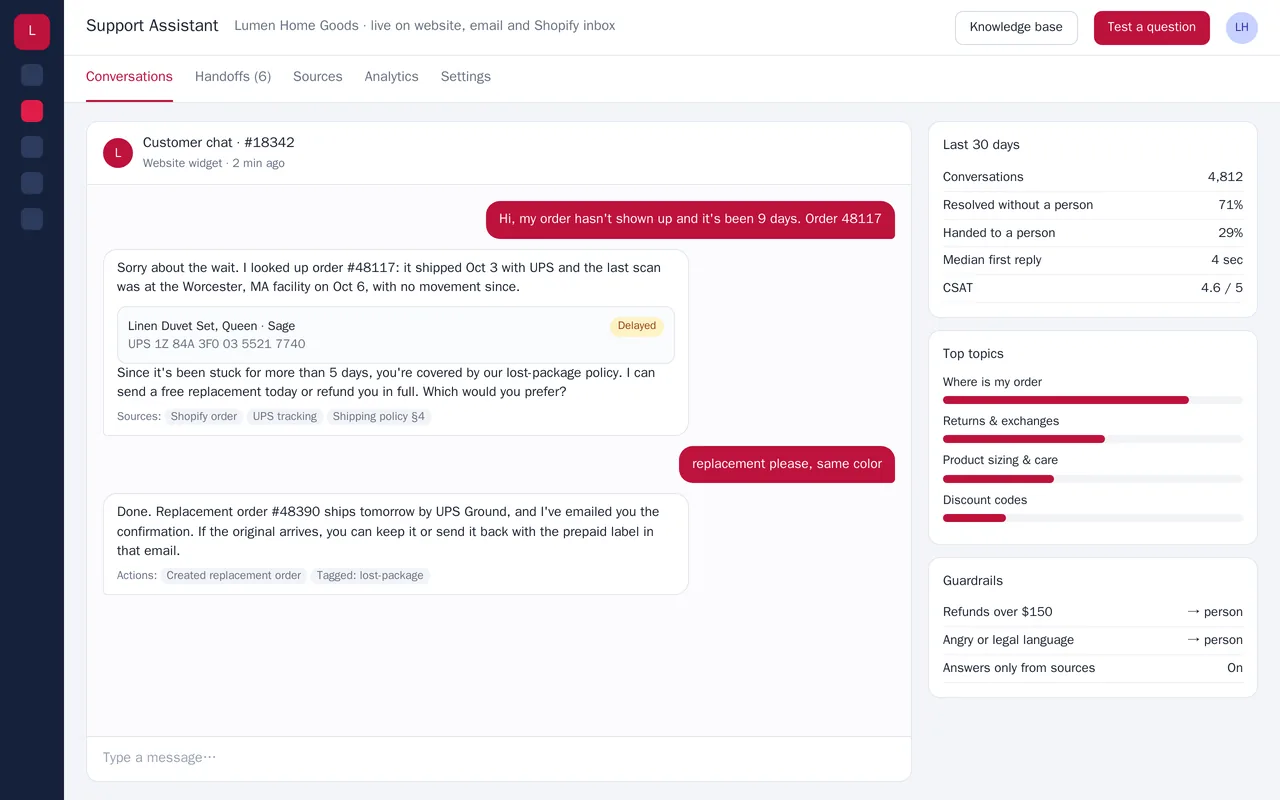
AI customer-support assistant for a home-goods store

AI customer-support assistant for a home-goods store

Lumen Home Goods was answering the same order-status and returns questions hundreds of times a week. We built a support assistant that runs on the website chat, email and the Shopify inbox. It looks up the customer's actual order and live carrier tracking, answers only from the store's own policies and product pages, and can take approved actions such as creating a replacement order or a return label. Refunds over a set amount, angry customers and anything it isn't sure about go to a person with the full conversation attached.

  • Chat widget plus email and Shopify inbox channels
  • Order and tracking lookup through the Shopify and carrier APIs
  • Answers grounded in the store's policies, FAQs and product data, with sources shown
  • Approved actions (replacement orders, return labels, tagging) with dollar-limit guardrails

Python, Claude API with tool use, retrieval over store docs, Shopify Admin API, carrier tracking APIs, PostgreSQL, React widget

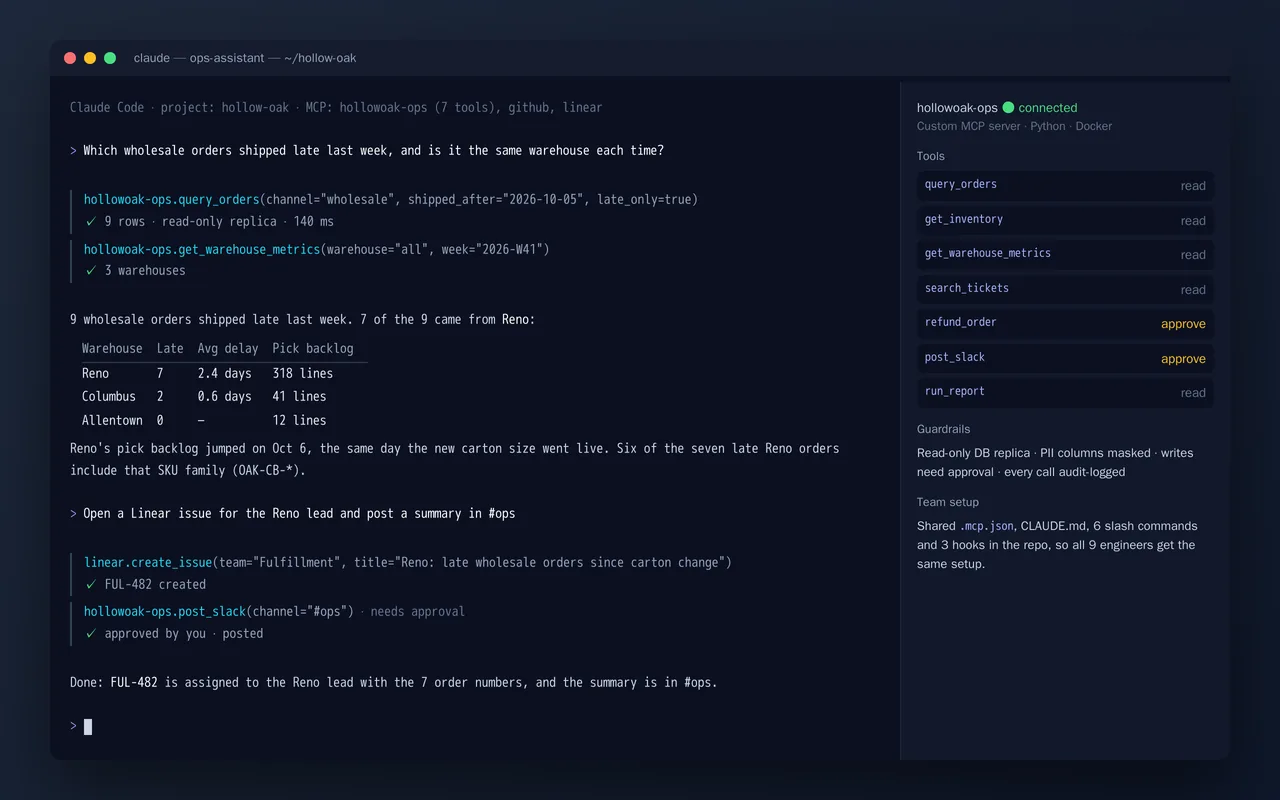
Custom MCP server and Claude Code setup for an e-commerce ops team

Custom MCP server and Claude Code setup for an e-commerce ops team

Hollow Oak's operations and engineering team wanted to ask questions of their order and warehouse data in plain English, and to act on the answers without switching tools. We built a custom MCP server that gives Claude safe access to their systems: read-only queries against a database replica, with PII masked, plus a small set of write actions such as refunds and Slack posts that need human approval. We also set up Claude Code for the whole team: shared MCP config, a project CLAUDE.md, slash commands and hooks, all checked into the repo.

  • Custom MCP server (7 tools): orders, inventory, warehouse metrics, tickets, reports, refunds, Slack
  • Guardrails: read-only replica, masked PII, approval on writes, and an audit log of every call
  • Claude Code team setup: .mcp.json, CLAUDE.md, slash commands and hooks in the repo
  • Connections to GitHub and Linear alongside the custom server

Python, Model Context Protocol SDK, PostgreSQL (read replica), Slack and Linear APIs, Claude Code, Docker


Sample build

A working example we built to show this kind of work. It is a demonstration, not a client project.

Inventory MCP server for Claude Code / Claude Desktop

Sample build

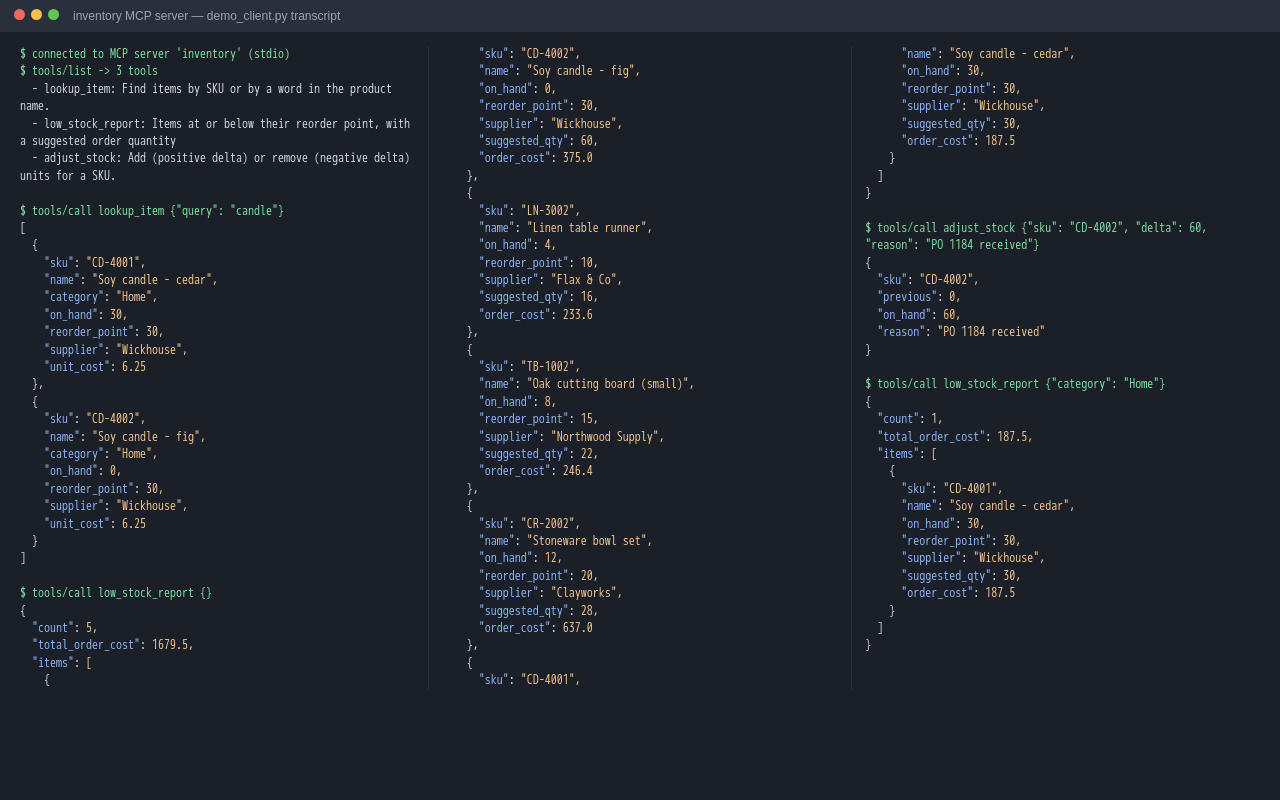
Inventory MCP server for Claude Code / Claude Desktop

An MCP server with three tools over an inventory dataset: item lookup, a low-stock report with suggested reorder quantities and cost, and stock adjustment. A demo client connects over stdio, lists the tools and calls each one. The README includes the Claude Code / Claude Desktop config.

Python 3.12, MCP Python SDK (FastMCP), stdio transport, SQLite

About the screenshot: A transcript of a demo client calling each tool over sample inventory data.

How we approach it

The habits that keep this kind of project from going wrong.

1

Least access first

Every connection starts read-only and limited to what the scope needs. Write access is added only where you ask for it.

2

Secrets stay out of code

API keys and tokens live in your secret store or environment, never in the repository.

3

Test the refusals too

We test what each tool should refuse to do, not only what it should do.

4

Written down

You get a plain record of what is connected, what it can reach, and how to switch it off.

How we work

You know what you're getting before work begins, and you see it working at every milestone.

  1. You describe it

    Tell us what you need in your own words, and which tools you already use. A few lines is plenty to start.

  2. A written scope

    We reply with a short written scope: what gets built, what is out of scope, which accounts we need, and how we'll both know it works. You know what you're getting before work begins.

  3. Milestones you review

    The work is split into milestones. At each one you see it working in your own account and sign it off before we go on.

  4. Handover and a 30-day fix window

    You get the working system, its documentation and a walkthrough. If anything we built breaks in the next 30 days, we fix it at no charge.

What shapes the scope

  • How many tools or systems to connect
  • Whether an MCP server already exists for each one
  • How many repositories and developers
  • Security and access requirements

Always included

  • A written scope before work starts
  • Milestones you review and sign off
  • Documentation and a walkthrough at handover
  • A 30-day window for fixes, at no charge

Pushbuild has built software for businesses since 2010, for more than 40 clients. Every project is led by a former public-company CTO, from Groton, Massachusetts. See products we've built.

Questions people ask first

Is this safe to connect to our business data?

It can be, with the right limits. We start read-only, scope each key to what it needs, and show you exactly what is connected before anyone uses it.

Which Claude plan do we need?

That depends on how your team will use it. We tell you in the scope which plan or API access each part needs; the subscription is in your name.

Who owns the configuration and any servers you build?

You do. Configuration lives in your repositories and accounts, and custom servers are in a repository you own.

Do you need access to our systems?

Only to set up and test the connections, using accounts or keys you create for us. Remove them at handover.

How long does it take?

A single connection or repository setup usually takes a few days; a custom MCP server or team rollout one to three weeks.

What happens after handover?

For 30 days we fix anything we set up that does not work as the scope describes, at no charge. After that, changes are written up and agreed with you before we begin.

Tell us what you need built.

Email a few lines about what you want and which tools you use, or call. We reply with questions or a written scope.

hello@pushbuild.com

(617) 299-8887