Pushbuild

The spreadsheet your team actually needs.

We build Excel tools: macros that do the repetitive steps, workbooks that combine many files into one report, and templates with the formulas and checks already in place. Built so the person who uses it every day can understand it.

Tell us what you needSee typical projects

You see it working at every milestone, not a status report.

Sound familiar?

What we hear from businesses before a project like this starts.

  • Every month someone spends two days combining spreadsheets from each store.
  • Our main workbook has macros nobody dares to touch.
  • We get raw exports from the system and have to clean them by hand before anyone can read them.
  • Formulas break whenever someone adds a row.
  • We have the data, but no clear report out of it.

What buyers usually need

The requests that come up most often for this kind of work, and what each one takes to work properly.

01

Many files combined into one summary

A workbook that opens on a summary sheet, one row per store or branch, followed by the group total.

02

Raw exports turned into a management report

Power Query steps that clean and reshape the export, so refreshing the report is one click.

03

A macro for the repetitive steps

VBA that does the copy, format, filter and save steps your team does by hand today.

04

A template that can't be broken

Locked formulas, input cells that check what is typed, and clear instructions on the sheet.

05

A tracker or register

Inventory, orders, songs, projects or cash, with the totals and alerts you need.

06

Old macros repaired or explained

Existing VBA read, documented and repaired, especially after an Office update.

Tools that come up most: Excel, VBA, Power Query, Power Pivot, pivot tables, MS Access, CSV exports, Google Sheets, Power BI.

What you get

Concrete pieces, each one something you can open and check when it's done.

Store workbooksSummary sheetSystem exportsManagement reportManual stepsOne-click refreshWorkbook and macrobuilt by Pushbuild

VBA macros

Buttons that run the repetitive steps: import, clean, format, split, email and save.

VBA, Excel object model

Power Query transforms

Repeatable clean-up and reshaping of exports, refreshed with one click.

Power Query, M

Consolidation workbooks

Many workbooks or sheets combined into one summary, with the group total.

Power Query, VBA

Reports and dashboards in Excel

Summary sheets, pivot tables and charts that update when the data does.

Pivot tables, Power Pivot, charts

Templates and input sheets

Protected templates with validation, so the numbers coming in are right.

Data validation, protection, named ranges

Access and legacy VBA

Existing Access databases and macros documented, repaired and tidied.

MS Access, VBA

Typical projects

Example packages to show the shape of the work. These are examples, not past clients; yours gets its own written scope.

Example package

Monthly consolidation workbook

One workbook that pulls every store or branch file into a single summary with a group total.

You get

  • Summary sheet, one row per site, then the total
  • One-click refresh from a folder of files
  • Checks that flag missing or odd files
  • Instructions on the first sheet

Example package

Export to report

A raw system export cleaned and turned into the report your managers read.

You get

  • Power Query clean-up steps
  • A formatted report sheet and charts
  • Refresh in one click
  • Notes on each step, in plain language

Example package

Macro for a manual process

The steps someone repeats every day or week, done by a macro.

You get

  • Macro with a button on the sheet
  • Error messages that say what went wrong
  • Commented code
  • A short guide for the person using it

Example package

Fix and document an existing workbook

A critical workbook or macro set read, repaired and explained.

You get

  • A written map of what each part does
  • The bugs you listed repaired
  • Fragile formulas made robust
  • A copy of the original kept untouched

Example projects

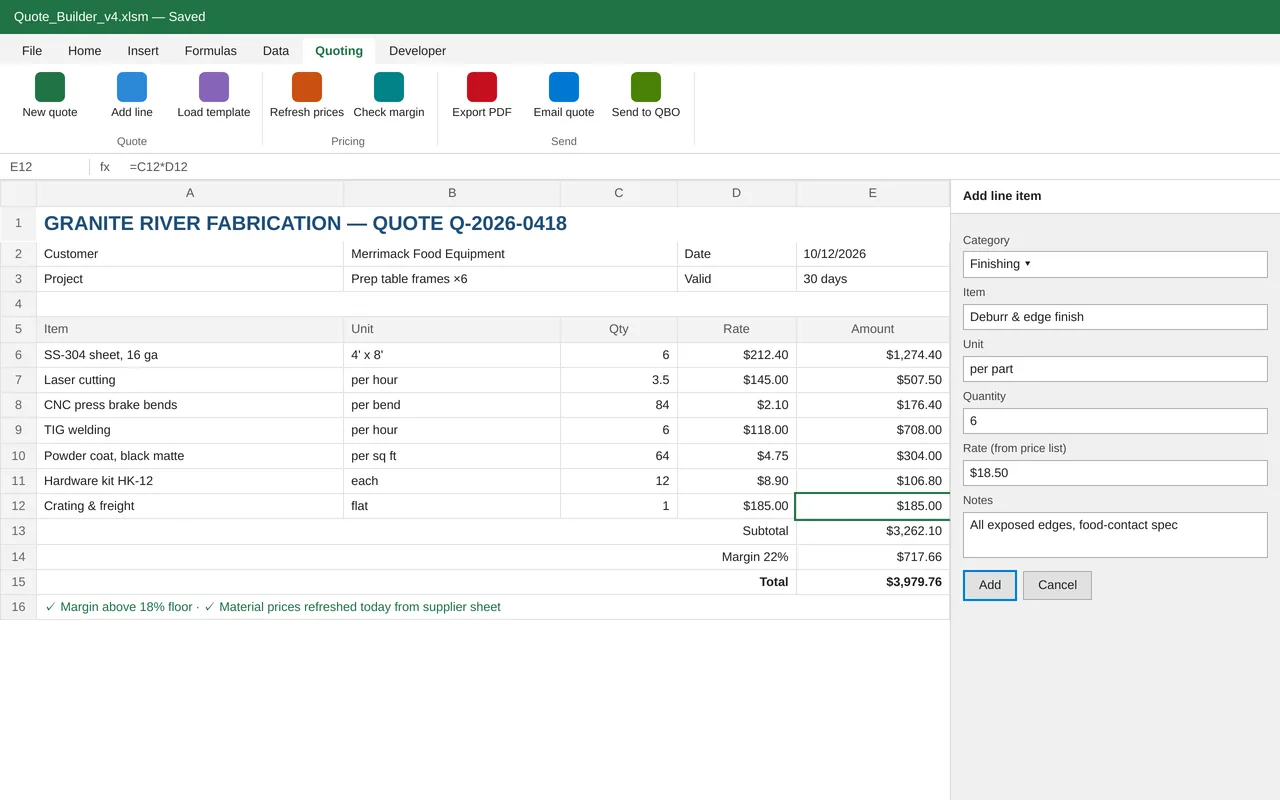
Excel quoting tool for a metal fabrication shop (VBA)

Excel quoting tool for a metal fabrication shop (VBA)

Granite River Fabrication built every quote by copying an old spreadsheet, which led to stale material prices and missed margins. We built a macro-enabled quoting workbook with its own Quoting tab on the ribbon. Estimators add lines from a form that pulls rates from the current price list, a margin check blocks quotes below the floor, and one click exports a branded PDF, emails it to the customer and logs the quote. Accepted quotes can be sent to QuickBooks as estimates.

  • Custom ribbon tab and line-item form (VBA UserForm)
  • Price list that refreshes from the supplier's sheet
  • Quote templates by job type and a margin floor check
  • PDF export, Outlook email and a quote log

Excel VBA, custom ribbon XML, Power Query, Outlook automation, QuickBooks Online API

Sample build

A working example we built to show this kind of work. It is a demonstration, not a client project.

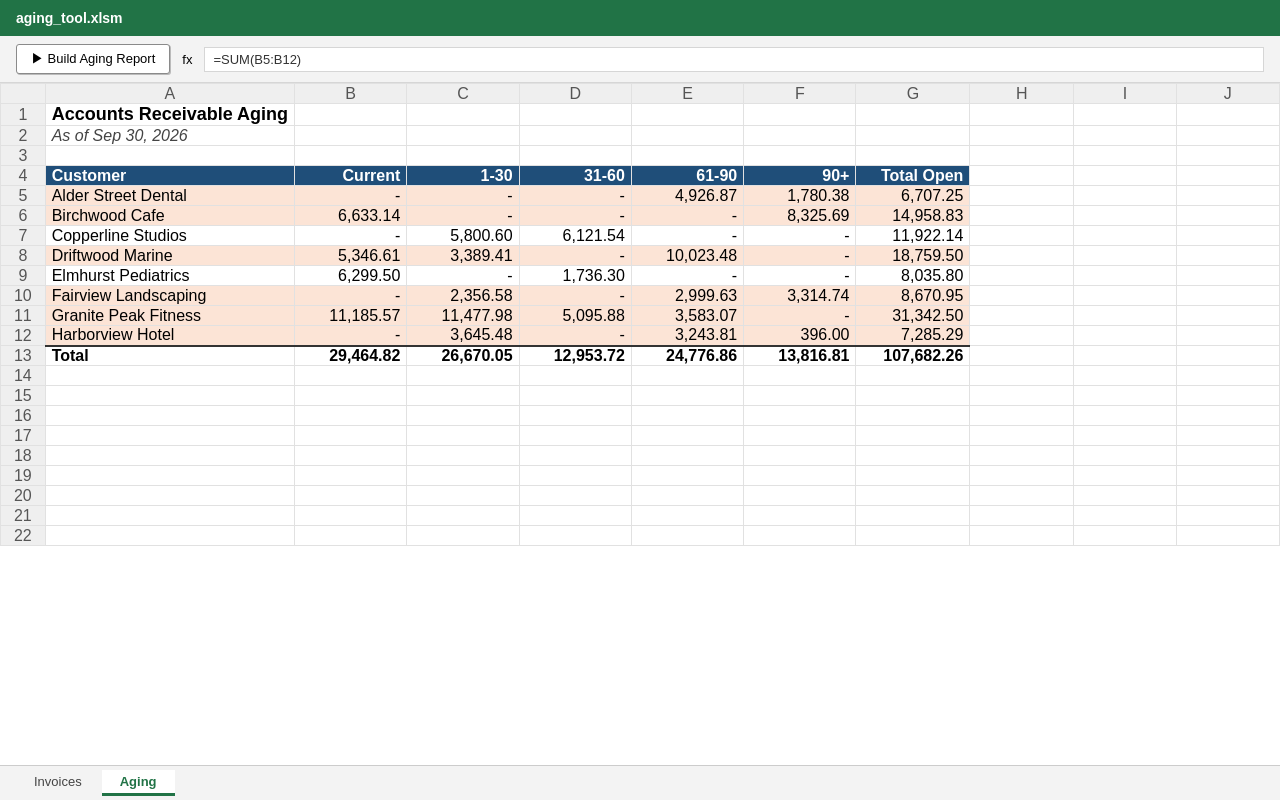
Excel AR Aging Report Macro

Sample build

Excel AR Aging Report Macro

One-button VBA macro that turns an Invoices sheet into a formatted accounts-receivable aging report by customer (Current, 1-30, 31-60, 61-90, 90+), with totals and 60+-day balances highlighted.

Excel VBA, openpyxl, Python, Docker

About the screenshot: The tool's output sheet: the aging report the macro produces from sample invoices.

How we approach it

The habits that keep this kind of project from going wrong.

1

Built for the person who uses it

We talk to whoever opens the workbook every day, and design the sheet around what they do.

2

Formulas over code where possible

If a formula or Power Query step does the job, we use that rather than VBA, because more people can follow it.

3

Checks built in

Totals that must match, files that must be present, and inputs that must be numbers are checked and flagged.

4

Nothing hidden

No locked VBA projects or hidden sheets you can't open. You get the passwords, if any.

How we work

A written scope first, then working progress you can check, then a proper handover.

  1. You describe it

    Tell us what you need in your own words, and which tools you already use. A few lines is plenty to start.

  2. A written scope

    We reply with a short written scope: what gets built, what is out of scope, which accounts we need, and how we'll both know it works. You know what you're getting before work begins.

  3. Milestones you review

    The work is split into milestones. At each one you see it working in your own account and sign it off before we go on.

  4. Handover and a 30-day fix window

    You get the working system, its documentation and a walkthrough. If anything we built breaks in the next 30 days, we fix it at no charge.

What shapes the scope

  • How many files and sheets are involved
  • Whether VBA is needed or formulas will do
  • How messy the source data is
  • Which Excel versions it must work on

Always included

  • A written scope before work starts
  • Milestones you review and sign off
  • Documentation and a walkthrough at handover
  • A 30-day window for fixes, at no charge

Pushbuild has built software for businesses since 2010, for more than 40 clients. Every project is led by a former public-company CTO, from Groton, Massachusetts. See products we've built.

Questions people ask first

Which versions of Excel do you support?

Microsoft 365 and recent desktop versions on Windows. Mac Excel and Excel on the web do not run all VBA, so we tell you in the scope if that matters.

Can you work on our existing workbook?

Yes. Send a copy with any sensitive data removed or replaced, and we work on that.

Who owns the workbook?

You do. There are no locked projects or licence keys; you get everything.

Is this data entry?

No. We build tools that do the work. If you need a one-off batch typed in, a data entry service will be cheaper and we will say so.

How long does it take?

Most Excel tools take a few days to two weeks from the signed scope.

What if Office updates break it?

In the 30 days after handover we fix anything we built at no charge. After that, further work is scoped the same way and agreed with you before we start.

Tell us what you need built.

Email a few lines about what you want and which tools you use, or call. We reply with questions or a written scope.

hello@pushbuild.com

(617) 299-8887