Pushbuild

Your trading rules, written as code that does exactly that.

We turn trading rules you already use into TradingView indicators and strategies, MetaTrader Expert Advisors, and alert-driven order flows. We build to your specification; we do not supply strategies or trading advice.

Tell us what you needSee typical projects

Agreed in writing first, then built and handed over to you.

Sound familiar?

What we hear from businesses before a project like this starts.

  • My entry rules live in a spreadsheet and I place every trade by hand.
  • I have an MT4 indicator I rely on and need it on MT5 or NinjaTrader.
  • My TradingView alert fires, then I still have to log in to the exchange and click.
  • The backtest looks nothing like what happens live.
  • I paid for a script once and got code that didn't match what I asked for.

What buyers usually need

The requests that come up most often for this kind of work, and what each one takes to work properly.

01

A Pine Script indicator from written rules

Your rules turned into an indicator with the plots, labels and alerts you describe, and inputs you can tune.

02

A strategy you can backtest

Entries, exits, stops and position sizing as a Pine strategy or MT5 Expert Advisor, so the rules can be tested on history.

03

An indicator moved between platforms

MT4 to MT5, MQL to Pine, or MetaTrader to NinjaTrader, checked bar by bar against the original.

04

TradingView alerts that place orders

Alerts sent by webhook to a small service that places the order through your broker or exchange API, with limits you set.

05

A trading journal that fills itself

Fills and results pulled into a sheet or database, so you can review what actually happened.

06

A fix to an existing script

Repainting, wrong signals on live bars, or errors after a platform update, found and repaired.

Tools that come up most: TradingView, Pine Script v5 and v6, MetaTrader 4 and 5, MQL4, MQL5, NinjaTrader 8, broker and exchange APIs, webhooks, Python.

What you get

Concrete pieces, each one something you can open and check when it's done.

Your written rulesSignals and alertsPrice dataBacktest reportTradingView alertBroker API orderIndicator or EAbuilt by Pushbuild

Pine Script indicators

Indicators with your plots, labels, tables and alert conditions, and inputs for every number you may want to change.

Pine Script v5 and v6

Pine strategies

Entries, exits, stops and sizing as a strategy, so TradingView's tester can run it on history.

Pine strategy(), alerts

MT4 and MT5 Expert Advisors

Rules executed by MetaTrader with risk limits, session filters and logging.

MQL4, MQL5, strategy tester

Conversions between platforms

An indicator or strategy rewritten for another platform and compared against the original output.

MQL4, MQL5, Pine, NinjaScript

Alert-to-order automation

TradingView webhooks received by a small service that places orders through your broker or exchange, within limits you set.

Webhooks, broker and exchange APIs, Python

Logs and journals

Every signal and order logged, and results pulled into a sheet or database for review.

Google Sheets, Postgres, CSV

Typical projects

Example packages to show the shape of the work. These are examples, not past clients; yours gets its own written scope.

Example package

Indicator from your rules

A written set of rules turned into a TradingView indicator with alerts.

You get

  • Pine Script indicator with your plots and labels
  • Alert conditions for each signal
  • Inputs for every tunable number
  • A short note on how each rule was coded
Example package

Indicator conversion

An MT4 indicator rebuilt for MT5, Pine or NinjaTrader 8.

You get

  • Converted indicator for the target platform
  • A side-by-side check on the same chart and period
  • Notes on any behaviour that cannot be matched exactly
  • Source code for both versions

Example package

Expert Advisor from a tested strategy

Your strategy as an MT5 Expert Advisor with risk limits and logging.

You get

  • EA with entries, exits, stops and sizing
  • Maximum position and daily loss limits
  • A strategy tester report on the period you choose
  • A log of every decision the EA makes

Example package

TradingView alerts to your broker

Alerts from your existing TradingView setup placing orders through your broker or exchange API.

You get

  • A webhook receiver in your hosting account
  • Order placement with size and loss limits
  • A kill switch and an error alert
  • A log of every alert and order

Example projects

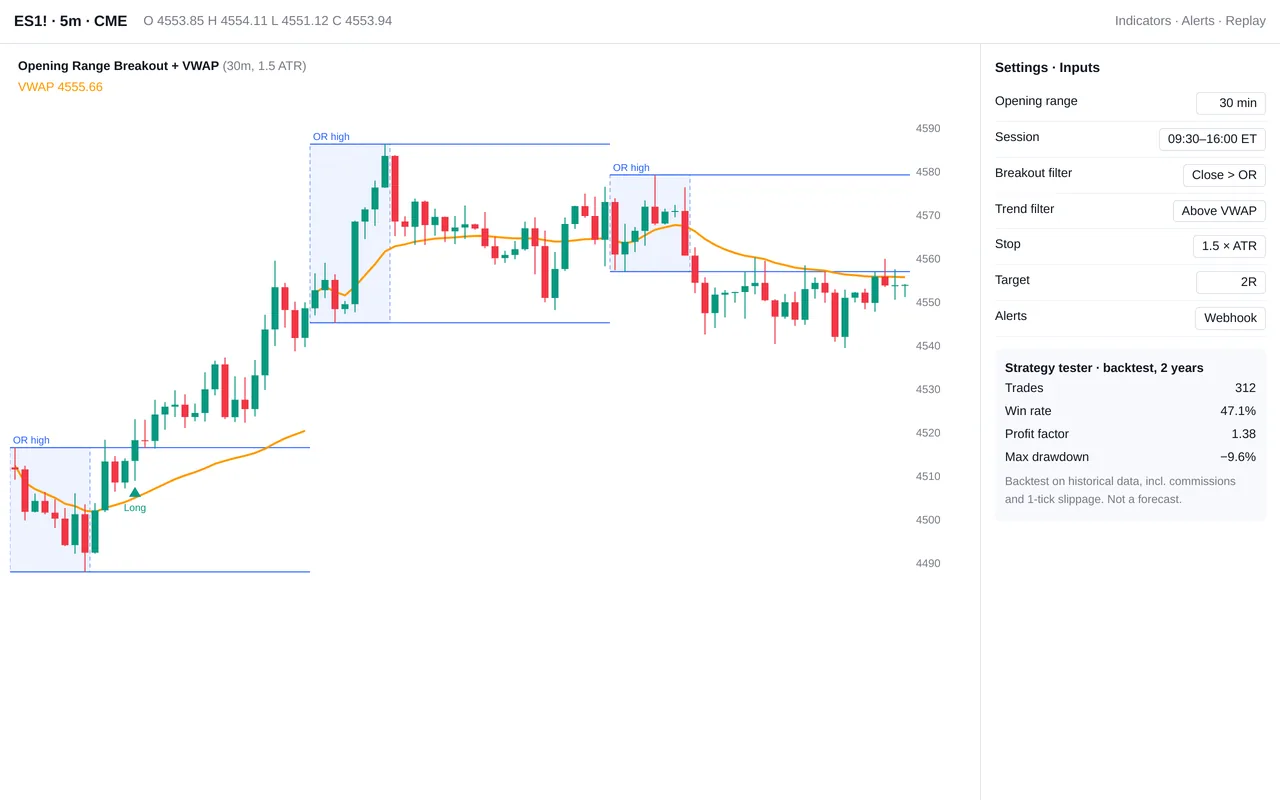
Opening-range breakout indicator and strategy for TradingView (Pine Script)

Opening-range breakout indicator and strategy for TradingView (Pine Script)

A futures day trader traded opening-range breakouts by drawing boxes by hand every morning. We wrote a Pine Script v5 indicator and a matching strategy for TradingView. It draws the opening range for any session, plots session VWAP, and marks breakouts that close beyond the range in the direction of VWAP. ATR-based stops and R-multiple targets are drawn on the chart. Alerts fire by webhook to the trader's execution tool, and the strategy version runs in TradingView's backtester so settings can be tested before use.

  • Pine Script v5 indicator: opening-range boxes, session VWAP, breakout signals
  • Configurable inputs: range length, session hours, filters, stop and target
  • Strategy version for TradingView's strategy tester, with commission and slippage
  • Webhook alerts formatted for the trader's execution platform

Pine Script v5, TradingView alerts and webhooks, MQL5

Sample build

A working example we built to show this kind of work. It is a demonstration, not a client project.

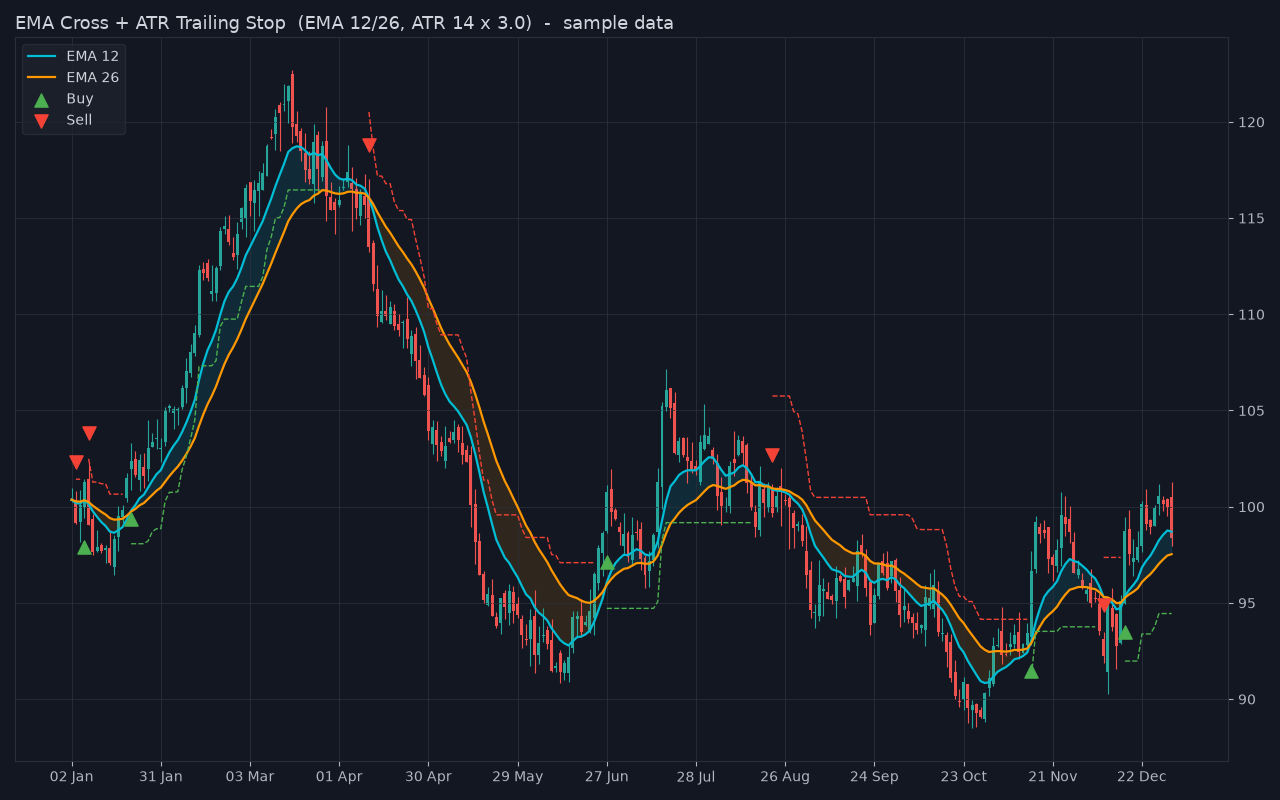
EMA Cross + ATR Trailing Stop (Pine Script v5 + MT5 EA)

Sample build

EMA Cross + ATR Trailing Stop (Pine Script v5 + MT5 EA)

TradingView indicator with EMA-cross buy/sell signals, an ATR trailing stop and alert conditions, plus an MT5 Expert Advisor skeleton trading the same rules; a Python port checks the logic and renders the chart on seeded sample data.

Pine Script v5, MQL5, Python, pandas, matplotlib, Docker

About the screenshot: The indicator logic plotted on sample price data. This is not a TradingView or MT5 chart.

How we approach it

The habits that keep this kind of project from going wrong.

1

Your rules, written down first

We restate your rules in plain language in the scope and agree them before coding. Ambiguity is where most trading scripts go wrong.

2

No repainting surprises

Signals are checked on closed bars and live bars, and we tell you where a rule cannot be known until a bar closes.

3

Limits before automation

Anything that places orders has position limits, a loss limit and a kill switch. It runs on a paper or demo account before a live one.

4

No advice, no promises

We build what you specify. We do not recommend strategies, manage money or claim any result.

How we work

A written scope first, then working progress you can check, then a proper handover.

  1. You describe it

    Tell us what you need in your own words, and which tools you already use. A few lines is plenty to start.

  2. A written scope

    We reply with a short written scope: what gets built, what is out of scope, which accounts we need, and how we'll both know it works. You know what you're getting before work begins.

  3. Milestones you review

    The work is split into milestones. At each one you see it working in your own account and sign it off before we go on.

  4. Handover and a 30-day fix window

    You get the working system, its documentation and a walkthrough. If anything we built breaks in the next 30 days, we fix it at no charge.

What shapes the scope

  • How many rules and conditions
  • Whether it only signals or also places orders
  • Which platforms and brokers are involved
  • Whether a conversion must match the original exactly

Always included

  • A written scope before work starts
  • Milestones you review and sign off
  • Documentation and a walkthrough at handover
  • A 30-day window for fixes, at no charge

Pushbuild has built software for businesses since 2010, for more than 40 clients. Every project is led by a former public-company CTO, from Groton, Massachusetts. See products we've built.

Questions people ask first

Will this make money?

We can't tell you that and won't claim it. We build your rules exactly as specified and show you a backtest; whether the strategy works is your decision.

Do you keep or share my strategy?

No. Your rules and code are yours, delivered to you and not reused. We are happy to sign a simple confidentiality agreement.

Do you need my broker login?

No. For order automation you create API keys in your own account with trading permission only, never withdrawal permission, and paste them into the service yourself.

Who owns the code?

You do. You get the full source: the Pine script, the MQL files or the automation service code.

How long does it take?

An indicator or conversion usually takes a few days to a week from the signed scope; an Expert Advisor or alert-to-order service one to three weeks.

What if the platform changes?

In the 30 days after handover we fix anything we built at no charge. After that, any further work is agreed in writing before we touch it.

Tell us what you need built.

Email a few lines about what you want and which tools you use, or call. We reply with questions or a written scope.

hello@pushbuild.com

(617) 299-8887