
Pushbuild

CompanyCam photos that end up where the job lives.

We connect CompanyCam to the rest of the job file, so photos are filed where the office and the adjuster can find them, project records match your CRM, and the daily photo trail does not depend on someone remembering. The scope is written down and agreed before we start.

Tell us what you needSee example projects

Sound familiar?

What contractors using CompanyCam tell us before a project starts.

  • Crews take good photos and the office still can't find them.
  • Projects get created in CompanyCam and again in our CRM.
  • The adjuster or the customer asks for photos and someone spends an hour collecting them.
  • We want an end-of-day summary of what each crew photographed.
  • Photos need to be named and sorted the same way every time.

What we build

Each one is a working piece you can open and check when it's done.

Photos filed to the job folder

New photos copied to a dated folder under the job in Drive or your file store, named the same way each time.

API integrations and data sync Python scripts and utilities

Projects in step with your CRM

A project created in CompanyCam when a job is created in your CRM, so the crew finds it ready.

API integrations and data sync n8n, Make and Zapier automation

Share pack for the adjuster

A set of photos for a job gathered into one shareable folder or report on request.

Python scripts and utilities

End-of-day crew summary

A short message to the office listing which jobs got photos today and which got none.

n8n, Make and Zapier automation

Checklist and photo gaps

A check that required photos exist before a job moves to complete, with the missing ones listed.

n8n, Make and Zapier automation Dashboards and reporting

One photo archive

Older photo exports sorted into a clean archive by job and date.

Python scripts and utilities

What we connect it to: AccuLynx, JobNimbus, Google Drive, Google Sheets, Zapier, Buildertrend, Procore.

Industries that use it: Roofing, Remodeling, General contractors, Solar.

Example projects

Illustrations of the shape of the work, not past clients. Yours gets its own written scope.

Example project

Photos filed for the insurance claim

Example: a roofing crew's daily photos are copied under the job in a dated folder the office can share with the adjuster.

CompanyCam, Google Drive, the roofing CRM

Example project

New job, ready project

Example: a remodeler signs a job in the CRM and wants the CompanyCam project created with the address and crew lead already set.

CRM, CompanyCam, Zapier

Example project

Photo gap report

Example: a contractor wants a list each evening of jobs worked today that have no photos.

CompanyCam, Google Sheets
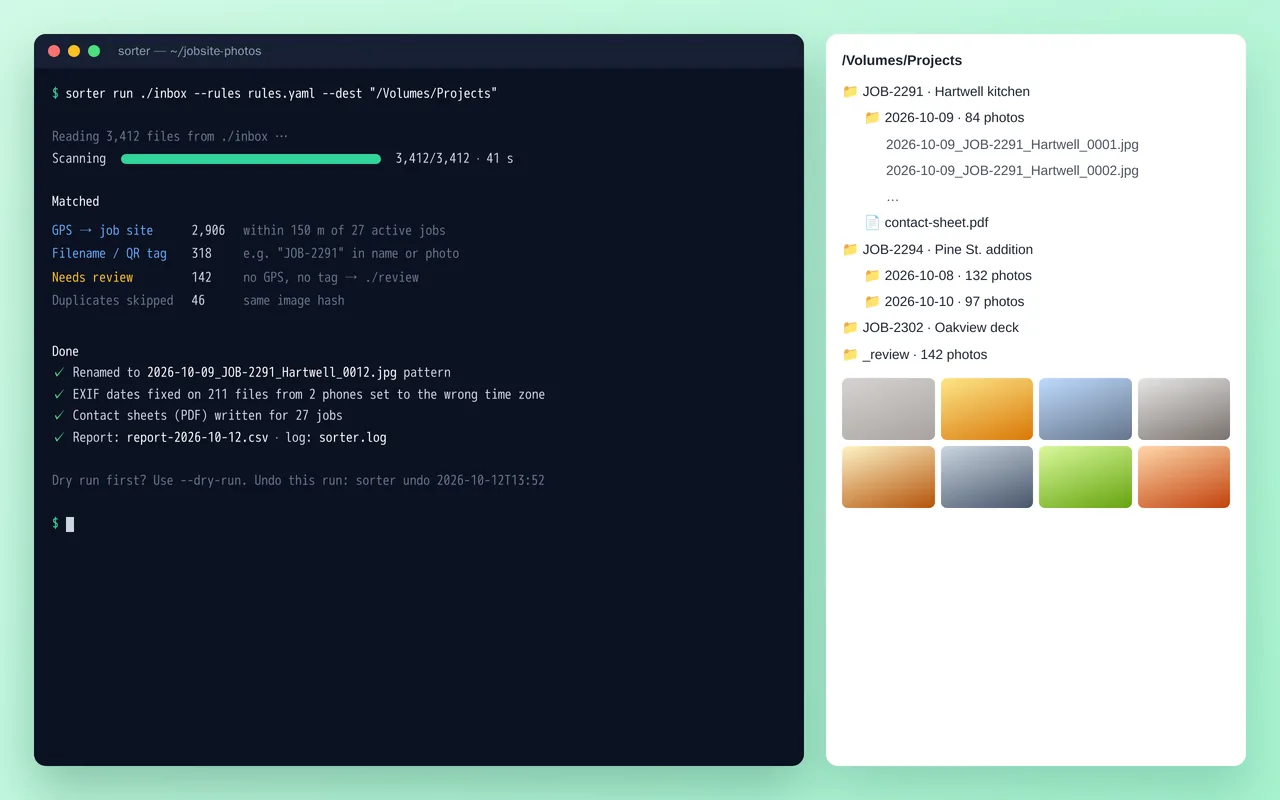
Job-site photo organizer for a home-renovation contractor (Python)

Example build

Job-site photo organizer for a home-renovation contractor (Python)

  • Command-line tool with YAML rules, dry-run mode and one-command undo
  • Job matching by GPS radius, filename tags and QR codes
  • EXIF date and time-zone correction, duplicate detection by image hash
  • Standard renaming and folder structure, plus PDF contact sheets per job

Python 3.12, Pillow, piexif, pyzbar (QR), ReportLab, Typer, Rich, PyInstaller

Questions people ask first

Do we have to change how we use CompanyCam?

No. We work around the way your office already uses it. If something you want can't be done from outside the software, we say so in the written scope before anything starts.

Can you connect CompanyCam to our other tools?

Yes. CompanyCam has an API with webhooks and a Zapier app. Photo links need sign-in, so we move the actual files rather than the links. Access can depend on your plan, so we confirm it first.

Who owns what you build?

You do. It is built in your own accounts, and you get notes on how it works so your office can change it without us.

How do we start?

Tell us what you use around CompanyCam and the one job that wastes the most time each week. We reply with questions or a written scope.

Tell us what you need built.

Email a few lines about what you want and which tools you use, or call. We reply with questions or a written scope.

hello@pushbuild.com

(617) 299-8887