
Pushbuild

Software that keeps a remodeler's leads, selections and change orders in one place.

We connect the tools a remodeling company already uses so a new inquiry gets a reply the same day, the estimate and the selections live with the job, and a change order is written down before the work happens. The scope is written down and agreed before we start.

Tell us what you needSee example projects

Sound familiar?

What remodeling companies tell us before a project starts.

  • Kitchen and bath inquiries sit in an inbox for days before anyone calls back.
  • Client selections are scattered across texts, emails and a shared folder, and we argue later about what was chosen.
  • A change order is agreed on site and never makes it onto an invoice.
  • Job photos are on five phones and nobody can find the before shots.
  • We re-type the same estimate into the accounting system once the job is signed.

What we build

Each one is a working piece you can open and check when it's done.

Inquiry intake and reply

Website forms, calls and referral emails land in one list with an owner, a first reply sent right away and a reminder if nobody has called.

CRM setup and lead pipelines GoHighLevel setup

Estimate and proposal sheet

A quoting sheet or small app that builds the estimate from your own cost lines and produces a clean proposal for the homeowner to sign.

Excel and VBA tools Google Sheets and Apps Script automation

Selections tracker

Each room's tile, fixtures, paint and finishes recorded with a due date, a status and the homeowner's sign-off, so nothing is ordered twice or late.

Notion and Airtable systems

Change orders that reach the invoice

A change order form that records the scope and the cost, gets a signature and adds the line to the job's billing without retyping.

n8n, Make and Zapier automation QuickBooks, Xero and HubSpot integrations

Job photos filed by room

Phone photos pulled in and sorted by job, date and room, so before and after sets are ready when the client or the website needs them.

Python scripts and utilities

Draw schedule and payment reminders

Payment milestones tracked per job, with a reminder to the client before each draw and a note to the office when one is overdue.

Stripe integration and billing Dashboards and reporting

Remodeling software we work with: Buildertrend, CoConstruct, Houzz Pro, JobTread, CompanyCam, Jobber.

And the general tools around it: QuickBooks, Google Sheets, Airtable, GoHighLevel, HubSpot, Zapier, Make.

Example projects

Illustrations of the shape of the work, not past clients. Yours gets its own written scope.

Example project

Selections that stay on the job

Example: a kitchen remodeler wants every finish choice entered once, with a due date, and a reminder to the homeowner a week before the order deadline.

Airtable, email reminders, Google Drive

Example project

Change order to invoice

Example: a design-build firm has its lead carpenter fill out a short form on site. The change order is sent for signature and the extra amount is added to the job in the accounting system.

Web form, e-signature, QuickBooks

Example project

Before and after photo sets

Example: a remodeler's crews upload photos all day. Each evening they are filed under the job and room, and a before and after folder is built for the sales team.

Phone upload, Python, Google Drive
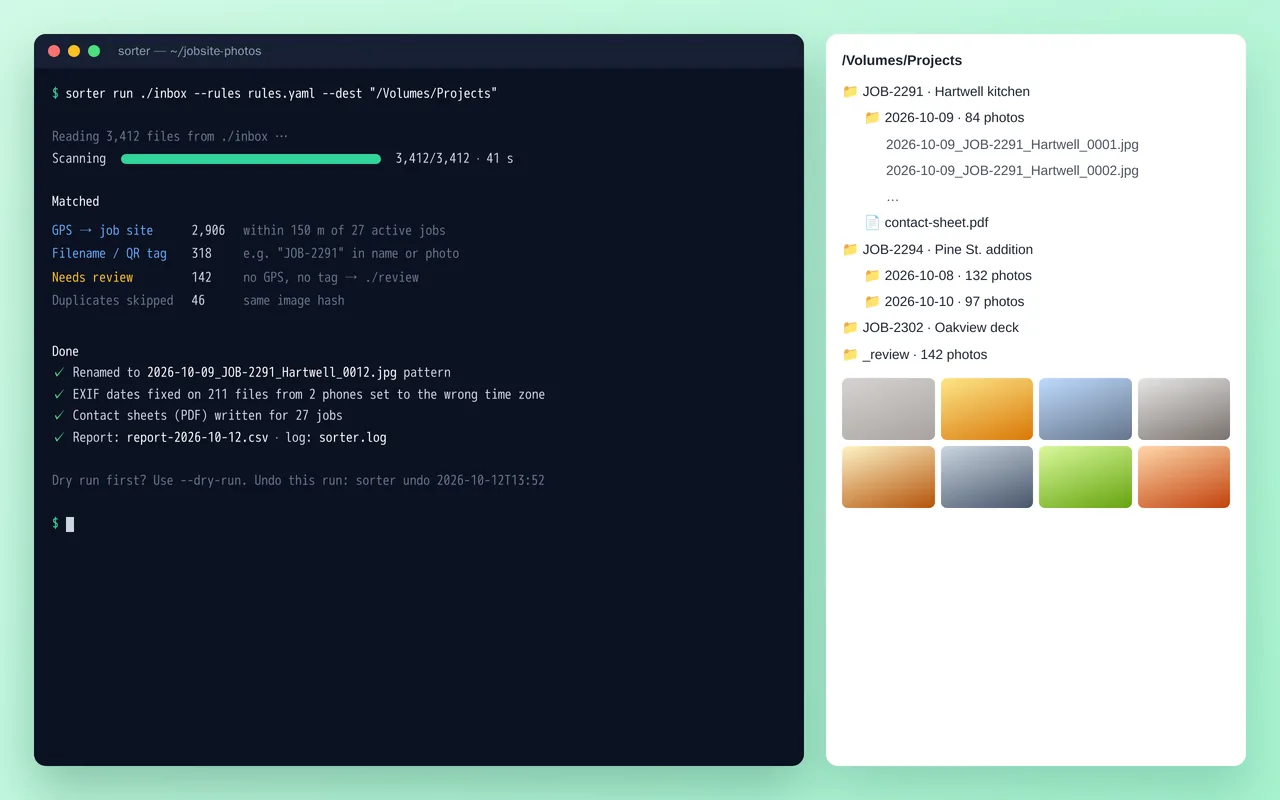
Job-site photo organizer for a home-renovation contractor (Python)

Example build

Job-site photo organizer for a home-renovation contractor (Python)

  • Command-line tool with YAML rules, dry-run mode and one-command undo
  • Job matching by GPS radius, filename tags and QR codes
  • EXIF date and time-zone correction, duplicate detection by image hash
  • Standard renaming and folder structure, plus PDF contact sheets per job

Python 3.12, Pillow, piexif, pyzbar (QR), ReportLab, Typer, Rich, PyInstaller

Questions people ask first

Do we have to move off our project software?

No. Most of the work is connecting what you already run, so the estimate, the schedule and the books agree. If a tool cannot do what you need, we say so in the scope and lay out the options first.

Can the crew use it from the job site?

Yes. Forms and uploads are built to work from a phone, with large buttons and as few fields as we can manage.

Who owns what you build?

You do. It is built in your own accounts, and you get plain notes on how it works so your office can change it without us.

How do we start?

Tell us which tools you use and the one task that costs the office the most time each week. We reply with questions or a written scope.

Tell us what you need built.

Email a few lines about what you want and which tools you use, or call. We reply with questions or a written scope.

hello@pushbuild.com

(617) 299-8887