
Pushbuild

Google Sheets that update themselves, send the emails and feed the rest of your tools.

A shared sheet is often the first system a team builds, and it keeps working long after it should have help. We add Apps Script and connections so the sheet fills itself, sends the messages and stays tidy as more people use it. The scope is written down and agreed before we start.

Tell us what you needSee example projects

Sound familiar?

What Google Sheets users tell us before a project starts.

  • Several people edit the same sheet and someone always overwrites someone else.
  • We paste form answers and CRM exports into the sheet by hand.
  • Reminder emails and status updates depend on someone remembering to send them.
  • The sheet has grown so large it is slow and nobody trusts the formulas.
  • We want reports from it but the layout changes every week.

What we build

Each one is a working piece you can open and check when it's done.

Sheets that fill themselves

Form answers, orders, leads and emails added as new rows automatically, with the columns in the same order every time.

Google Sheets and Apps Script automation API integrations and data sync

Emails and messages from a sheet

Rows that meet a rule send a reminder, a quote or a status update, and the sheet records that it went.

Google Sheets and Apps Script automation n8n, Make and Zapier automation

Scheduling and rosters

Shifts, crews or appointments laid out in a sheet with checks for clashes and a sent summary for each person.

Google Sheets and Apps Script automation

Cleaning and combining data

Several messy tabs or exports merged into one clean table, with duplicates removed and values made consistent.

Python scripts and utilities ETL and data pipelines

Dashboards from your sheet

Charts and summaries that update from the data, shared as a page so people stop asking for a copy.

Dashboards and reporting

Moving off the sheet when it is time

When a sheet has become a database, we move it to a proper one and keep a simple view for the people who like the sheet.

Notion and Airtable systems Web apps and MVPs

What we connect it to: Gmail, Google Calendar, Google Forms, Slack, Zapier, Airtable, HubSpot, QuickBooks.

Industries that use it: Property management, Marketing agencies, Real estate, Ecommerce.

Full detail: Google Sheets and Apps Script automation.

Example projects

Illustrations of the shape of the work, not past clients. Yours gets its own written scope.

Example project

Crew schedule in a sheet

Example: a landscaping company plans crews in a sheet and wants each crew lead to get their jobs by email each evening, with a warning when one person is booked twice.

Google Sheets, Apps Script, Gmail

Example project

Orders into one tab

Example: a small shop gets orders from two channels and wants them in one tab with the same columns, a status dropdown, and a daily summary to the owner.

Sheets, webhooks, Apps Script

Example project

Lead sheet with follow-up

Example: an agency collects leads from a form into a sheet and wants a reminder to the owner if a lead has no note after two days.

Google Forms, Sheets, email
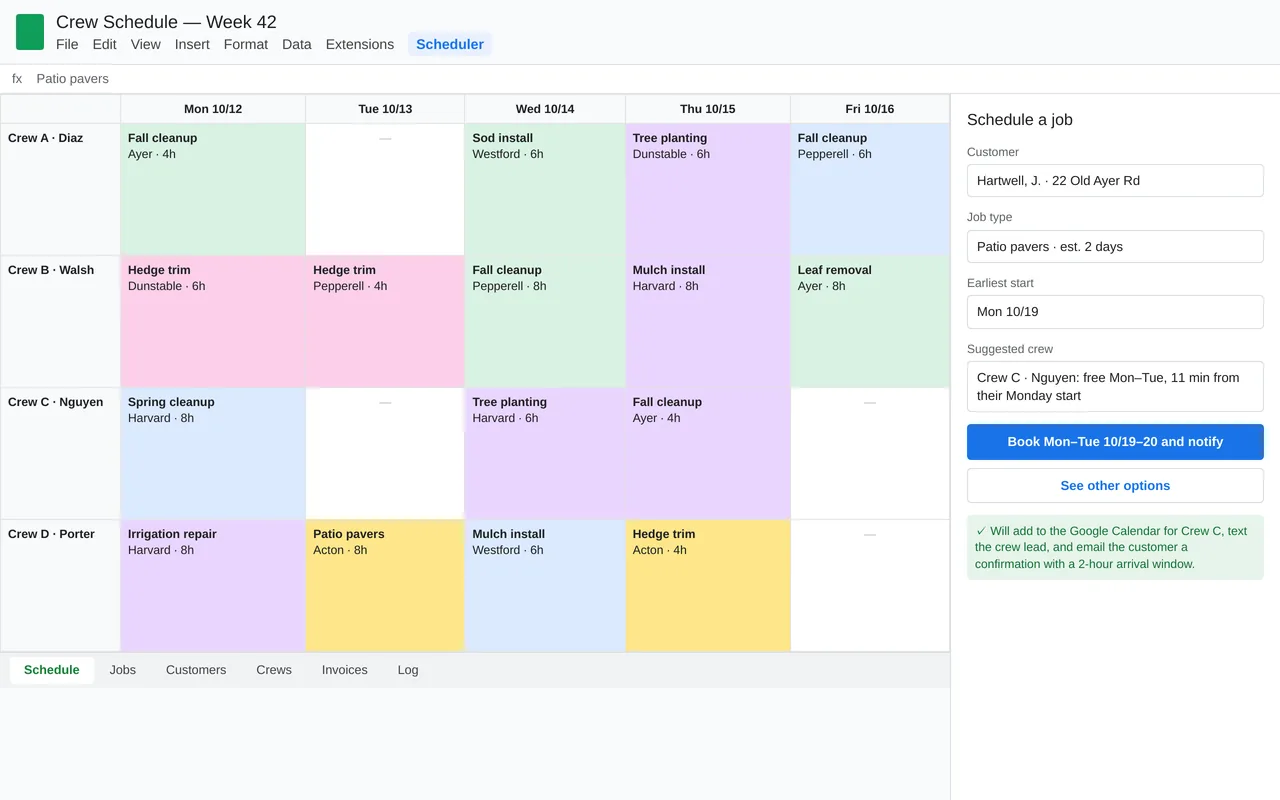
Crew scheduling in Google Sheets for a landscaping company (Apps Script)

Example build

Crew scheduling in Google Sheets for a landscaping company (Apps Script)

  • Custom Scheduler menu and booking sidebar in Google Sheets
  • Crew suggestion from availability and drive time
  • Sync to each crew's Google Calendar
  • Evening crew texts, customer arrival-window emails, and a weekly summary to the owner

Google Apps Script, Google Sheets, Calendar and Gmail APIs, Google Maps distance matrix, Twilio SMS, time-driven triggers

Questions people ask first

Is a sheet still the right tool for this?

Often yes, up to a point. If it has outgrown a sheet, we tell you and set out the options, including moving it to a database.

Does it run in our Google account?

Yes. It is built in your own account, so it keeps working without us and you control who can see it.

Will it break if someone edits the sheet?

We protect the parts that must not change, and add checks so a bad entry is flagged rather than silently breaking something.

How do we start?

Share the sheet, or describe it, and tell us the step you repeat by hand. We reply with questions or a written scope.

Tell us what you need built.

Email a few lines about what you want and which tools you use, or call. We reply with questions or a written scope.

hello@pushbuild.com

(617) 299-8887