
Pushbuild

Software that stops a bookkeeper chasing clients for the same receipts.

We connect the tools a bookkeeping practice already uses, so documents arrive when they are due, bills and receipts are read into the books for review, and you can see at a glance which clients are closed for the month. The scope is written down and agreed before we start.

Tell us what you needSee example projects

Sound familiar?

What bookkeepers and small accounting firms tell us before a project starts.

  • Every month I send the same reminder to the same clients for their statements.
  • Clients email bills as PDFs and photos, and I key each one in by hand.
  • I cannot tell without opening each file which clients are closed for the month.
  • Onboarding a new client is a pile of emails, a questionnaire and a folder I make myself.
  • I keep a spreadsheet of deadlines because my practice tool does not match how I work.

What we build

Each one is a working piece you can open and check when it's done.

Document requests on a schedule

A monthly request goes to each client for what you need, with reminders until it arrives and a list of who is still outstanding.

n8n, Make and Zapier automation

Bills and receipts into the books

PDFs, photos and forwarded emails read for vendor, date, total and tax, matched to a category you set, and sent to QuickBooks or Xero as drafts for you to review.

PDF and document data extraction QuickBooks, Xero and HubSpot integrations

Client onboarding

A signed engagement starts the checklist: questionnaire, access requests, folder, first-call invite, each with a reminder.

n8n, Make and Zapier automation Booking and scheduling systems

Month-end tracker

A board of clients by task, such as reconciled, reviewed and sent, filled from your tools so status is never a guess.

Airtable consulting and development Dashboards and reporting

Invoicing and payment reminders

Your own billing cycle, with invoices generated from agreed fees and polite reminders on overdue ones.

Stripe integration and billing QuickBooks, Xero and HubSpot integrations

Bank and app data into one sheet

Exports from the apps your clients use pulled into a standard layout for review, so each client does not need its own cleanup.

Python scripts and utilities ETL and data pipelines

Bookkeepers software we work with: QuickBooks, Xero, TaxDome, Karbon, Bill.com, Gusto, FreshBooks.

And the general tools around it: Google Sheets, Airtable, Gmail, Google Drive, Dropbox, Zapier, Make, n8n.

Example projects

Illustrations of the shape of the work, not past clients. Yours gets its own written scope.

Example project

Monthly statement requests

Example: a bookkeeper with thirty clients wants each one asked for bank statements on the third of the month, reminded twice, and shown on a single list when the files land in the shared folder.

Email, Google Drive, a tracking sheet

Example project

Bills from email to draft entries

Example: a client forwards supplier bills to one address. Each is read for vendor, date, amount and tax, then created as a draft bill in the books for the bookkeeper to approve.

Gmail, PDF extraction, QuickBooks API

Example project

Close checklist by client

Example: a small firm tracks each client through reconcile, review, report and send, with a Friday summary of which are behind and a nudge to the person responsible.

Airtable, forms, scheduled summaries
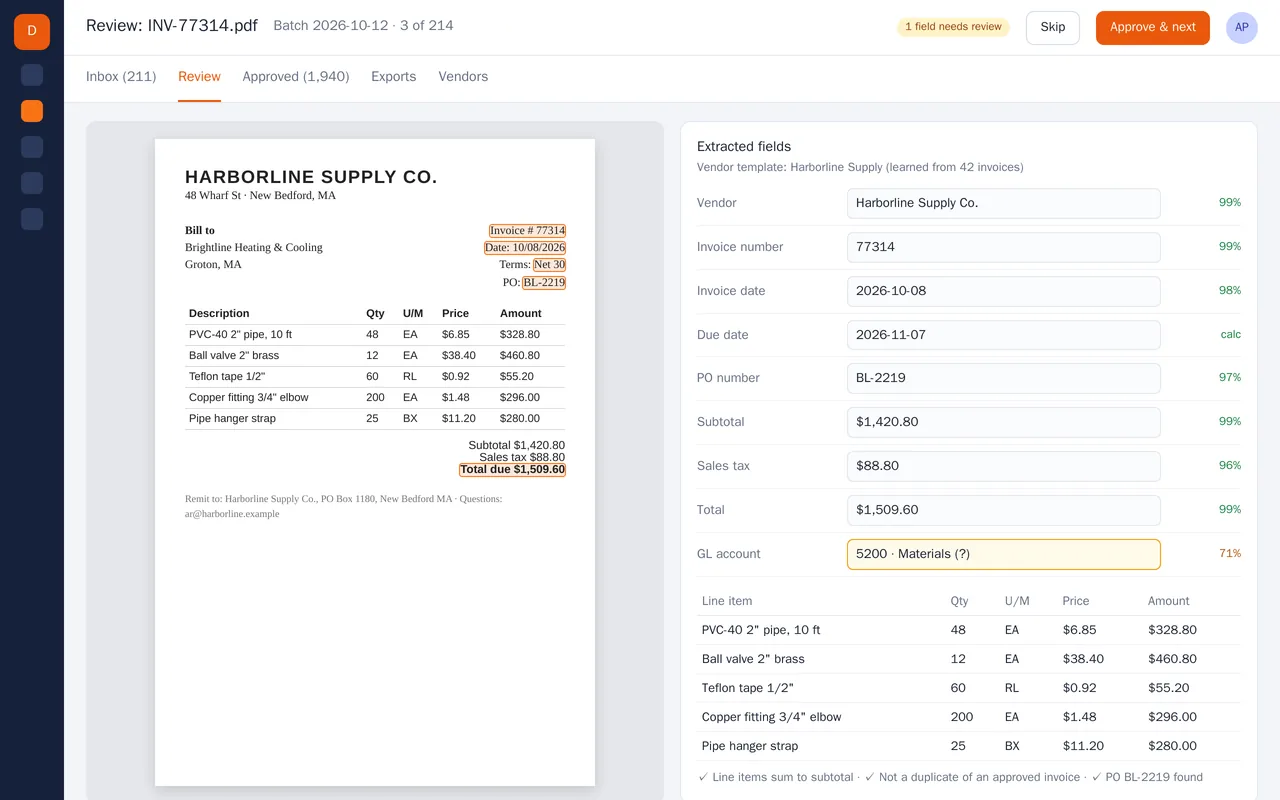
Supplier invoice extraction for an accounts-payable team (PDF to structured data)

Example build

Supplier invoice extraction for an accounts-payable team (PDF to structured data)

  • PDF and scan ingestion from a shared inbox and a watched folder
  • Header and line-item extraction with per-field confidence scores
  • Per-vendor templates that improve as invoices are approved
  • Checks: line items vs subtotal, duplicate detection, PO match, GL account suggestion

Python, OCR, layout-aware PDF parsing, LLM extraction with validation rules, PostgreSQL, React

Questions people ask first

Can it work with QuickBooks and Xero?

Yes, both have ways to connect, and we usually create drafts or bring data into a sheet for your review rather than posting straight to the books. We confirm the exact route in the scope.

Will clients have to learn something new?

Not if we can help it. They still email, upload to a folder or reply to a text. The sorting happens on your side.

Who owns what you build?

You do. It is built in your own accounts, and you get notes on how it works so you can change it without us.

How do we start?

Tell us which tools you use and the one thing that wastes the most time each month. We reply with questions or a written scope.

Tell us what you need built.

Email a few lines about what you want and which tools you use, or call. We reply with questions or a written scope.

hello@pushbuild.com

(617) 299-8887