Pushbuild

Software that keeps a roofing company's leads, photos and jobs moving.

We connect the tools a roofing company already runs on, so a storm lead gets a reply in minutes, the inspection lands on the right rep's calendar, and photos, measurements and the estimate end up on the job without anyone retyping them. The scope is written down and agreed before we start.

Tell us what you needSee example projects

Sound familiar?

What roofing companies tell us before a project starts.

  • After a storm we get a flood of leads and lose track of who has been called back.
  • Reps take photos on their phones and the office can't find them when the adjuster asks.
  • Measurements come in as a PDF and someone types them into the estimate by hand.
  • We pay for a roofing CRM and still run the schedule off a whiteboard and a spreadsheet.
  • Nobody follows up on estimates that went out three weeks ago.

What we build

Each one is a working piece you can open and check when it's done.

Speed-to-lead for storm and ad leads

Every website, ad and call lead gets a text within a minute, an owner, and a follow-up sequence that stops when the homeowner replies or books.

GoHighLevel setup CRM setup and lead pipelines

Inspection booking

A booking link reps and homeowners can both use, with territory or round-robin assignment, reminders and no-show re-booking.

Booking and scheduling systems

Measurements into the estimate

Measurement report PDFs read automatically, with squares, pitch and line items filled into the estimate or a quoting sheet for review.

PDF and document data extraction

Photos and documents on the job

Job photos, signed contracts and insurance paperwork filed to the right job and folder, named the same way every time.

API integrations and data sync

Estimate follow-up

Open estimates tracked by age, with reminders to the rep and a polite sequence to the homeowner until it is signed or closed out.

CRM setup and lead pipelines

One view of the pipeline

Leads, inspections, signed jobs and revenue by rep and by source, on one page the office checks each morning.

Dashboards and reporting

Roofing software we work with: AccuLynx, JobNimbus, CompanyCam, Roofr, EagleView, Hover, SalesRabbit.

And the general tools around it: GoHighLevel, HubSpot, QuickBooks, Google Sheets, Twilio, Zapier, Make, n8n.

Example projects

Illustrations of the shape of the work, not past clients. Yours gets its own written scope.

Example project

Storm-season lead follow-up

Example: a roofer running door-knocking and Facebook ads after a hail storm wants every lead texted within a minute, assigned by zip code, and chased for seven days unless the homeowner answers.

GoHighLevel workflows, SMS, round-robin calendars

Example project

Measurement PDF to quote

Example: a residential roofer receives measurement reports by email. Each one is read on arrival, the squares and pitch go into a quoting sheet, and the rep gets a draft quote to check before it is sent.

Gmail, PDF extraction, Google Sheets

Example project

Photos filed for the insurance claim

Example: a crew lead's photos are pulled from the photo app at the end of each day and filed under the job, with a dated folder the office can share with the adjuster.

CompanyCam, Google Drive, the roofing CRM
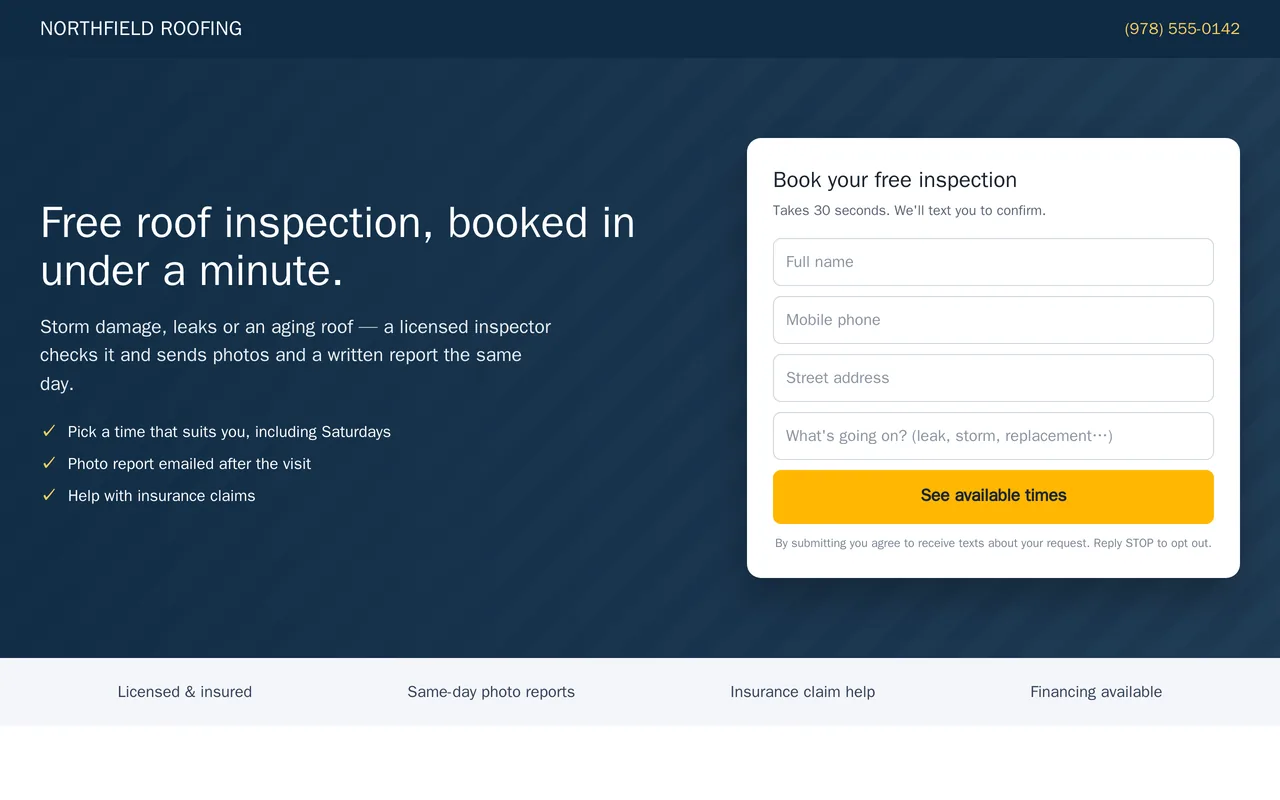
Lead-to-booking system for a roofing company (GoHighLevel)

Example build

Lead-to-booking system for a roofing company (GoHighLevel)

  • Inspection landing page and form (desktop and mobile)
  • Speed-to-lead workflow: instant SMS, rep alert, booking link, quiet hours
  • Booked / no-response branches with reminders and a 7-day nurture
  • Residential Roofing pipeline with stages from new lead to won

GoHighLevel workflows, opportunities, calendars, forms, SMS and email

Questions people ask first

Do we have to switch CRMs?

No. Most of the work is connecting the CRM you already use to the tools around it. If it can't do what you need, we say so in the scope and lay out the options before anything changes.

Can it work for the reps in the field?

Yes. Everything is built to work from a phone: the booking link, the lead text and the photo upload are all things a rep can use from a driveway.

Who owns what you build?

You do. It is built in your own accounts, and you get notes on how it works so your office can change it without us.

How do we start?

Tell us which tools you use and the one thing that wastes the most time each week. We reply with questions or a written scope.

Tell us what you need built.

Email a few lines about what you want and which tools you use, or call. We reply with questions or a written scope.

hello@pushbuild.com

(617) 299-8887