
Pushbuild

Dropbox folders that file things for you and stay tidy.

Dropbox is easy to start with and hard to keep organised once a team and its clients share it. We connect it to your email, forms and job tools so files land in the right folder, names stay consistent, and the right people have access. The scope is written down and agreed before we start.

Tell us what you needSee example projects

Sound familiar?

What teams storing work in Dropbox tell us before a project starts.

  • Everyone saves files in their own way and we can't find things later.
  • We make a new client folder by hand each time and forget the subfolders.
  • Claim and job paperwork arrives by email and has to be saved manually.
  • Shared links are sent around and never turned off.
  • The folder is huge and we are not sure what is safe to move.

What we build

Each one is a working piece you can open and check when it's done.

Client and job folders from a template

A new client or job creates the folder tree and shares it with the right people.

API integrations and data sync n8n, Make and Zapier automation

Email attachments filed

Documents and photos from email saved under the right client, with a name that follows your rule.

API integrations and data sync Python scripts and utilities

Claim or job tracking linked to files

A tracker where each row links to its Dropbox folder, with status and owner kept up to date.

Web apps and MVPs QuickBooks, Xero and HubSpot integrations

Link and access review

A list of shared links and who has access, with old ones reviewed or closed on your approval.

Python scripts and utilities

Files into your other tools

New files noted in your CRM, project tool or chat, so people see them without looking in Dropbox.

API integrations and data sync

Folder clean-up and move

Existing folders sorted into a clear structure in stages, with a log of what moved.

Python scripts and utilities ETL and data pipelines

What we connect it to: Gmail, Outlook, Google Drive, Airtable, Slack, Zapier, Make.

Industries that use it: Restoration, Photography, Architects, Insurance.

Example projects

Illustrations of the shape of the work, not past clients. Yours gets its own written scope.

Example project

Claims folders from email

Example: a restoration company receives photos and reports by email. Each claim has a folder, new attachments are filed to it, and the claim tracker shows the latest upload date.

Dropbox, Gmail, Airtable

Example project

Project folders for an architect

Example: a small architecture studio wants a numbered folder with the same subfolders for each project, and a note in chat when a drawing set is added.

Dropbox, Slack, a script

Example project

Client delivery links

Example: a photographer shares finished work through Dropbox links. The link is emailed to the client and flagged for review after the agreed period.

Dropbox, Gmail, a sheet
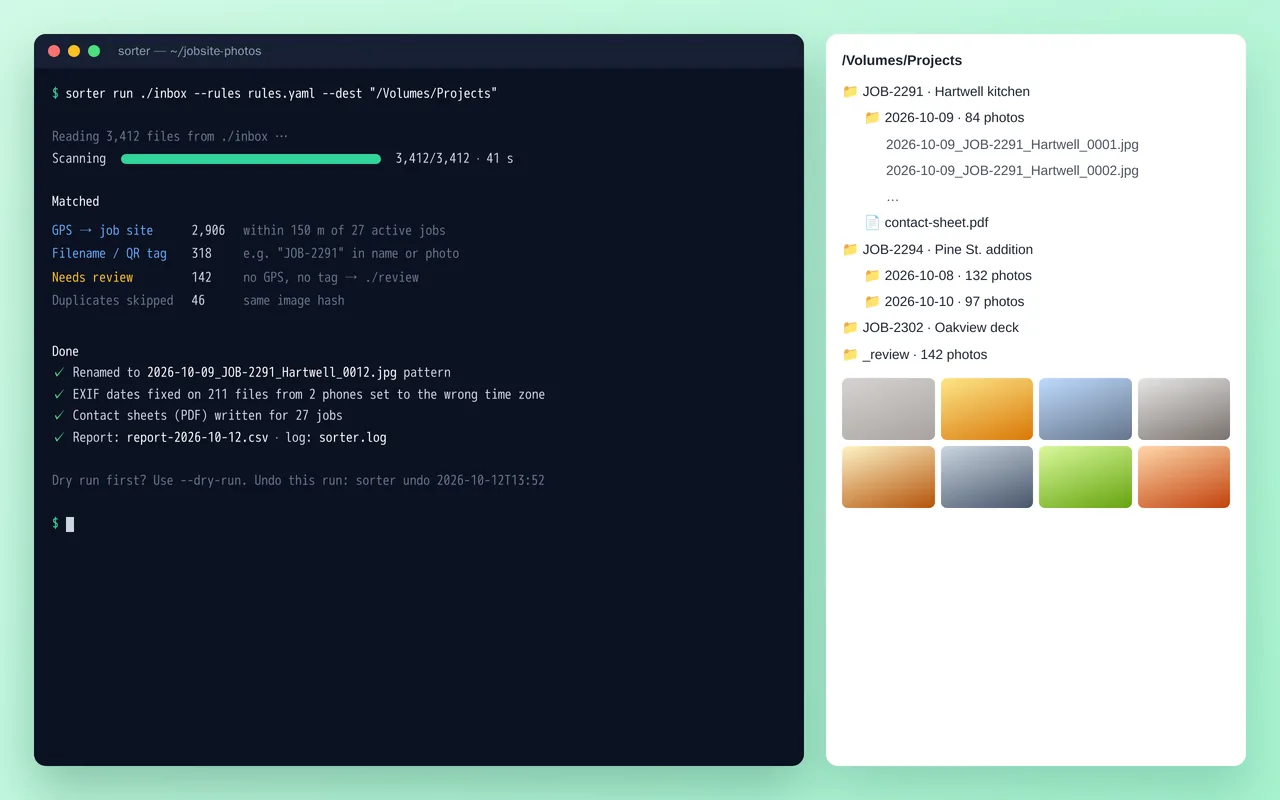
Job-site photo organizer for a home-renovation contractor (Python)

Example build

Job-site photo organizer for a home-renovation contractor (Python)

  • Command-line tool with YAML rules, dry-run mode and one-command undo
  • Job matching by GPS radius, filename tags and QR codes
  • EXIF date and time-zone correction, duplicate detection by image hash
  • Standard renaming and folder structure, plus PDF contact sheets per job

Python 3.12, Pillow, piexif, pyzbar (QR), ReportLab, Typer, Rich, PyInstaller

Questions people ask first

Can Dropbox connect to our other tools?

Yes, it can be connected through its API and the integrations that support it, and we confirm the specific route for your setup before building.

Can you reorganise our folders?

Yes. We propose a structure and move files in stages with a log, and nothing is deleted without your say.

Who owns what you build?

You do. It is built in your own accounts, and you get notes on how it works so your team can change it without us.

How do we start?

Tell us which tools you use and the one thing that wastes the most time each week. We reply with questions or a written scope.

Tell us what you need built.

Email a few lines about what you want and which tools you use, or call. We reply with questions or a written scope.

hello@pushbuild.com

(617) 299-8887