
Pushbuild

Gmail that sorts itself, files attachments and feeds your CRM.

For many small teams the inbox is the real system: leads, orders, claims and invoices all arrive as email. We connect Gmail to the tools around it so the right messages are labelled, logged and followed up, and attachments land where they belong. The scope is written down and agreed before we start.

Tell us what you needSee example projects

Sound familiar?

What teams running on Gmail tell us before a project starts.

  • Important emails get buried and nobody knows who is replying to what.
  • We copy details from emails into a spreadsheet or CRM by hand.
  • Attachments are saved to a drive one at a time with whatever name they arrived with.
  • Follow-ups depend on someone remembering to write them.
  • Several of us share an inbox and answer the same customer twice.

What we build

Each one is a working piece you can open and check when it's done.

Labels and routing

Incoming mail sorted by sender, subject or content, labelled, and passed to the right person or shared inbox.

Google Sheets and Apps Script automation n8n, Make and Zapier automation

Emails into the CRM or sheet

Name, contact details and request read from a message and added as a record, with the thread linked back.

API integrations and data sync CRM setup and lead pipelines

Attachments filed

Invoices, forms and photos saved to Drive under the right folder, named the same way every time.

Google Sheets and Apps Script automation PDF and document data extraction

Follow-up reminders

Threads with no reply after an agreed number of days flagged to the owner, with a draft ready to review.

n8n, Make and Zapier automation

Urgent mail to chat

Messages that match your rules posted to a Slack or Teams channel with a link to the thread.

API integrations and data sync

Case or claim tracking from email

A simple tracker where each thread becomes a case, with status, owner and a history that comes from the mail.

Web apps and MVPs Claude Code and MCP setup

What we connect it to: Google Sheets, Google Drive, Slack, HubSpot, Pipedrive, Zapier, Make, n8n.

Industries that use it: Insurance, Restoration, Real estate, Recruiting.

Example projects

Illustrations of the shape of the work, not past clients. Yours gets its own written scope.

Example project

Claims inbox tracker

Example: a restoration company has three office staff sharing an inbox. Each claim email is logged with its status, owner and last contact, and anything quiet for a week is flagged.

Gmail, Google Sheets, Apps Script

Example project

Invoice emails to the books

Example: a small agency receives supplier invoices by email. The PDF is read, the amount and date are put in a sheet for review, and the file is saved to the right folder.

Gmail, PDF extraction, Google Drive

Example project

Lead emails to the pipeline

Example: a sales team receives quote requests from a web form and by email. Both become records in the CRM, and a reply goes out from the owner's own address.

Gmail, Pipedrive, n8n
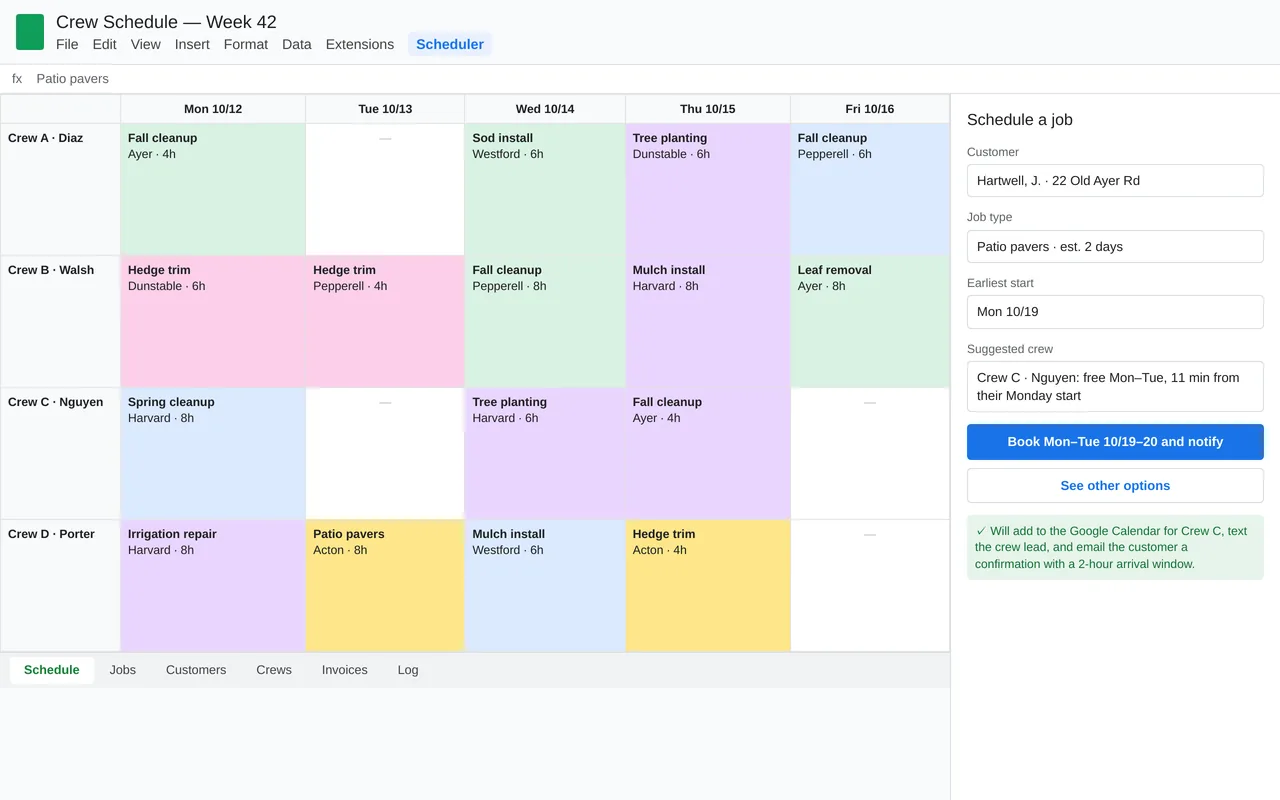
Crew scheduling in Google Sheets for a landscaping company (Apps Script)

Example build

Crew scheduling in Google Sheets for a landscaping company (Apps Script)

  • Custom Scheduler menu and booking sidebar in Google Sheets
  • Crew suggestion from availability and drive time
  • Sync to each crew's Google Calendar
  • Evening crew texts, customer arrival-window emails, and a weekly summary to the owner

Google Apps Script, Google Sheets, Calendar and Gmail APIs, Google Maps distance matrix, Twilio SMS, time-driven triggers

Questions people ask first

Can you connect to our Gmail safely?

We use Google sign-in with the narrowest access the job needs, in your own Google account, and we tell you exactly which permissions are asked for and why.

Does it work with Google Workspace?

Yes. Personal Gmail and Workspace accounts are both supported, though a Workspace admin may need to approve an app or script first.

Can it send emails for us?

It can draft them for a person to review, or send them on a rule you agreed. We recommend review first for anything going to customers.

How do we start?

Tell us which tools you use and the one thing that wastes the most time each week. We reply with questions or a written scope.

Tell us what you need built.

Email a few lines about what you want and which tools you use, or call. We reply with questions or a written scope.

hello@pushbuild.com

(617) 299-8887