
Pushbuild

Slack that tells the team what matters and lets them act without leaving it.

Slack is where your team already looks, so it is a good place to put alerts, requests and approvals. We build bots, notifications and workflows that connect Slack to your CRM, forms, sheets and internal tools. The scope is written down and agreed before we start.

Tell us what you needSee example projects

Sound familiar?

What teams who run on Slack tell us before a project starts.

  • Important alerts get lost in a busy channel.
  • People ask the same questions in Slack and someone answers by hand each time.
  • Approvals are posted in a channel and then chased by message.
  • We copy updates from our CRM or sheet into Slack manually.
  • Urgent emails don't reach the people who need to see them.

What we build

Each one is a working piece you can open and check when it's done.

Alerts that matter

New leads, failed payments, late jobs or urgent emails posted to the right channel with the key details and a link.

API integrations and data sync n8n, Make and Zapier automation

Slash commands and forms

Commands and forms in Slack that create records in your CRM, sheet or tracker, so people do not switch tools.

API integrations and data sync Python scripts and utilities

Approvals in Slack

Requests sent with Approve and Decline buttons, reminders for the slow ones, and the outcome recorded.

n8n, Make and Zapier automation

Internal question bot

A bot that answers common questions from your documents and sheets, and says so when it does not know.

AI chatbots trained on your business Claude Code and MCP setup

Daily and weekly summaries

A short post each morning or week with the numbers your team asks for, taken from your own data.

Dashboards and reporting ETL and data pipelines

Customer channels

Shared channels set up for new clients with the right people, pinned links and a welcome message.

API integrations and data sync

What we connect it to: Gmail, Google Sheets, HubSpot, Airtable, Notion, Stripe, Zapier, Make, n8n.

Industries that use it: SaaS startups, Marketing agencies, IT / MSP, Ecommerce.

Example projects

Illustrations of the shape of the work, not past clients. Yours gets its own written scope.

Example project

Urgent email digest

Example: a team tags important emails in Gmail. Unresolved ones are posted to a channel with a short summary and a link, and removed once the thread is closed.

Slack, Gmail, n8n

Example project

Ad account monitor

Example: a marketing agency wants a warning in Slack when an ad account drifts from its agreed settings, with the account name and what changed.

Slack, an ad platform API, a script

Example project

Refund approvals

Example: a shop lets support staff request refunds in Slack. A manager approves with a button and the payment tool and order record are updated.

Slack, Stripe, a sheet
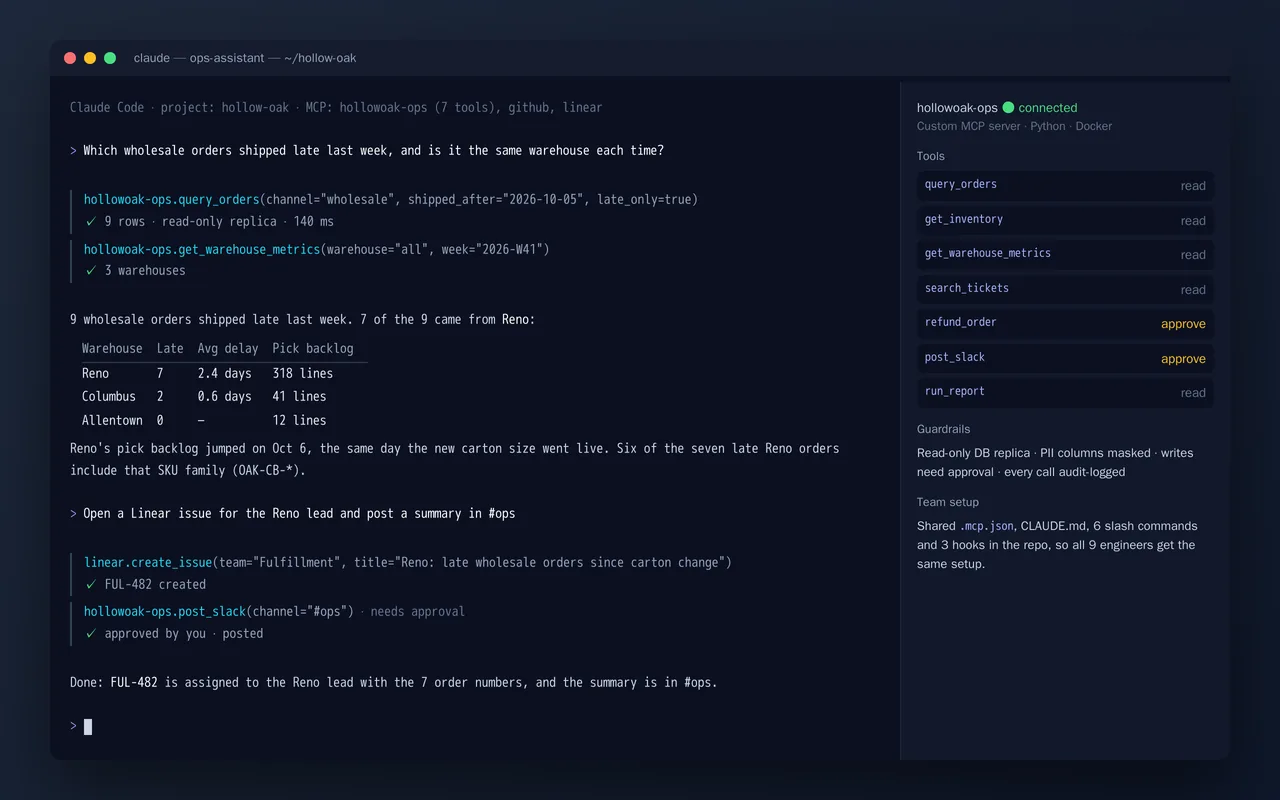
Custom MCP server and Claude Code setup for an e-commerce ops team

Example build

Custom MCP server and Claude Code setup for an e-commerce ops team

  • Custom MCP server (7 tools): orders, inventory, warehouse metrics, tickets, reports, refunds, Slack
  • Guardrails: read-only replica, masked PII, approval on writes, and an audit log of every call
  • Claude Code team setup: .mcp.json, CLAUDE.md, slash commands and hooks in the repo
  • Connections to GitHub and Linear alongside the custom server

Python, Model Context Protocol SDK, PostgreSQL (read replica), Slack and Linear APIs, Claude Code, Docker

Questions people ask first

Do you build Slack apps?

Yes, where a custom app is needed. For simpler jobs an incoming message from your other tools is enough and we keep it that way.

Will it work in our existing workspace?

Yes. We build in your own workspace, and a workspace admin may need to approve the app.

Who owns what you build?

You do. It is built in your own accounts, and you get notes on how it works so your team can change it without us.

How do we start?

Tell us which tools you use and the one thing that wastes the most time each week. We reply with questions or a written scope.

Tell us what you need built.

Email a few lines about what you want and which tools you use, or call. We reply with questions or a written scope.

hello@pushbuild.com

(617) 299-8887