
Pushbuild

eBay selling without the spreadsheet juggling.

Selling on eBay at volume means a lot of repeated work: creating listings, keeping stock honest across channels, printing labels, and chasing what sold for what. We build tools and connections that handle the repeats, using the interfaces eBay offers sellers and developers. The scope is written down and agreed before we start.

Tell us what you needSee example projects

Sound familiar?

What eBay sellers tell us before a project starts.

  • I create listings by hand, one at a time, from photos and notes.
  • An item sells on eBay and is still live on my other channels.
  • Orders are retyped into the shipping tool and my books.
  • I can't see which items earn money after fees and shipping.
  • I have to check competitor prices by hand.

What we build

Each one is a working piece you can open and check when it's done.

Bulk listing from a sheet

Listings built from a spreadsheet of titles, prices, photos and item details, reviewed first and then sent in a batch.

Python scripts and utilities API integrations and data sync

Inventory across channels

A sale in one place lowers the count everywhere else, with an alert when a channel falls out of step.

ETL and data pipelines API integrations and data sync

Orders to shipping and accounting

Sold items passed to your shipping tool and your books, so labels and entries come from one source.

QuickBooks, Xero and HubSpot integrations API integrations and data sync

Price and competitor tracking

Comparable listings and sold prices collected on a schedule, so you reprice from facts rather than a hunch.

Web scraping and data pipelines

Profit per item and per source

Sale price, fees, shipping and what you paid for the item brought together, so you see real margin.

Dashboards and reporting

Buyer messages and returns

Common questions and return requests routed to a shared inbox or tracker with a clear status.

n8n, Make and Zapier automation

What we connect it to: ShipStation, QuickBooks, Google Sheets, Shopify, Amazon Seller Central, Airtable, Zapier, Etsy.

Industries that use it: Ecommerce, Amazon sellers, Auto dealers.

Example projects

Illustrations of the shape of the work, not past clients. Yours gets its own written scope.

Example project

Listings from a spreadsheet

Example: a reseller photographs and describes new stock into a sheet and wants listings created from it, with a list of any eBay rejected.

eBay Sell APIs, Google Sheets, Python

Example project

Sold on one channel, pulled from the rest

Example: a parts seller lists on eBay and its own store and wants a sale on either one to lower the stock count on the other within minutes.

eBay notifications or polling, store API

Example project

Sold-price tracker

Example: a collectibles seller wants the recent sold prices for chosen items gathered each week into a sheet for pricing.

Scheduled collector, Google Sheets
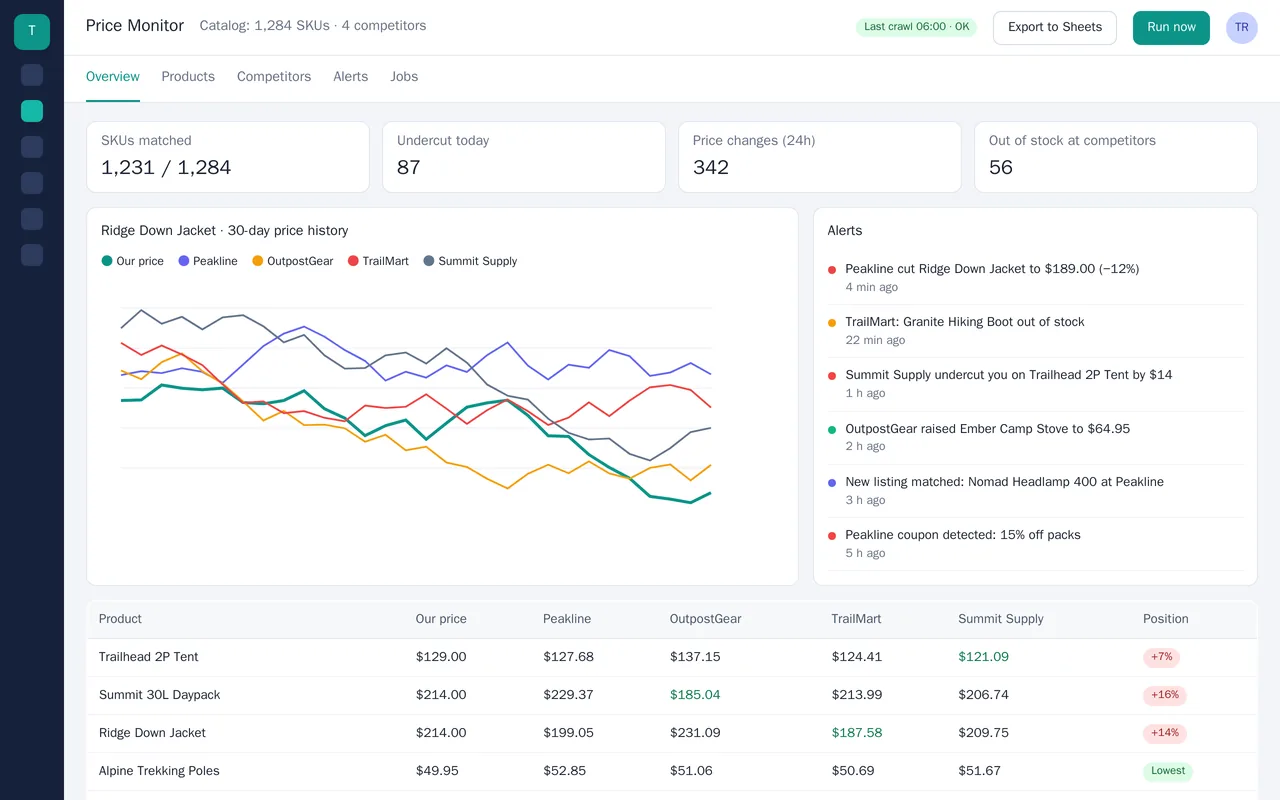
Competitor price monitor for an outdoor-gear retailer (web scraping)

Example build

Competitor price monitor for an outdoor-gear retailer (web scraping)

  • Scheduled crawlers for 4 competitor sites, with retries and a rotating proxy pool
  • Product matching against the store's Shopify catalog (GTIN first, then title + brand)
  • Dashboard: price position per SKU, 30-day price history, alerts feed
  • Slack and email alerts for undercuts, price moves, coupons and stock changes

Python, Playwright, Scrapy, PostgreSQL, Shopify Admin API, Google Sheets API, Docker

Questions people ask first

Do you work within eBay's rules?

Yes. We use the interfaces eBay provides to sellers, and we tell you if something you ask for is outside what it allows.

Can it handle thousands of listings?

That is the usual case. We build with batches, retries and a log, so a failure on one item does not stop the rest.

Who owns the work?

You do. It is built in your own accounts, and you get plain notes on how to run it.

How do we start?

Tell us the one chore that takes the most time each week. We reply with questions or a written scope.

Tell us what you need built.

Email a few lines about what you want and which tools you use, or call. We reply with questions or a written scope.

hello@pushbuild.com

(617) 299-8887