
Pushbuild

QuickBooks connected to the rest of your business, so nobody retypes it.

We connect QuickBooks to the systems that create your invoices, bills and customers, so entries arrive once and correctly. We also build the reports and checks that make month-end shorter. The scope is written down and agreed before we start.

Tell us what you needSee example projects

Sound familiar?

What businesses on QuickBooks tell us before a project starts.

  • Jobs are invoiced in one system and typed into QuickBooks again by hand.
  • Customers and vendors are duplicated and the lists need cleaning every quarter.
  • Bank feeds are full of uncategorised items waiting for someone to sort.
  • I can't get QuickBooks numbers into a dashboard or a spreadsheet my team can use.
  • Sales tax and payroll figures take a day to pull together.

What we build

Each one is a working piece you can open and check when it's done.

Job and invoice sync

Completed jobs, quotes or orders from your field or CRM software create the matching customer and invoice in QuickBooks Online.

QuickBooks, Xero and HubSpot integrations

Customer and vendor cleanup

Duplicates found, merged and the naming made consistent, with a log of every change so it can be reviewed.

Python scripts and utilities

Bill and receipt capture

Supplier invoices and receipts read from email or uploads and entered as draft bills for someone to approve.

PDF and document data extraction

Reports in a sheet or dashboard

QuickBooks data pulled on a schedule into Google Sheets, Power BI or a dashboard, with the numbers laid out the way you review them.

Dashboards and reporting ETL and data pipelines

Payments and payouts matched

Stripe, Shopify or bank payouts matched to invoices so deposits are applied and the books agree with the bank.

QuickBooks, Xero and HubSpot integrations Stripe integration and billing

Custom rules and approvals

Rules for categorising, class or location tagging and approvals, built around how your business is organised across sites.

API integrations and data sync

What we connect it to: Stripe, Shopify, HubSpot, Salesforce, Google Sheets, Power BI, Zapier.

Industries that use it: Accounting, HVAC, Plumbing, Logistics.

Full detail: QuickBooks, Xero and HubSpot integrations.

Example projects

Illustrations of the shape of the work, not past clients. Yours gets its own written scope.

Example project

Field jobs into invoices

Example: an HVAC company wants each closed work order to become a QuickBooks invoice with the right customer and items, ready for the office to review.

Job software API, QuickBooks Online

Example project

Hourly data copy to a database

Example: a finance team wants QuickBooks Online figures copied into its own database every hour, so reports run without logging in to QuickBooks.

QuickBooks API, Postgres, scheduled jobs

Example project

Multi-location reporting

Example: an owner of several auto centers wants sales and expenses by location in one sheet each Monday, without exporting five reports.

QuickBooks API, Google Sheets, Apps Script
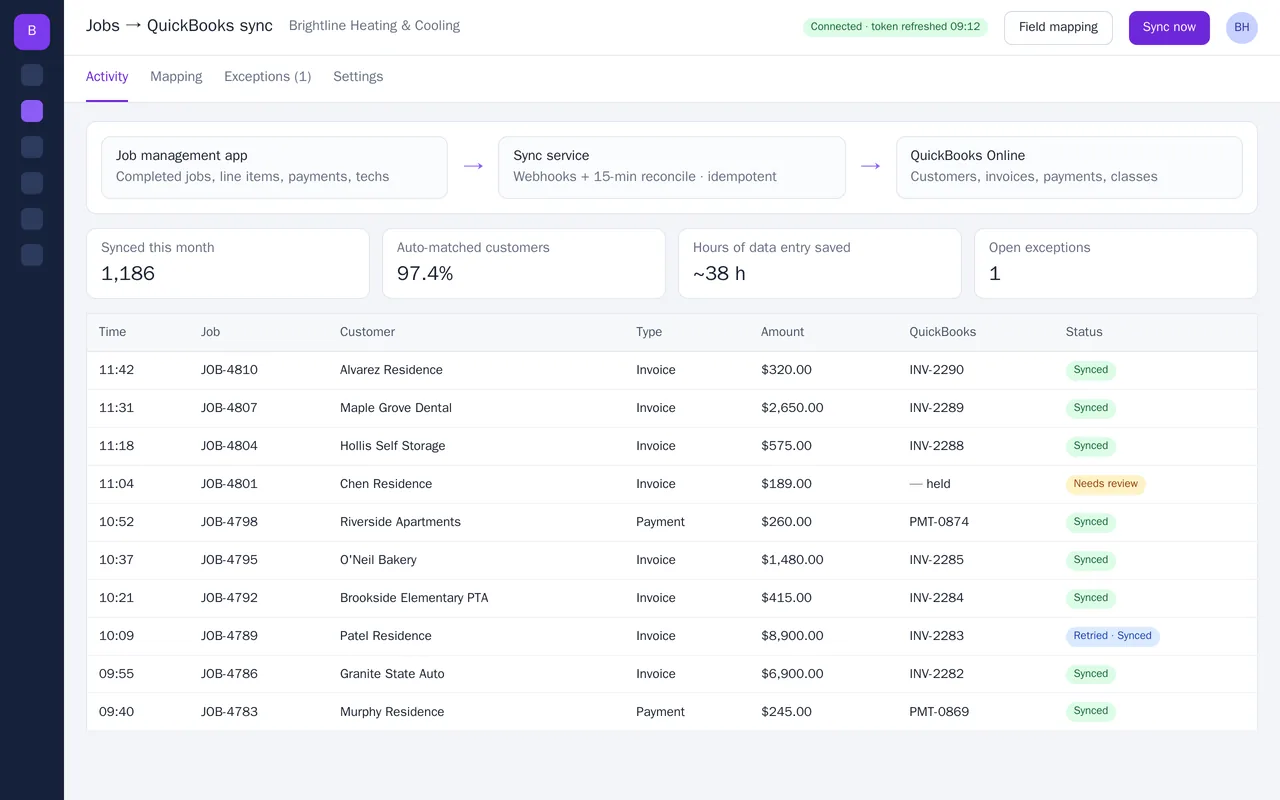
Job management to QuickBooks Online sync for an HVAC company

Example build

Job management to QuickBooks Online sync for an HVAC company

  • Webhook-driven sync plus a 15-minute reconcile, idempotent so nothing is double-posted
  • Customer matching on email, then phone, then name, with an exceptions queue
  • Field mapping screen: items, income accounts, classes, departments, sales tax
  • Payments recorded to Undeposited Funds and matched to invoices

Python, FastAPI, QuickBooks Online API (OAuth 2.0), webhooks, PostgreSQL, Docker

Questions people ask first

Do you work with QuickBooks Online or Desktop?

Mostly QuickBooks Online, which has an API. If you are on Desktop, we say what is realistic before agreeing a scope.

Will you change our books?

Only what we agreed, and only in the way agreed. Where possible we create drafts for your bookkeeper to approve.

Can you work alongside our bookkeeper?

Yes, and we prefer it. We ask them how the accounts are set up so the integration follows their rules.

How do we start?

Tell us which system creates the invoices and what is retyped today. We reply with questions or a written scope.

Tell us what you need built.

Email a few lines about what you want and which tools you use, or call. We reply with questions or a written scope.

hello@pushbuild.com

(617) 299-8887