Pushbuild

Software that takes the clerical drag out of an engineering firm's projects.

We automate the repetitive parts of engineering practice, such as setting up a job, producing reports from data, tracking deliverables and watching project budgets, and connect them to the accounting and project systems you already run. The scope is written down and agreed before we start.

Tell us what you needSee example projects

Sound familiar?

What engineering firms tell us before a project starts.

  • Our calculation sheets are copied from job to job and nobody trusts which version is current.
  • Field data comes back in spreadsheets and PDFs and someone retypes it into the report.
  • We find out a project has used its budget after the last invoice goes out.
  • Deliverables and review comments are tracked in a spreadsheet that falls behind.
  • Proposals take a senior engineer a day because each one is written from scratch.

What we build

Each one is a working piece you can open and check when it's done.

Report generation from data

Field readings and calculation outputs pulled into a report template, with tables and figures filled in for the engineer to review and sign.

Python scripts and utilities Excel and VBA tools

Calculation sheet control

Standard calculation workbooks kept in one place with a version, an owner and a change note, so a job always starts from the current one.

Excel and VBA tools

Project budget watch

Hours and expenses compared with budget by task, with a note to the project manager when a task passes a set share of its budget.

Dashboards and reporting ETL and data pipelines

Deliverable and review tracker

Each deliverable with its due date, reviewer and status, and reminders sent before the date.

Notion and Airtable systems n8n, Make and Zapier automation

Data extraction from PDFs

Values read from vendor sheets, lab results and permit documents into a table, with anything unclear flagged.

PDF and document data extraction

Proposal assembly

Scopes, fee tables and standard sections assembled from a library, then reviewed by a principal.

Google Sheets and Apps Script automation

Engineering firms software we work with: Deltek Vision, Deltek Vantagepoint, BQE Core, Bluebeam, Autodesk Construction Cloud, Procore, Bentley ProjectWise.

And the general tools around it: Microsoft Excel, Microsoft 365, SharePoint, Google Sheets, QuickBooks, Airtable, Power BI, Zapier.

Example projects

Illustrations of the shape of the work, not past clients. Yours gets its own written scope.

Example project

Lab results into the report

Example: a geotechnical firm receives lab results as PDFs. The values are read into a table and dropped into the report template, with unreadable entries flagged for a person to check.

PDF extraction, Python, Word templates

Example project

Budget alerts by task

Example: a civil firm with forty live projects sends each project manager a weekly list of tasks that have used most of their hours.

Timesheet export, Google Sheets, email

Example project

Current calculation workbook

Example: a structural group keeps its standard workbooks in one library with version notes, and a project setup form copies in the current ones.

SharePoint, Excel, Power Automate
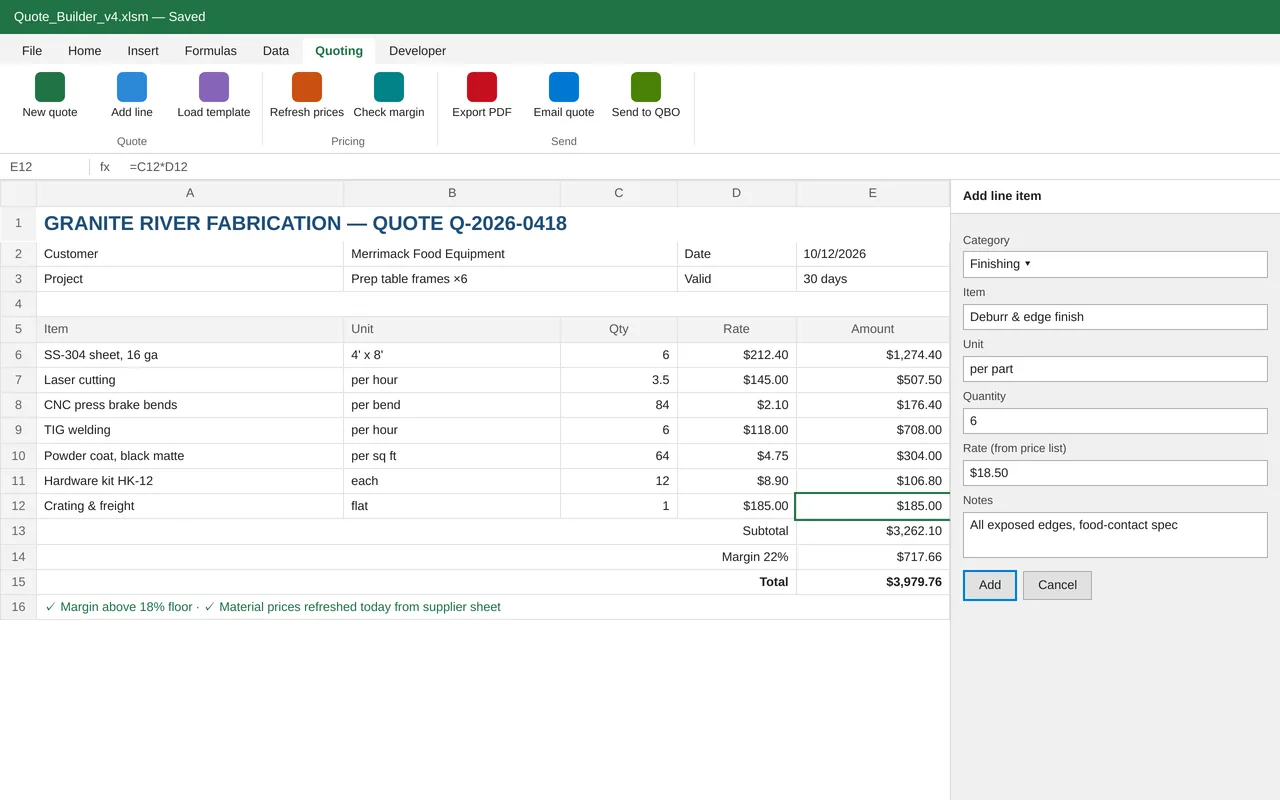
Excel quoting tool for a metal fabrication shop (VBA)

Example build

Excel quoting tool for a metal fabrication shop (VBA)

  • Custom ribbon tab and line-item form (VBA UserForm)
  • Price list that refreshes from the supplier's sheet
  • Quote templates by job type and a margin floor check
  • PDF export, Outlook email and a quote log

Excel VBA, custom ribbon XML, Power Query, Outlook automation, QuickBooks Online API

Questions people ask first

Do we have to change the software we use?

No. We build around your timesheet, accounting and document systems. Where a tool has an export or an integration, we use it.

Who owns what you build?

You do. It is built in your own accounts, and you get notes on how it works so your team can change it without us.

Can it work from the field?

Yes. Field data collection and sign-offs can be set up to work from a phone or tablet.

How do we start?

Tell us which tools you use and the one task that wastes the most time each week. We reply with questions or a written scope.

Tell us what you need built.

Email a few lines about what you want and which tools you use, or call. We reply with questions or a written scope.

hello@pushbuild.com

(617) 299-8887