
Pushbuild

Software that keeps a construction company's bids, crews and paperwork in step.

We connect the systems a construction company already depends on, so bids are tracked to a decision, subcontractor paperwork is current before they step on site, and field reports, photos and change orders reach the office without being retyped. The scope is written down and agreed before we start.

Tell us what you needSee example projects

Sound familiar?

What construction companies tell us before a project starts.

  • Bid invites come in by email and we lose track of which ones we are pricing and which are due.
  • Nobody knows whose insurance certificate has lapsed until the owner's rep asks.
  • The field writes daily reports on paper or in texts, and the office rebuilds them later.
  • A change order is agreed in the trailer and never reaches the invoice.
  • Job costs live in accounting, schedules in another system, and we find out about overruns at month end.

What we build

Each one is a working piece you can open and check when it's done.

Bid pipeline

Invitations to bid logged as they arrive, with the due date, scope, estimator and status, and a reminder before each deadline.

CRM setup and lead pipelines Google Sheets and Apps Script automation

Subcontractor compliance

Insurance certificates, licenses and W-9s tracked by expiry date, with a reminder to the sub and a flag to the project manager before it lapses.

n8n, Make and Zapier automation

Daily reports from the field

A short form a superintendent fills in on a phone, which becomes a dated report with weather, crew counts and photos filed to the job.

Google Sheets and Apps Script automation API integrations and data sync

Change orders that reach billing

Change orders captured with scope, amount and approval, then carried onto the invoice or pay application so none are left behind.

QuickBooks, Xero and HubSpot integrations

Plans, RFIs and submittals

Document logs for RFIs and submittals with owner, due date and status, so open items are visible before they hold up the work.

Notion and Airtable systems

Job cost view

Budget, committed cost and actuals by job on one page, drawn from your accounting and project tools.

Dashboards and reporting ETL and data pipelines

Construction software we work with: Procore, Buildertrend, Sage 300 CRE, Foundation Software, Bluebeam, PlanGrid, JobTread.

And the general tools around it: QuickBooks, Google Sheets, Microsoft Excel, Airtable, Zapier, Make, n8n, DocuSign.

Example projects

Illustrations of the shape of the work, not past clients. Yours gets its own written scope.

Example project

Subcontractor certificate tracker

Example: a commercial builder with sixty active subs keeps each certificate and license date in one table, and the sub and project manager are emailed thirty days before anything expires.

Airtable, Gmail, Google Drive

Example project

Daily report from a phone

Example: a site superintendent answers a short form at the end of the day, and the office receives a dated PDF report with photos, ready to send to the owner.

Google Forms, Apps Script, Google Drive

Example project

Change order to pay application

Example: a mid-size contractor logs approved change orders in a sheet and the totals flow into the monthly pay application, with anything unapproved flagged.

Google Sheets, QuickBooks, email
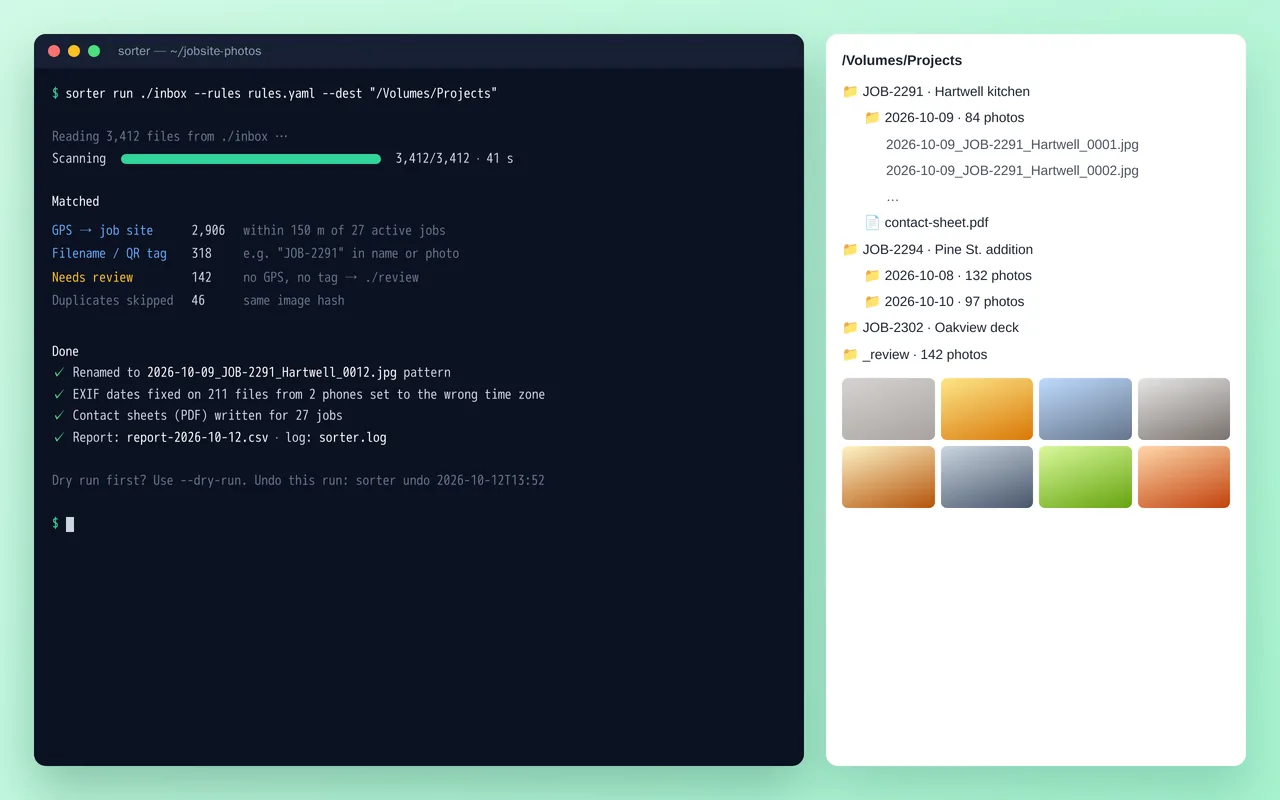
Job-site photo organizer for a home-renovation contractor (Python)

Example build

Job-site photo organizer for a home-renovation contractor (Python)

  • Command-line tool with YAML rules, dry-run mode and one-command undo
  • Job matching by GPS radius, filename tags and QR codes
  • EXIF date and time-zone correction, duplicate detection by image hash
  • Standard renaming and folder structure, plus PDF contact sheets per job

Python 3.12, Pillow, piexif, pyzbar (QR), ReportLab, Typer, Rich, PyInstaller

Questions people ask first

Do we have to change the software we use?

No. Most of the work is connecting what you already use, whether that is Procore, Buildertrend or a set of spreadsheets. If a tool cannot do what you need, we say so in the scope and lay out the options.

Who owns what you build?

You do. It is built in your own accounts, and you get notes on how it works so your team can change it without us.

Can it work from the field?

Yes. The report form, photo upload and sign-off are built to work on a phone on site.

How do we start?

Tell us which tools you use and the one task that wastes the most time each week. We reply with questions or a written scope.

Tell us what you need built.

Email a few lines about what you want and which tools you use, or call. We reply with questions or a written scope.

hello@pushbuild.com

(617) 299-8887