
Pushbuild

Software that keeps an agency's onboarding, leads and reports off the team's to-do list.

We build the plumbing a marketing agency repeats for every client: onboarding, lead routing, reports and approvals. Build it once, reuse it for each account. The scope is written down and agreed before we start.

Tell us what you needSee example projects

Sound familiar?

What marketing agencies tell us before a project starts.

  • Every new client means the same twenty setup steps, done by hand.
  • Monthly reports take a day of copying numbers out of ad dashboards.
  • Leads from client campaigns sit in an inbox until somebody notices.
  • Each client has a different CRM and none of them are set up quite right.
  • We resell a CRM under our own name and the sub-accounts are a mess.

What we build

Each one is a working piece you can open and check when it's done.

Client onboarding flow

A form that creates the client's folder, project, CRM sub-account, tasks and welcome email, so day one starts the same way every time.

n8n, Make and Zapier automation n8n workflows and self-hosting

White-label CRM setup

Sub-account templates with pipelines, forms, calendars and follow-up sequences, ready to copy for each new client.

GoHighLevel setup CRM setup and lead pipelines

Lead routing for client campaigns

Leads from ads, landing pages and calls sent to the right client account, texted back fast, and logged to one sheet.

GoHighLevel setup API integrations and data sync

Reports that build themselves

Ad spend, leads and bookings pulled from each platform into a report for each client, ready on the first of the month.

Dashboards and reporting ETL and data pipelines

Approvals and asset handoff

Drafts, designs and ad copy sent for client sign-off, with the answer recorded and the next task started.

n8n, Make and Zapier automation

Landing pages from a design

Figma designs turned into landing pages that post leads straight into the client's CRM.

Figma to code

Marketing agencies software we work with: GoHighLevel, Google Ads, Meta Ads Manager, Looker Studio, ClickUp, Asana, Calendly.

And the general tools around it: HubSpot, Airtable, Google Sheets, Slack, Zapier, Make, n8n.

Example projects

Illustrations of the shape of the work, not past clients. Yours gets its own written scope.

Example project

One-form client onboarding

Example: a small agency wants a signed proposal to create the client's shared folder, a task list for the team and a CRM sub-account from a template, then email the client what happens next.

n8n, GoHighLevel, Google Drive

Example project

Monthly report assembly

Example: an agency running ads for ten local businesses wants spend, leads and booked calls for each one gathered into a single sheet and a short report on the first of the month.

Ad platform exports, Google Sheets, Looker Studio

Example project

Call and form lead routing

Example: a performance agency takes calls and form fills for service businesses. Each one is tagged to the right client, texted back, and counted toward that client's report.

GoHighLevel, call tracking, SMS
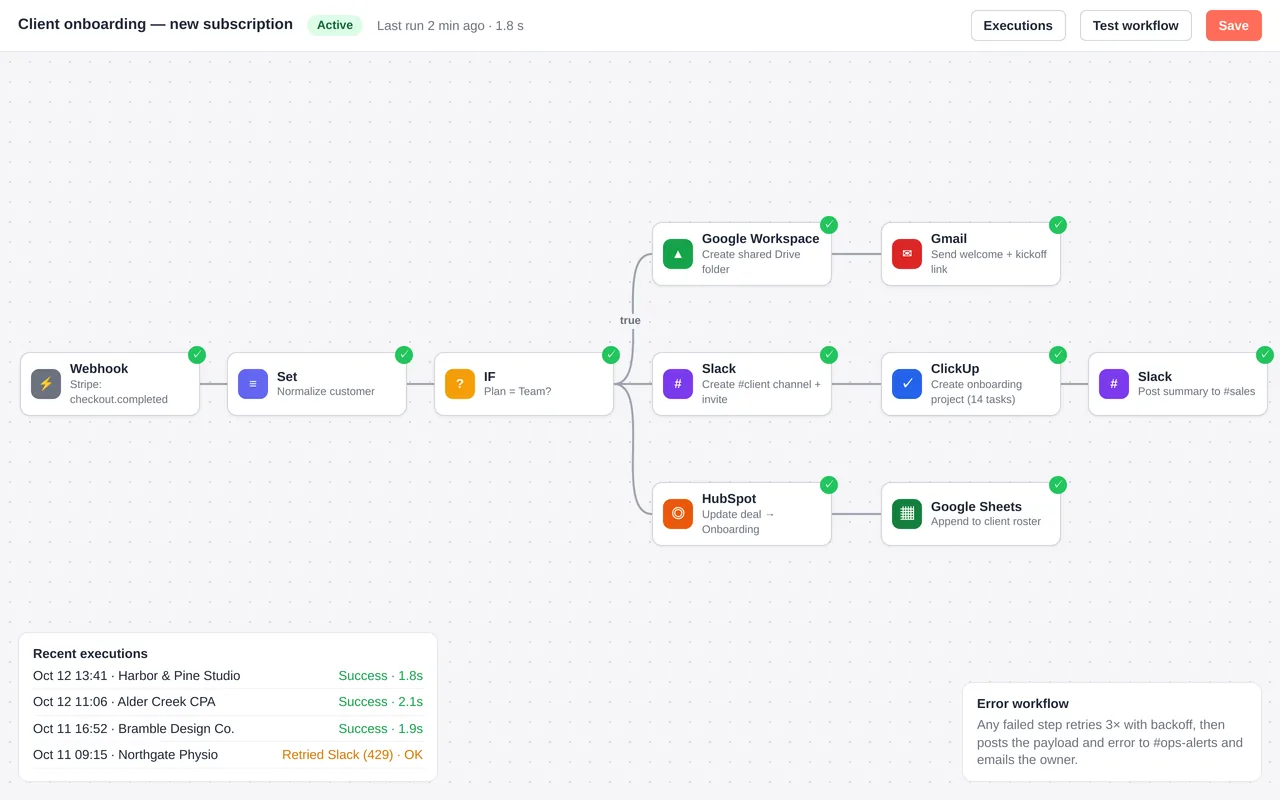
Automated client onboarding for a marketing agency (n8n)

Example build

Automated client onboarding for a marketing agency (n8n)

  • Stripe-triggered n8n workflow with plan-based branching
  • Google Drive folder from a template, Slack channel with invites, ClickUp project from a template
  • HubSpot deal update, welcome email, and roster logging in Google Sheets
  • Error workflow: retries, Slack alert and an email to the owner

n8n (self-hosted), Stripe webhooks, Google Workspace, Slack, ClickUp, HubSpot and Gmail APIs, Docker. The same build can be done in Zapier or Make.

Questions people ask first

Can it sit under our brand?

Yes. What we build runs in your accounts and under your name, and your clients never see ours.

Do we have to change project tools?

No. We connect whatever you use now, whether that is ClickUp, Asana or a Notion board.

Can you set up client accounts too?

Yes, as part of the agreed scope. We build the template once so you can copy it for each new client.

How do we start?

Tell us the task your team repeats for every client. We reply with questions or a written scope.

Tell us what you need built.

Email a few lines about what you want and which tools you use, or call. We reply with questions or a written scope.

hello@pushbuild.com

(617) 299-8887