
Pushbuild

HubSpot set up the way your sales process actually runs.

We set up HubSpot around how you sell, then connect it to your website, calendar, billing and the other tools around it. Leads get routed, followed up and tracked without manual copying. The scope is written down and agreed before we start.

Tell us what you needSee example projects

Sound familiar?

What businesses on HubSpot tell us before a project starts.

  • We bought HubSpot and it's mostly a contact list.
  • Leads from forms, ads and chat land in different places and nobody owns them.
  • Email sequences exist, but replies and bookings don't stop them.
  • Deal stages don't match how we sell and reports can't be trusted.
  • Marketing and sales both edit the same fields and the data keeps getting worse.

What we build

Each one is a working piece you can open and check when it's done.

Pipelines and properties

Deal stages, required fields and properties cleaned up and agreed, so each deal moves the same way and reports mean something.

CRM setup and lead pipelines

Lead routing and scoring

Leads assigned by territory, source or score, with a task and a notification for the owner and a fallback if nobody picks it up.

CRM setup and lead pipelines n8n, Make and Zapier automation

Email and SMS sequences

Nurture sequences that stop when someone replies, books or buys, with templates your team can edit.

CRM setup and lead pipelines

Calendar, chat and form connections

Booking links, chat bots and website forms feeding HubSpot with the source recorded, including WordPress sites.

Booking and scheduling systems AI chatbots trained on your business

Billing and quote handoff

A won deal creates the invoice or subscription in your billing tool, and payment status comes back to the deal.

Stripe integration and billing API integrations and data sync

Data migration and cleanup

Contacts and deals brought in from another CRM or spreadsheets, de-duplicated and mapped field by field.

Python scripts and utilities CRM setup and lead pipelines

What we connect it to: Stripe, QuickBooks, Salesforce, Calendly, Google Sheets, Slack, Zapier, n8n.

Industries that use it: Marketing agencies, Real estate, Insurance.

Full detail: CRM setup and lead pipelines.

Example projects

Illustrations of the shape of the work, not past clients. Yours gets its own written scope.

Example project

Lead handoff from marketing to sales

Example: a B2B software company scores leads from forms and webinars, and passes the ones above a set score to a rep with the history attached.

HubSpot workflows, lead scoring, Slack

Example project

Real estate buyer follow-up

Example: a brokerage wants new buyer leads texted and emailed at once, assigned to an agent, and chased until they book a showing.

HubSpot, calendar booking, SMS

Example project

Won deal to invoice

Example: an agency wants a closed deal in HubSpot to create the client in its billing tool and open a project, with no re-entering of details.

HubSpot API, Stripe, n8n
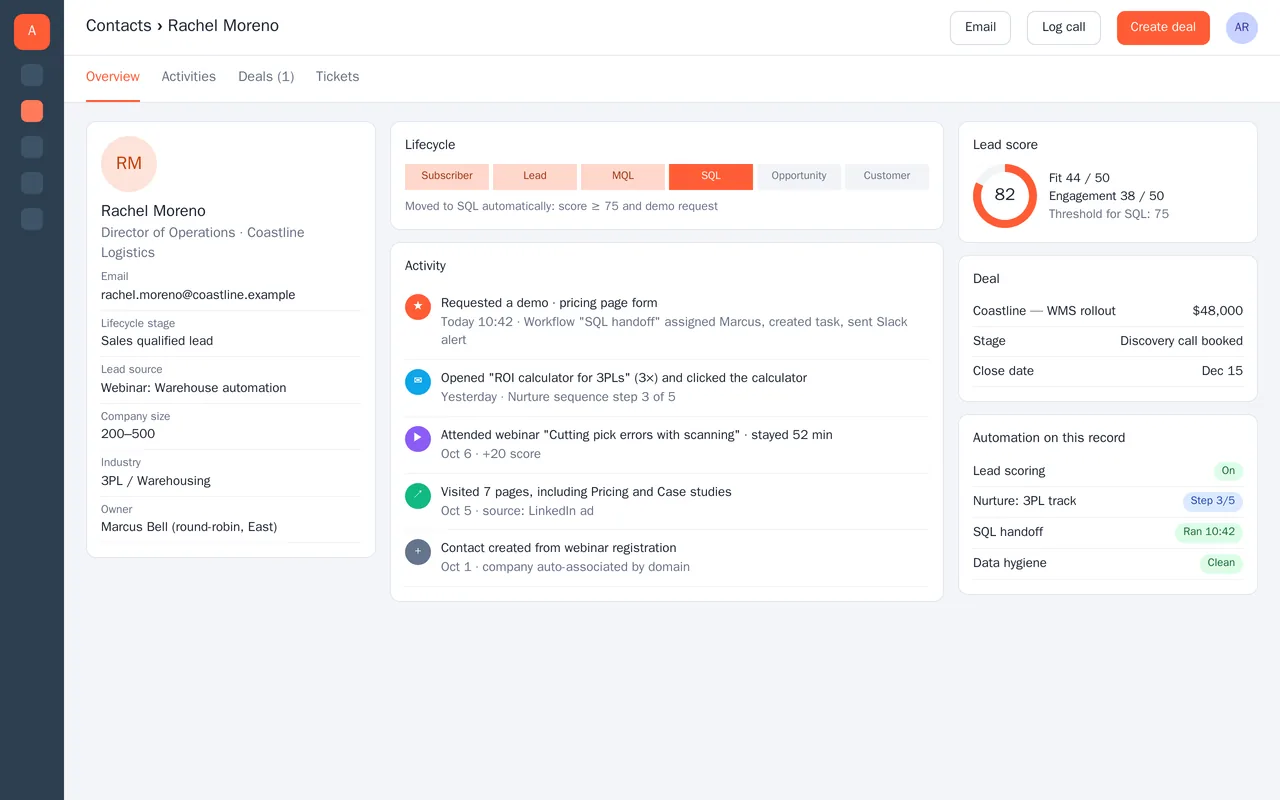
HubSpot lead scoring and sales handoff for a B2B software company

Example build

HubSpot lead scoring and sales handoff for a B2B software company

  • Custom properties, lifecycle stages and pipeline cleaned up and documented
  • Fit + engagement lead scoring with an SQL threshold
  • Workflows: nurture tracks by industry, SQL handoff, round-robin by territory
  • Data hygiene: deduplication, company association by domain, required fields

HubSpot Marketing and Sales Hub, workflows, lead scoring, sequences, custom properties, Slack integration

Questions people ask first

Do we have to move off our current HubSpot setup?

No. We start with what you have and change only what is agreed. If something is better rebuilt, we say so and show you why.

Can you connect HubSpot to tools it doesn't list?

Usually. HubSpot has an API and webhooks, so most tools can be connected directly or through Zapier, Make or n8n.

Will our team be able to edit the workflows?

Yes. We build in your account, label things clearly and give you notes so your team can change them.

How do we start?

Tell us how a lead becomes a customer today and where it gets stuck. We reply with questions or a written scope.

Tell us what you need built.

Email a few lines about what you want and which tools you use, or call. We reply with questions or a written scope.

hello@pushbuild.com

(617) 299-8887