
Pushbuild

n8n workflows you can host yourself and still understand.

We build n8n workflows for the jobs that outgrew simple connectors: branching logic, webhooks, code nodes and calls to APIs of any kind. We can set up n8n on your own server or use n8n Cloud, with backups, credentials and error alerts in place. The scope is written down and agreed before we start.

Tell us what you needSee example projects

Sound familiar?

What teams building on n8n tell us before a project starts.

  • We want automation but don't want every run billed, or our data passing through a third party.
  • Our n8n instance was set up once and nobody has updated or backed it up.
  • A workflow fails halfway and we can't see which step or which record.
  • We need logic that Zapier-style tools make awkward: loops, merges, retries.
  • Webhooks time out or fire twice and we get duplicate records.

What we build

Each one is a working piece you can open and check when it's done.

Installation and hosting

n8n running in Docker on your server or cloud account, behind HTTPS, with a database, backups and a note on updating it.

n8n workflows and self-hosting

Workflows from your process

Triggers, branches, loops and merges built around how the work actually goes, with the edge cases handled.

n8n workflows and self-hosting n8n, Make and Zapier automation

Webhooks and API calls

Incoming webhooks checked and de-duplicated, outgoing HTTP requests with authentication, paging and retries.

API integrations and data sync

Code and custom nodes

JavaScript or Python steps where a node is not enough, and small custom nodes or helper services when the same thing is needed again and again.

n8n workflows and self-hosting

Error workflows and monitoring

A shared error workflow that names the failed workflow, step and record, and tells the right person.

n8n workflows and self-hosting

Assistants inside workflows

Chat assistants and document steps added to a workflow when the request is for one, with a person reviewing what matters.

AI chatbots trained on your business OpenAI and LLM integration

What we connect it to: Zapier, Make, Google Sheets, Airtable, Slack, Gmail, HubSpot, Stripe.

Industries that use it: Marketing agencies, SaaS startups, IT / MSP, Coaches and consultants.

Full detail: n8n workflows and self-hosting.

Example projects

Illustrations of the shape of the work, not past clients. Yours gets its own written scope.

Example project

Client onboarding

Example: an agency wants a signed proposal to create the client folder, the project, the invoice and the welcome email, with a message to the team in chat.

n8n, Google Drive, project tool, Gmail

Example project

Self-hosted setup for a small team

Example: a team wants its automations on its own server, with nightly backups, HTTPS and an alert if a workflow fails.

n8n, Docker, Postgres

Example project

Webhook intake without duplicates

Example: a store sends order webhooks that sometimes arrive twice. The workflow checks the order number first and only creates the record once.

n8n, store webhooks, Airtable
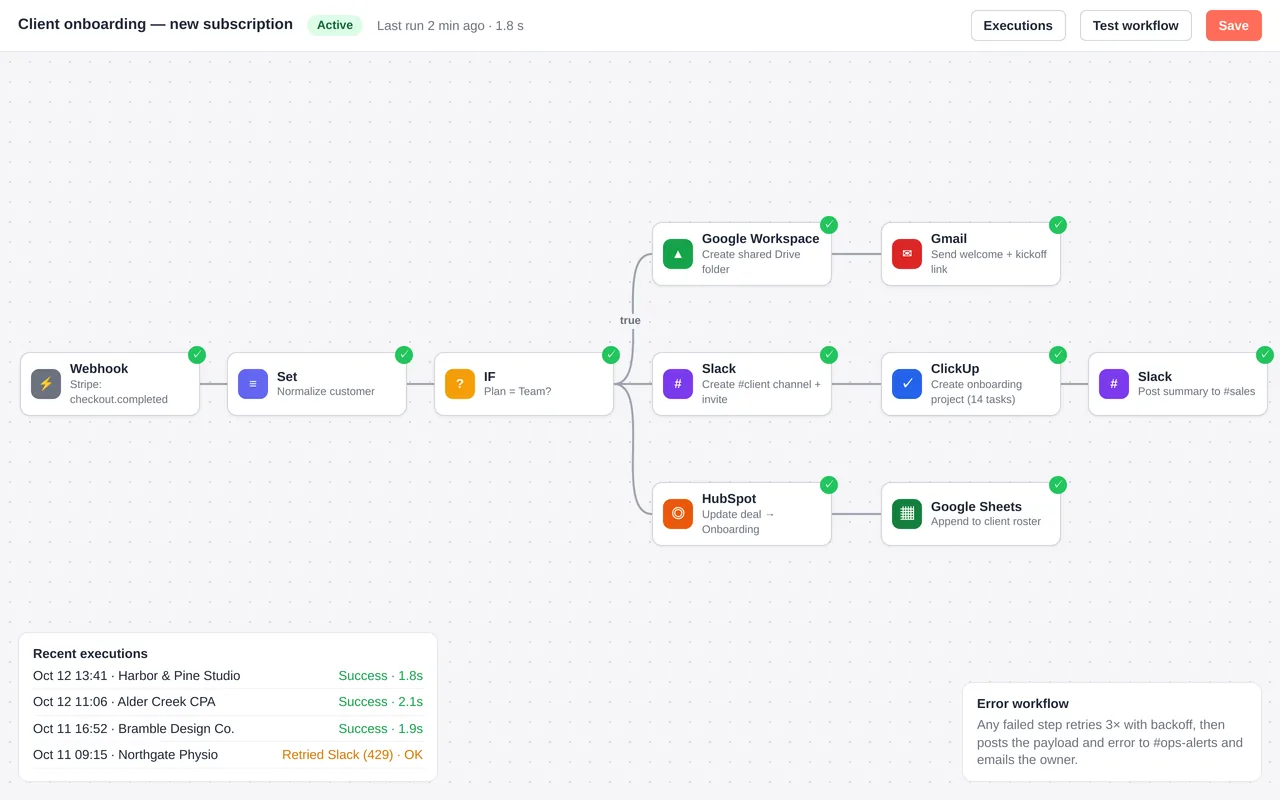
Automated client onboarding for a marketing agency (n8n)

Example build

Automated client onboarding for a marketing agency (n8n)

  • Stripe-triggered n8n workflow with plan-based branching
  • Google Drive folder from a template, Slack channel with invites, ClickUp project from a template
  • HubSpot deal update, welcome email, and roster logging in Google Sheets
  • Error workflow: retries, Slack alert and an email to the owner

n8n (self-hosted), Stripe webhooks, Google Workspace, Slack, ClickUp, HubSpot and Gmail APIs, Docker. The same build can be done in Zapier or Make.

Questions people ask first

Self-hosted or cloud?

Either works. Self-hosting gives you more control and no per-run billing but needs someone to keep it updated. We lay out both and you choose.

Can you take over workflows someone else built?

Yes. We read them first, tell you what they do and where they break, and agree the changes before we touch them.

Who owns what you build?

You do. It runs in your own instance, and you get short notes on how it works.

How do we start?

Tell us the job you want automated and where your data lives. We reply with questions or a written scope.

Tell us what you need built.

Email a few lines about what you want and which tools you use, or call. We reply with questions or a written scope.

hello@pushbuild.com

(617) 299-8887