
Pushbuild

Software that keeps a landscaping company's crews, quotes and routes organized.

We connect the tools a landscaping company already uses so quote requests get answered, crew schedules are built from one list and recurring customers are billed without anyone chasing. The scope is written down and agreed before we start.

Tell us what you needSee example projects

Sound familiar?

What landscaping companies tell us before a project starts.

  • Crew schedules are rebuilt every Sunday night from texts and a spreadsheet.
  • Quote requests come in from the website, Facebook and calls, and some never get an answer.
  • Rain cancels half a day and customers are told one at a time.
  • Seasonal work like aeration and leaf cleanup gets sold to some customers and forgotten for others.
  • Recurring customers are invoiced by hand and a few slip through.

What we build

Each one is a working piece you can open and check when it's done.

Crew schedule from one list

Jobs, crews and routes in one place, with each crew getting their day on a phone and the office seeing what is done.

Google Sheets and Apps Script automation Booking and scheduling systems

Quote request follow-up

Every request is logged, answered with a text or email, and followed up on a schedule until the customer says yes or no.

GoHighLevel setup CRM setup and lead pipelines

Weather delay notices

When a day is called off, affected customers get a short message and a new date, sent from the same list in a few clicks.

n8n, Make and Zapier automation

Seasonal service reminders

Customers who had spring cleanup, mulching or aeration are asked about the next service at the right time of year.

AI automation for business workflows n8n, Make and Zapier automation

Recurring billing and reminders

Weekly or monthly service invoices created from the schedule, sent on time, with a reminder when one is late.

QuickBooks, Xero and HubSpot integrations Stripe integration and billing

Route and profit view

Hours, materials and revenue by customer and by crew, so you can see which routes pay and which ones do not.

Dashboards and reporting

Landscaping software we work with: Jobber, LMN, Service Autopilot, Aspire, Housecall Pro, CompanyCam.

And the general tools around it: QuickBooks, Google Sheets, Google Calendar, GoHighLevel, Twilio, Zapier, Make.

Example projects

Illustrations of the shape of the work, not past clients. Yours gets its own written scope.

Example project

Crew scheduling in Google Sheets

Example: a landscaping company keeps its jobs in a sheet. A script builds each crew's daily list and sends it to the foreman's phone the evening before.

Google Sheets, Apps Script, SMS

Example project

Rain-day notices

Example: a lawn care company marks a route as rained out. Every customer on it gets a message with the new date, and the schedule moves itself.

Scheduling sheet, Twilio, Google Calendar

Example project

Spring cleanup campaign

Example: a landscaper wants last year's cleanup customers contacted in March, with a booking link and a reminder to anyone who has not replied.

CRM list, email, booking link
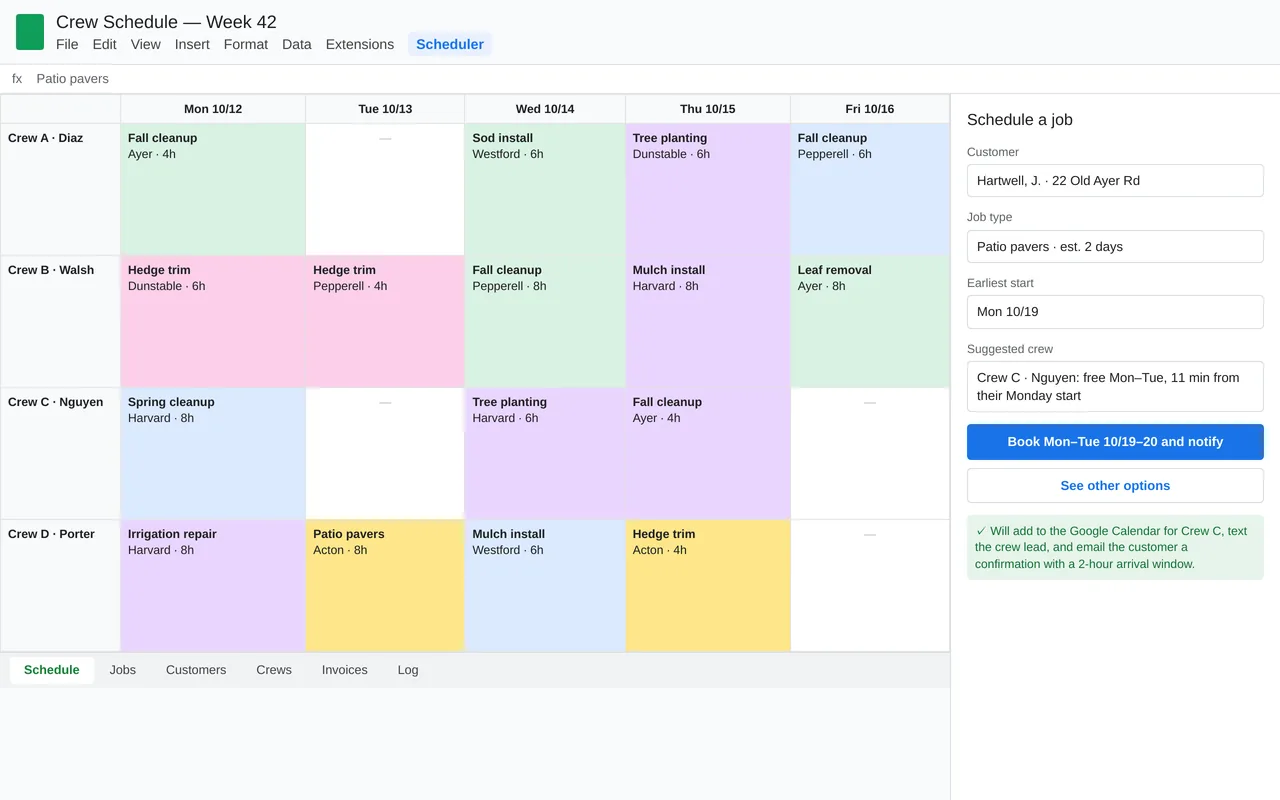
Crew scheduling in Google Sheets for a landscaping company (Apps Script)

Example build

Crew scheduling in Google Sheets for a landscaping company (Apps Script)

  • Custom Scheduler menu and booking sidebar in Google Sheets
  • Crew suggestion from availability and drive time
  • Sync to each crew's Google Calendar
  • Evening crew texts, customer arrival-window emails, and a weekly summary to the owner

Google Apps Script, Google Sheets, Calendar and Gmail APIs, Google Maps distance matrix, Twilio SMS, time-driven triggers

Questions people ask first

We already use Jobber or a similar app. Is this still useful?

Often yes. We connect it to the pieces it does not cover, such as lead follow-up, reminders and reports, rather than replacing it.

Can foremen use it without training?

Yes. They get a simple daily list on their phone and one button to mark a job done.

Who owns what you build?

You do. It is built in your own accounts, and you get plain notes on how it works so your office can change it without us.

How do we start?

Tell us what you use today and what the office does over and over each week. We reply with questions or a written scope.

Tell us what you need built.

Email a few lines about what you want and which tools you use, or call. We reply with questions or a written scope.

hello@pushbuild.com

(617) 299-8887