Excel workbooks that do the repetitive work and that your team can still edit.
Excel runs more of most businesses than anyone admits. We tidy workbooks that have grown out of control, add macros for the steps people repeat by hand, and connect Excel to the other systems it has to talk to. The scope is written down and agreed before we start.
Illustrations of the shape of the work, not past clients. Yours gets its own written scope.
Example project
Weekly export cleanup
Example: an operations team receives a messy export every Monday. One macro removes the blank and duplicate rows, fixes the date styles and lays out the columns for the report.
Excel, VBA, Power Query
Example project
Quote builder for a workshop
Example: a fabrication shop wants staff to pick the material and size and get a priced, printable quote, with the price table kept on one sheet the owner can edit.
Excel, VBA, a price sheet
Example project
Excel to accounting
Example: a small firm keeps job costs in Excel and wants the monthly totals loaded to its accounting software without retyping.
Excel, scheduled script, accounting API
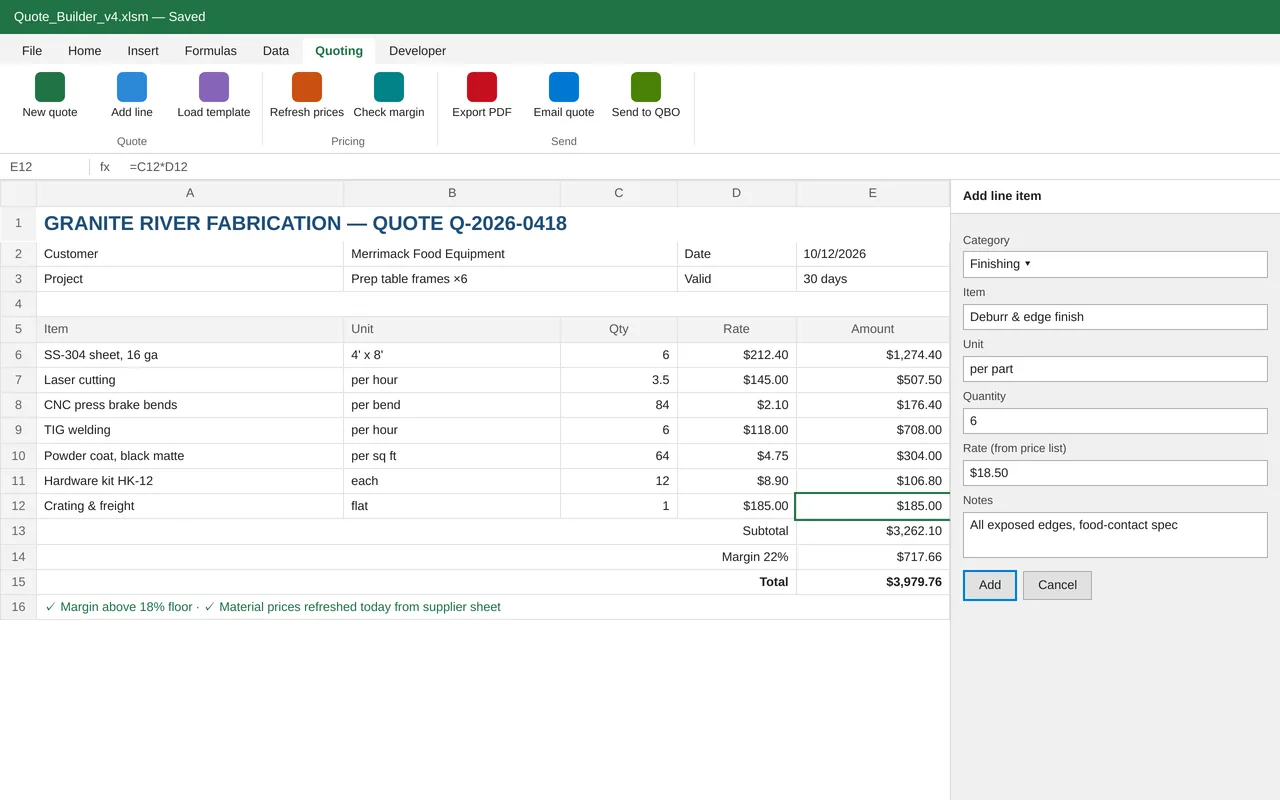
Example build
Excel quoting tool for a metal fabrication shop (VBA)
Custom ribbon tab and line-item form (VBA UserForm)
Price list that refreshes from the supplier's sheet
Quote templates by job type and a margin floor check
PDF export, Outlook email and a quote log
Excel VBA, custom ribbon XML, Power Query, Outlook automation, QuickBooks Online API
Questions people ask first
Do you replace Excel with something else?
Only if it is the better answer, and we say so in the scope. Most of the time the right fix is to make the workbook cleaner and let it do more of the work.
Will macros work on our computers?
We build for the Excel version you run and test it on a copy of your file. Some companies restrict macros, and if so we tell you the options before we start.
Can we edit it after you leave?
Yes. We keep things readable, label the parts and leave notes so your team can change them.
How do we start?
Send us the workbook, or describe it, and say which step costs the most time. We reply with questions or a written scope.