
Pushbuild

ServiceTitan connected to the rest of how your shop runs.

We build the pieces around ServiceTitan that the software does not do on its own: reports your owner actually reads, follow-up that goes out after a job, and clean hand-offs to your lead sources and accounting. The scope is written down and agreed before we start.

Tell us what you needSee example projects

Sound familiar?

What contractors on ServiceTitan tell us before a project starts.

  • We export reports from ServiceTitan every week and rebuild the same spreadsheet by hand.
  • Leads from ads and our website get typed into the system hours after they arrive.
  • Customers finish a job and never hear from us again unless someone remembers.
  • Booking, dispatch and invoicing all work, but nobody can see call-to-booked rates by source.
  • We want a phone assistant to take after-hours calls, but it needs to put the job in the right place.

What we build

Each one is a working piece you can open and check when it's done.

Lead intake without retyping

Web forms, ad leads and call-tracking records turned into customers and bookings, with the source kept so you can see which ads pay.

API integrations and data sync n8n, Make and Zapier automation

Owner dashboard

Booked jobs, close rates, average ticket and callbacks by technician and by source on one page, built from your exports or the data ServiceTitan makes available.

Dashboards and reporting

After-job follow-up

A thank-you text, a review request and a membership offer that go out after a completed job, and stop if the customer replies or complains.

n8n, Make and Zapier automation CRM setup and lead pipelines

Accounting hand-off

Invoices and payments checked against your books, with a list of the ones that don't match for the office to look at.

QuickBooks, Xero and HubSpot integrations

After-hours call handling

A phone assistant or answering flow that collects the details and puts the request where dispatch will see it first thing.

AI chatbots trained on your business API integrations and data sync

Scheduled reports by email

The weekly numbers sent to the owner and each manager as a clean sheet or PDF, with no one pulling them by hand.

Python scripts and utilities Google Sheets and Apps Script automation

What we connect it to: Google Sheets, QuickBooks, GoHighLevel, Twilio, Zapier, Make, HubSpot.

Industries that use it: HVAC, Plumbing, Electricians.

Example projects

Illustrations of the shape of the work, not past clients. Yours gets its own written scope.

Example project

Call source to booked job

Example: an HVAC company runs ads and call tracking. Each call is matched to the booked job so the owner can see which source books the most work.

Call tracking, ServiceTitan data, Google Sheets

Example project

Review request after a completed job

Example: a plumbing shop wants a text sent two hours after a job closes, with a review link. It is skipped if the customer has an open complaint.

ServiceTitan, Twilio, workflow automation

Example project

Weekly technician report

Example: an electrical contractor gets one sheet each Monday with jobs, revenue and callbacks per technician, ready to read in five minutes.

Exports, Google Sheets, Apps Script
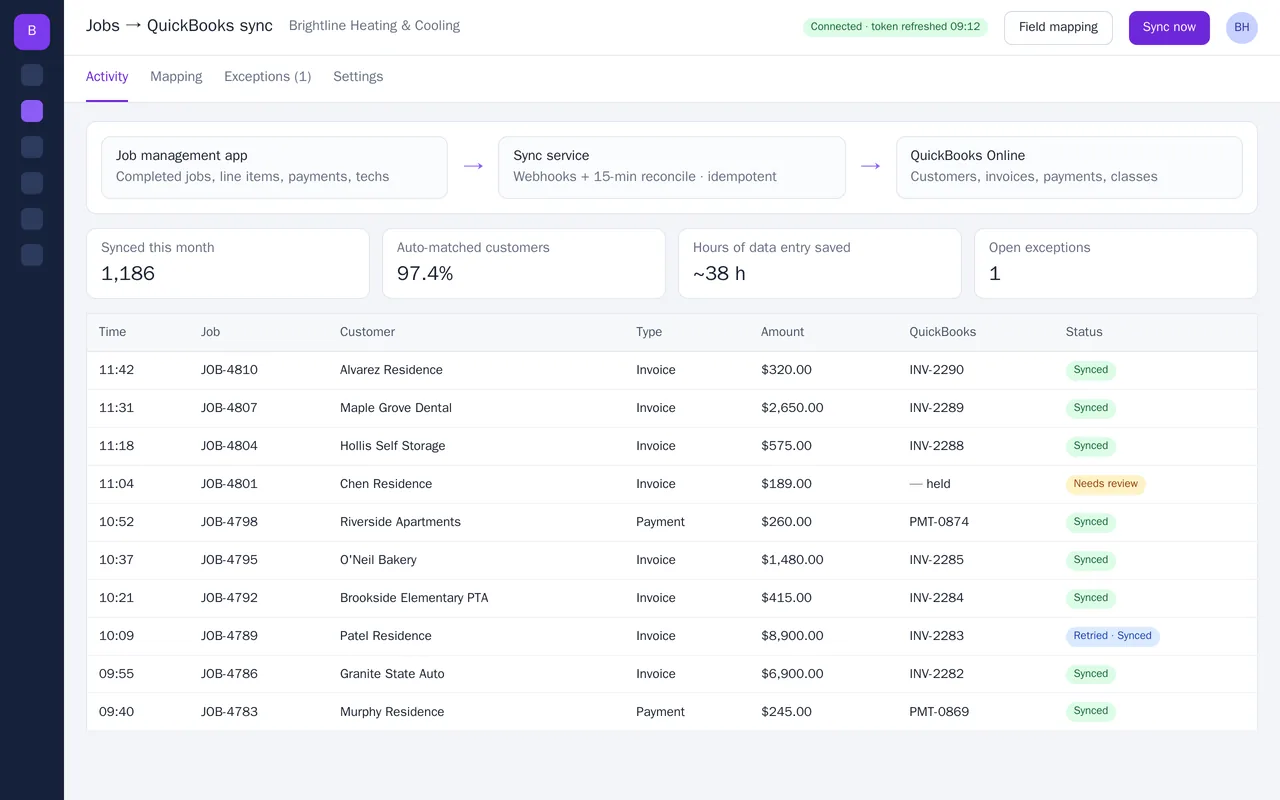
Job management to QuickBooks Online sync for an HVAC company

Example build

Job management to QuickBooks Online sync for an HVAC company

  • Webhook-driven sync plus a 15-minute reconcile, idempotent so nothing is double-posted
  • Customer matching on email, then phone, then name, with an exceptions queue
  • Field mapping screen: items, income accounts, classes, departments, sales tax
  • Payments recorded to Undeposited Funds and matched to invoices

Python, FastAPI, QuickBooks Online API (OAuth 2.0), webhooks, PostgreSQL, Docker

Questions people ask first

Do we have to change how we use ServiceTitan?

No. We work around the way your office already uses it. If something you want can't be done from outside the software, we say so in the written scope before anything starts.

Can you connect ServiceTitan to our other tools?

Yes. We connect it through the integrations it supports, its exports and its email notifications, and through its developer access where your account has it. We check which of these your account can use before we write the scope.

Who owns what you build?

You do. It is built in your own accounts, and you get notes on how it works so your office can change it without us.

How do we start?

Tell us what you use around ServiceTitan and the one job that wastes the most time each week. We reply with questions or a written scope.

Tell us what you need built.

Email a few lines about what you want and which tools you use, or call. We reply with questions or a written scope.

hello@pushbuild.com

(617) 299-8887