
Pushbuild

Housecall Pro wired into your leads, texts and books.

We connect Housecall Pro to the tools around it, so a new lead becomes a customer and an estimate request without typing, finished jobs trigger the follow-up you want, and the office sees the numbers without exports. The scope is written down and agreed before we start.

Tell us what you needSee example projects

Sound familiar?

What contractors on Housecall Pro tell us before a project starts.

  • A lead comes in from an ad or a missed call and someone has to key it into Housecall Pro.
  • Estimates go out and nobody chases them.
  • We want texts and a phone assistant to handle after-hours enquiries, and the job has to land in Housecall Pro.
  • Our reports live in three spreadsheets that never agree.
  • We use GoHighLevel for marketing and Housecall Pro for jobs, and the two don't talk.

What we build

Each one is a working piece you can open and check when it's done.

Lead to customer and job

Leads from forms, ads and calls created as customers in Housecall Pro with the source attached, and a first text sent within a minute.

API integrations and data sync GoHighLevel setup

Estimate follow-up

Open estimates tracked by age, with a reminder to the office and a polite sequence to the customer until it is approved or closed out.

n8n, Make and Zapier automation

After-hours phone and text assistant

Calls and texts answered after hours, details collected, and the request passed to the office with the customer already looked up.

AI chatbots trained on your business API integrations and data sync

Job-complete follow-up

A thank-you, review request and maintenance reminder that go out after a completed job and stop when the customer replies.

n8n, Make and Zapier automation CRM setup and lead pipelines

Books and invoices in step

Paid invoices and customers checked against QuickBooks, with a short list of mismatches for the office to settle.

QuickBooks, Xero and HubSpot integrations

Weekly numbers in one place

Jobs, revenue, estimates sent and approved by technician and by source, on one page or one email.

Dashboards and reporting

What we connect it to: GoHighLevel, Zapier, Make, Google Sheets, QuickBooks, Twilio, HubSpot.

Industries that use it: HVAC, Plumbing, Electricians, Cleaning.

Example projects

Illustrations of the shape of the work, not past clients. Yours gets its own written scope.

Example project

Missed call to booked estimate

Example: a plumbing company gets missed calls after five. Each caller gets a text, answers two questions, and the request appears as an estimate for the morning.

Twilio, GoHighLevel, Housecall Pro

Example project

Estimates that don't go quiet

Example: an electrician wants every estimate over a week old chased by text, with the owner told which ones are still open on Friday.

Housecall Pro, Zapier, Google Sheets

Example project

Marketing and jobs in one view

Example: an HVAC company runs campaigns in GoHighLevel and wants each booked job tied back to the campaign that produced it.

GoHighLevel, Housecall Pro, Sheets
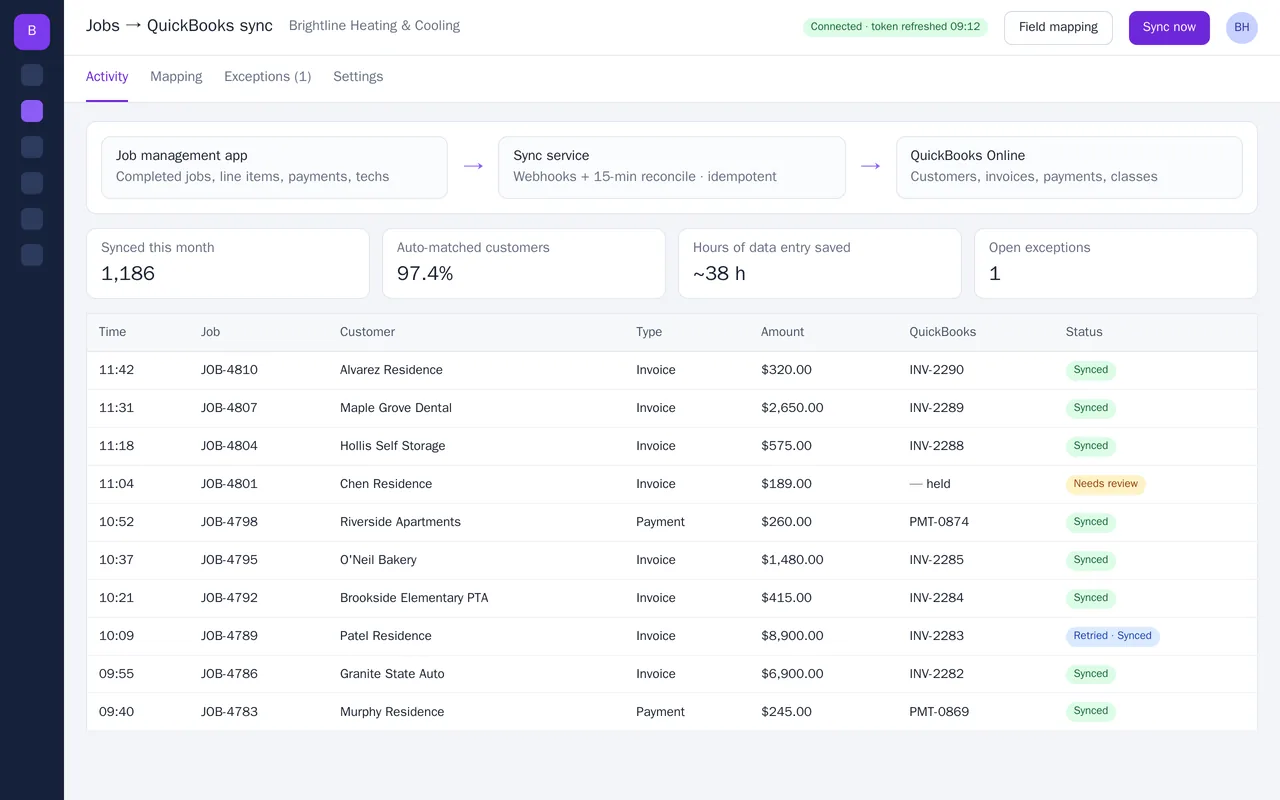
Job management to QuickBooks Online sync for an HVAC company

Example build

Job management to QuickBooks Online sync for an HVAC company

  • Webhook-driven sync plus a 15-minute reconcile, idempotent so nothing is double-posted
  • Customer matching on email, then phone, then name, with an exceptions queue
  • Field mapping screen: items, income accounts, classes, departments, sales tax
  • Payments recorded to Undeposited Funds and matched to invoices

Python, FastAPI, QuickBooks Online API (OAuth 2.0), webhooks, PostgreSQL, Docker
Lead-to-booking system for a roofing company (GoHighLevel)

Example build

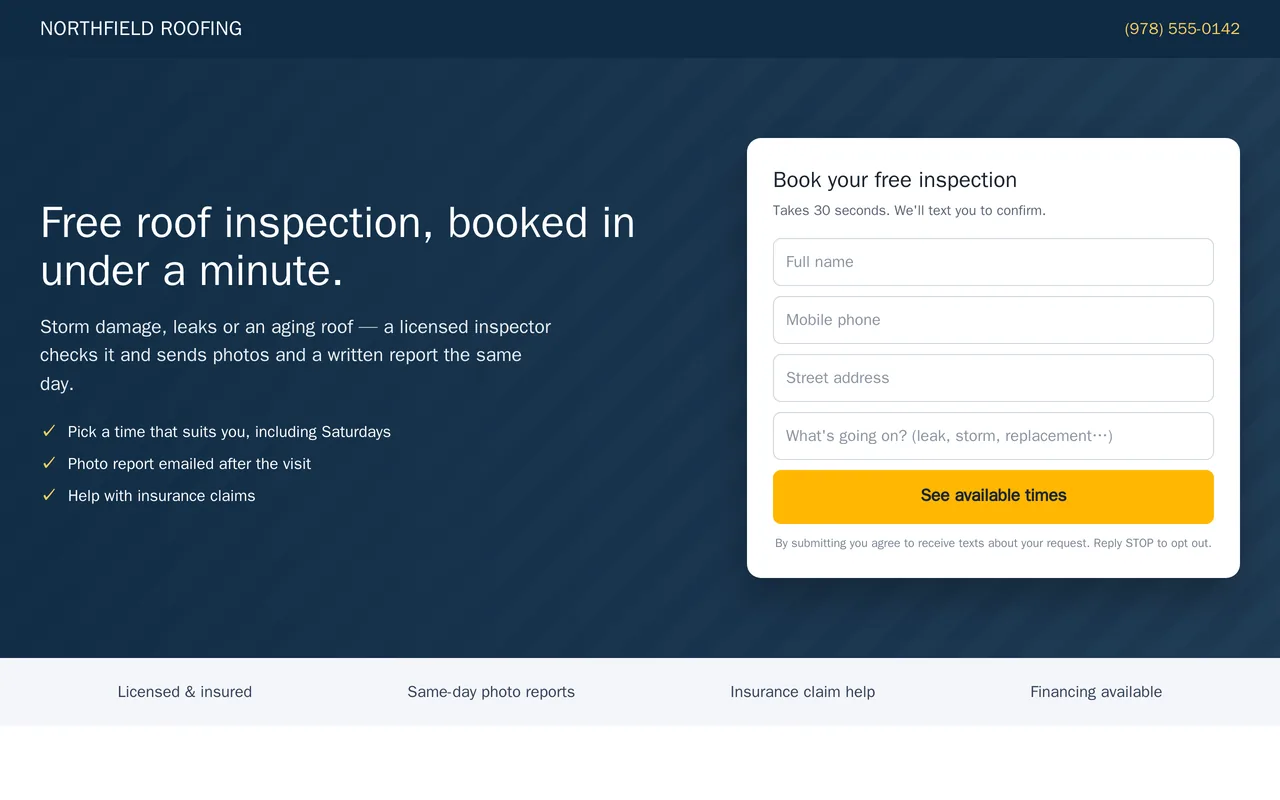
Lead-to-booking system for a roofing company (GoHighLevel)

  • Inspection landing page and form (desktop and mobile)
  • Speed-to-lead workflow: instant SMS, rep alert, booking link, quiet hours
  • Booked / no-response branches with reminders and a 7-day nurture
  • Residential Roofing pipeline with stages from new lead to won

GoHighLevel workflows, opportunities, calendars, forms, SMS and email

Questions people ask first

Do we have to change how we use Housecall Pro?

No. We work around the way your office already uses it. If something you want can't be done from outside the software, we say so in the written scope before anything starts.

Can you connect Housecall Pro to our other tools?

Yes. It connects through its Zapier app and its webhooks and API where your plan includes them, and through exports and email notifications where it doesn't. Access depends on your plan, so we confirm it first and put it in the scope.

Who owns what you build?

You do. It is built in your own accounts, and you get notes on how it works so your office can change it without us.

How do we start?

Tell us what you use around Housecall Pro and the one job that wastes the most time each week. We reply with questions or a written scope.

Tell us what you need built.

Email a few lines about what you want and which tools you use, or call. We reply with questions or a written scope.

hello@pushbuild.com

(617) 299-8887