
Pushbuild

Software that keeps an HVAC company's calls, jobs and invoices in step.

We connect your field service software, phones, calendar and accounting so a call becomes a booked visit, a finished job becomes an invoice, and a customer due for a tune-up hears from you before the season hits. The scope is written down and agreed before we start.

Tell us what you needSee example projects

Sound familiar?

What HVAC companies tell us before a project starts.

  • Calls come in while the team is on a roof and nobody rings back until the evening.
  • Techs finish a job and the invoice waits until the office gets around to entering it.
  • Maintenance agreement customers are due a visit and we only notice when they call us.
  • The first heatwave or cold snap buries the phones and the schedule falls apart.
  • Job management and QuickBooks disagree and the bookkeeper reconciles by hand.

What we build

Each one is a working piece you can open and check when it's done.

Missed-call text back

Every missed call and web form gets a text within a minute with a booking link, so an emergency or a quote request is answered before the next company is called.

GoHighLevel setup n8n, Make and Zapier automation

Service booking and dispatch

A booking page tied to your calendar and service areas, with the right job type, a reminder and a reschedule link.

Booking and scheduling systems

Maintenance plan reminders

Customers on a plan or due for a tune-up are messaged ahead of the season, with a link to pick a slot, and chased until it is booked.

CRM setup and lead pipelines n8n, Make and Zapier automation

Job to invoice

A completed job in your field service software becomes a draft invoice in QuickBooks with the right customer, items and tax.

QuickBooks, Xero and HubSpot integrations API integrations and data sync

Quote follow-up

Open quotes tracked by age with a reminder to the comfort advisor and a friendly nudge to the homeowner.

CRM setup and lead pipelines

Tech and revenue dashboard

Calls, booked jobs, close rate and revenue by tech, source and service type, ready each Monday morning.

Dashboards and reporting

HVAC software we work with: ServiceTitan, Housecall Pro, Jobber, FieldEdge, Service Fusion, Workiz, Successware.

And the general tools around it: QuickBooks, GoHighLevel, HubSpot, Google Sheets, Twilio, Zapier, Make, n8n.

Example projects

Illustrations of the shape of the work, not past clients. Yours gets its own written scope.

Example project

Heatwave overflow

Example: an HVAC company gets triple the usual calls in a heatwave. Missed calls get an instant text, emergency words route to the on-call tech, and everything else goes into a booking queue for the morning.

GoHighLevel, SMS, round-robin calendars

Example project

Job management to QuickBooks

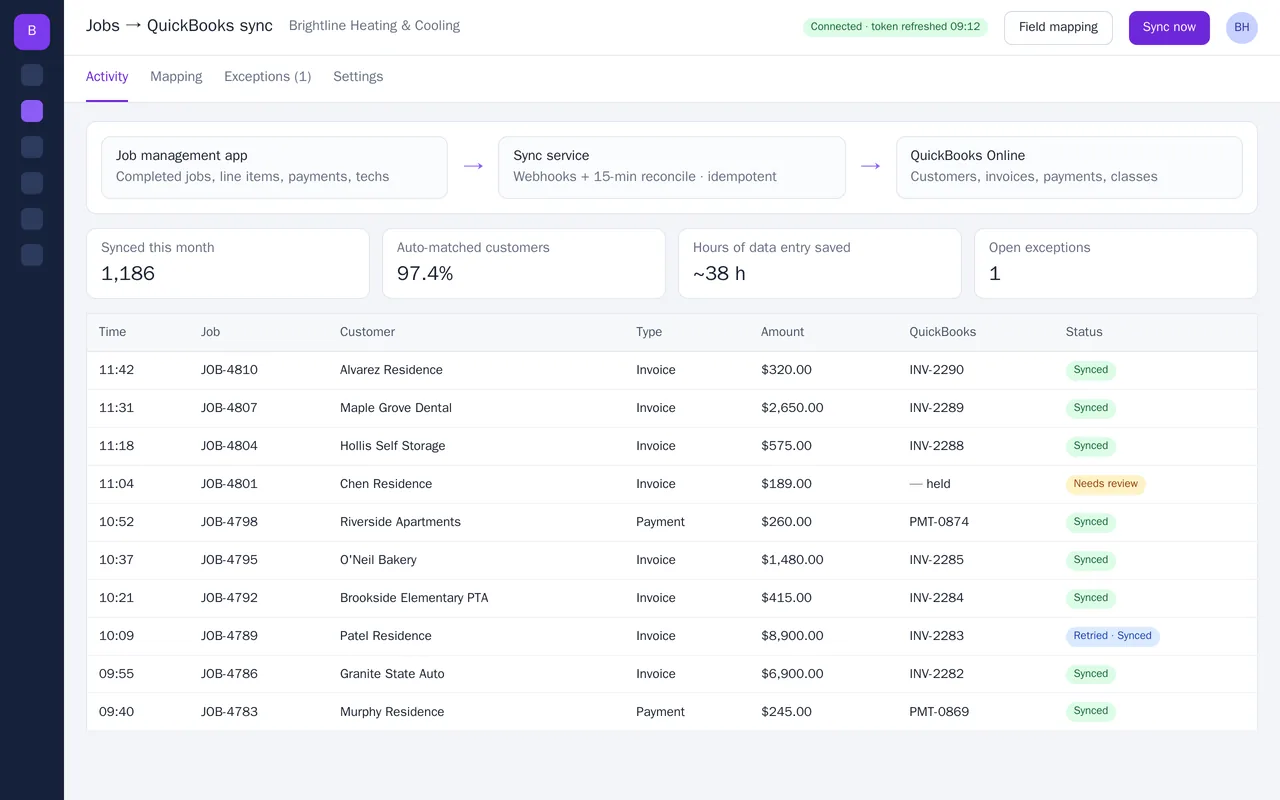
Example: a residential HVAC contractor wants each completed job to appear in QuickBooks Online as a draft invoice, with the customer matched and parts on separate lines, ready for the bookkeeper to approve.

Field service API, QuickBooks Online

Example project

Spring tune-up campaign

Example: a company with a few hundred maintenance customers wants a reminder sequence each spring and autumn, stopping when a customer books and flagging anyone who has not replied after three tries.

CRM, SMS, email
Job management to QuickBooks Online sync for an HVAC company

Example build

Job management to QuickBooks Online sync for an HVAC company

  • Webhook-driven sync plus a 15-minute reconcile, idempotent so nothing is double-posted
  • Customer matching on email, then phone, then name, with an exceptions queue
  • Field mapping screen: items, income accounts, classes, departments, sales tax
  • Payments recorded to Undeposited Funds and matched to invoices

Python, FastAPI, QuickBooks Online API (OAuth 2.0), webhooks, PostgreSQL, Docker

Questions people ask first

Do we have to switch field service software?

No. We connect the one you use. If something you need cannot be done with it, we say so in the scope and set out the options.

Can the techs use it from the truck?

Yes. Anything a tech touches is built to work on a phone, in a few taps.

Who owns what you build?

You do. It is built in your own accounts, with notes so your office can change it without us.

How do we start?

Tell us which software you use and the job that costs the office the most time. We reply with questions or a written scope.

Tell us what you need built.

Email a few lines about what you want and which tools you use, or call. We reply with questions or a written scope.

hello@pushbuild.com

(617) 299-8887