
Pushbuild

Software that keeps a coaching or consulting practice's leads, clients and invoices in order.

We connect the calendar, the CRM, the forms and the payment tool you already use, so an enquiry becomes a booked call, a signed agreement and a paid invoice without you chasing each step. The scope is written down and agreed before we start.

Tell us what you needSee example projects

Sound familiar?

What coaches and consultants tell us before a project starts.

  • Someone books a discovery call and I find out about it from my calendar, not my CRM.
  • Proposals and agreements are written from scratch every time.
  • I send invoices late because I forget which sessions have happened.
  • Leads from my website, LinkedIn and referrals all sit in different places.
  • Past clients never hear from me again unless I remember.

What we build

Each one is a working piece you can open and check when it's done.

Enquiry to booked call

A form and booking page that put every new lead in your CRM, send a confirmation and reminders, and ask the questions you need before the call.

Booking and scheduling systems CRM setup and lead pipelines

Proposals and agreements

A proposal and agreement built from the call notes in one step, sent for signature, and filed under the client when it comes back.

n8n, Make and Zapier automation Google Sheets and Apps Script automation

Session tracking and invoicing

Sessions or hours logged once, then turned into the invoice on your schedule, with a reminder when one is overdue.

QuickBooks, Xero and HubSpot integrations Stripe integration and billing

Client intake and onboarding

A welcome sequence, intake questionnaire and shared folder created for each new client, the same way every time.

n8n, Make and Zapier automation

Follow-up with past clients

Check-ins, review requests and reminders sent on a schedule you set, and a list of who is due for a conversation.

GoHighLevel setup CRM setup and lead pipelines

A simple view of the practice

Pipeline, active clients, revenue and open invoices on one page you can read in a minute.

Dashboards and reporting

Coaches and consultants software we work with: Calendly, Acuity Scheduling, Dubsado, HoneyBook, Practice Better, Kajabi.

And the general tools around it: HubSpot, GoHighLevel, Stripe, QuickBooks, Google Sheets, Notion, Zapier, Make.

Example projects

Illustrations of the shape of the work, not past clients. Yours gets its own written scope.

Example project

Discovery call workflow

Example: a business coach gets leads from a website form and LinkedIn. Each lead lands in the CRM, books a call, gets reminders, and a short summary is ready before the call starts.

Calendar tool, CRM, forms

Example project

Proposal in one click

Example: a consultant fills in scope and rate after a call and gets a proposal and agreement as a document, sent for e-signature and filed on the client record.

Google Docs, e-signature, Google Sheets

Example project

Monthly retainer invoicing

Example: a consultant on five monthly retainers has invoices created on the first of the month from a tracking sheet, with a reminder to herself if hours run over.

Google Sheets, QuickBooks, Stripe
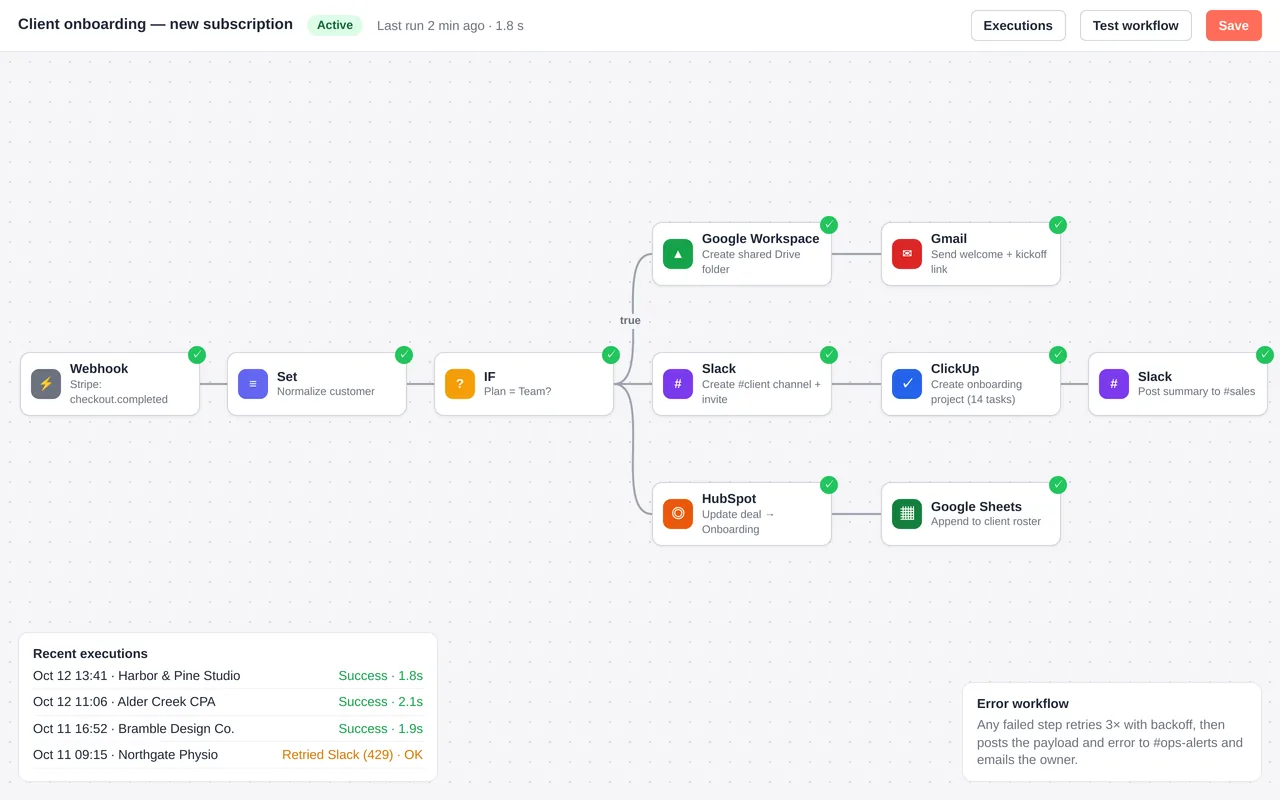
Automated client onboarding for a marketing agency (n8n)

Example build

Automated client onboarding for a marketing agency (n8n)

  • Stripe-triggered n8n workflow with plan-based branching
  • Google Drive folder from a template, Slack channel with invites, ClickUp project from a template
  • HubSpot deal update, welcome email, and roster logging in Google Sheets
  • Error workflow: retries, Slack alert and an email to the owner

n8n (self-hosted), Stripe webhooks, Google Workspace, Slack, ClickUp, HubSpot and Gmail APIs, Docker. The same build can be done in Zapier or Make.

Questions people ask first

I work alone. Is this too much?

Not if we keep it small. Often it is two or three connections between tools you already use, and nothing more. We scope it to what saves you real time.

Can you work with the CRM I have?

Usually yes. If it can't do what you need, we say so in the scope and lay out the options before anything changes.

Who owns what you build?

You do. It is built in your own accounts, and you get notes on how it works so you can change it without us.

How do we start?

Tell us which tools you use and the task you most want off your plate. We reply with questions or a written scope.

Tell us what you need built.

Email a few lines about what you want and which tools you use, or call. We reply with questions or a written scope.

hello@pushbuild.com

(617) 299-8887