
Pushbuild

Software that gets students enrolled, onboarded and through the course without you babysitting it.

We connect the course platform, the payment processor, the email list and the community, so a new buyer gets access, a welcome and the right sequence without you doing it by hand. The scope is written down and agreed before we start.

Tell us what you needSee example projects

Sound familiar?

What online course creators tell us before a project starts.

  • A student pays and then emails me a day later because they never got access.
  • I copy buyers from Stripe into my email list and my course platform by hand.
  • I can't tell which students have gone quiet and which ones finished.
  • Launch week is a pile of tags, segments and automations that nobody but me understands.
  • Refunds, payment plans and failed cards are handled in a spreadsheet.

What we build

Each one is a working piece you can open and check when it's done.

Purchase to access

A payment creates the student, grants the right course or cohort, tags them in the email tool and sends a welcome, with a clear alert when any step fails.

Stripe integration and billing API integrations and data sync

Onboarding sequences

A short run of emails or texts tied to what the student has actually done, so people who start get a nudge and people who finish get the next offer.

n8n, Make and Zapier automation CRM setup and lead pipelines

Payment plans and failed cards

Failed payments caught, the student reminded, access paused or kept by your rules, and the result logged where you can see it.

Stripe integration and billing

Cohort and live-call logistics

Booking, reminders, replay links and attendance recorded for each cohort, without a manual list for every call.

Booking and scheduling systems Google Sheets and Apps Script automation

Student progress and support

Course progress pulled into one sheet or board, with a flag for students who stalled and a place for support questions to land.

Airtable consulting and development Notion and Airtable systems

One view of the business

Sales, refunds, completion and email results by course and by launch, on one page you open when you plan the next one.

Dashboards and reporting

Online courses software we work with: Kajabi, Teachable, Thinkific, Podia, Skool, Circle, LearnWorlds.

And the general tools around it: Stripe, Mailchimp, ActiveCampaign, Google Sheets, Zapier, Make, n8n, Airtable.

Example projects

Illustrations of the shape of the work, not past clients. Yours gets its own written scope.

Example project

New buyer to the right course

Example: a creator sells two courses and a membership through checkout pages. Each purchase adds the student to the right course, tags them in the email list and sends the matching welcome.

Stripe, the course platform, the email tool

Example project

Stalled-student nudge

Example: a course with a twelve-week schedule flags students who have not opened a lesson in ten days, sends a short check-in, and lists them for the creator to reply to personally.

Course platform export, Google Sheets, email

Example project

Launch dashboard

Example: a creator running a two-week launch wants sign-ups, sales, refunds and email results by source on one page, refreshed through the day.

Stripe, email tool, a dashboard
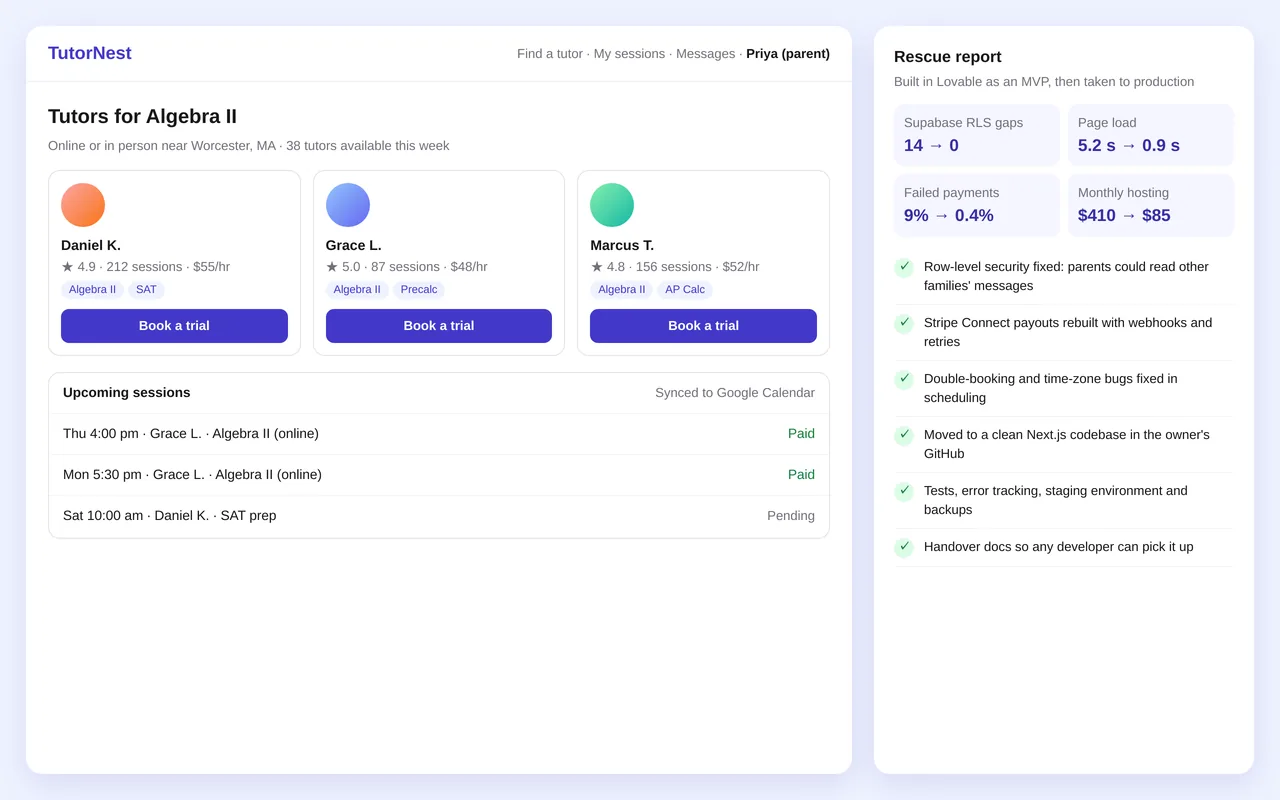
Rescuing a Lovable-built tutoring marketplace and taking it to production

Example build

Rescuing a Lovable-built tutoring marketplace and taking it to production

  • Security audit and Supabase row-level security fixes
  • Stripe Connect payouts rebuilt with webhooks, retries and reconciliation
  • Scheduling fixes: double bookings, time zones and calendar sync
  • Migration to a maintainable Next.js codebase, with performance work (5.2 s → 0.9 s load)

Lovable export, Next.js, TypeScript, Supabase (Postgres, auth, RLS), Stripe Connect, Sentry, Vercel

Questions people ask first

Do we have to change course platform?

No. We work with the platform you already use and connect it to payments and email. If it can't do what you need, we say so in the scope and lay out the options before anything changes.

Can you fix an automation that keeps breaking?

Yes. We read what is there, find where it drops people, and either repair it or rebuild the part that is causing the trouble.

Who owns what you build?

You do. It is built in your own accounts, and you get notes on how it works so you can change it without us.

How do we start?

Tell us which tools you use and the one task that eats the most time each launch. We reply with questions or a written scope.

Tell us what you need built.

Email a few lines about what you want and which tools you use, or call. We reply with questions or a written scope.

hello@pushbuild.com

(617) 299-8887