
Pushbuild

Software that keeps a painting contractor's estimates, crews and invoices moving.

We connect the tools a painting company runs on, so a quote request gets an answer the same day, estimates are chased until they are signed, crews know where to be, and finished jobs go to invoice without waiting on paperwork. The scope is written down and agreed before we start.

Tell us what you needSee example projects

Sound familiar?

What painting companies tell us before a project starts.

  • Quote requests come in by phone, text and web form and some get no reply.
  • I sent forty estimates and I couldn't tell you which ones are still open.
  • Crew schedules live in a group chat and someone always misses a change.
  • Colors and paint codes are written on a sheet that gets lost between visits.
  • Finished jobs sit uninvoiced for a week because the paperwork is on my truck seat.

What we build

Each one is a working piece you can open and check when it's done.

Quote request intake

Web form, text and call-back requests collected in one list with a prompt reply and an owner for each.

GoHighLevel setup CRM setup and lead pipelines

Estimate follow-up

Open estimates tracked by age, with a polite message to the customer at set intervals until it is signed or closed.

CRM setup and lead pipelines n8n, Make and Zapier automation

Crew schedule messages

The day's jobs, addresses and notes texted to each crew, with a reply to confirm.

n8n, Make and Zapier automation Google Sheets and Apps Script automation

Job sheet with colors and scope

A job record that holds rooms, colors, sheen, prep notes and photos, available to the crew on a phone.

Notion and Airtable systems

Invoice on completion

When a job is marked complete, an invoice is drafted in your accounting software and the customer gets a review request.

QuickBooks, Xero and HubSpot integrations

Pipeline at a glance

Quotes sent, jobs won, jobs scheduled and revenue by source on one page.

Dashboards and reporting

Painting software we work with: Jobber, Housecall Pro, PaintScout, Estimate Rocket, JobNimbus, CompanyCam, Workiz.

And the general tools around it: QuickBooks, GoHighLevel, Google Sheets, Google Calendar, Twilio, Zapier, Make, Airtable.

Example projects

Illustrations of the shape of the work, not past clients. Yours gets its own written scope.

Example project

Estimates that get chased

Example: a residential painter sends an estimate and the customer gets a friendly message after three days and again after a week, stopping when they sign or decline.

CRM workflow, SMS, email

Example project

Morning crew text

Example: a painting company with three crews sends each lead the day's addresses, access notes and paint colors at 6 a.m., with a one-word reply to confirm.

Google Calendar, Twilio, Apps Script

Example project

Job done, invoice drafted

Example: a commercial painter marks a job complete on a phone and a draft invoice with the agreed price lands in QuickBooks for the office to approve.

Jobber, QuickBooks, Zapier
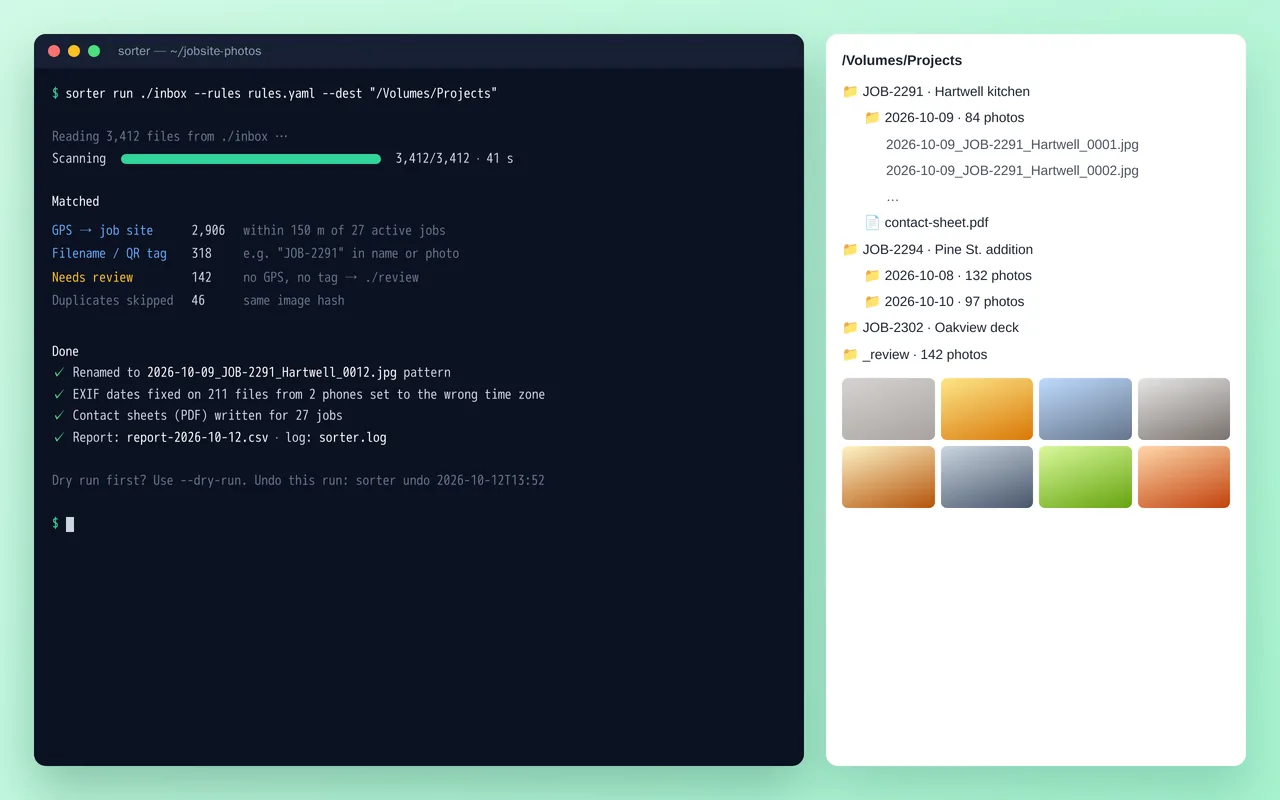
Job-site photo organizer for a home-renovation contractor (Python)

Example build

Job-site photo organizer for a home-renovation contractor (Python)

  • Command-line tool with YAML rules, dry-run mode and one-command undo
  • Job matching by GPS radius, filename tags and QR codes
  • EXIF date and time-zone correction, duplicate detection by image hash
  • Standard renaming and folder structure, plus PDF contact sheets per job

Python 3.12, Pillow, piexif, pyzbar (QR), ReportLab, Typer, Rich, PyInstaller

Questions people ask first

Do we have to change the software we use?

No. If you already use Jobber, Housecall Pro or PaintScout, we build around it and connect it to your accounting and messaging.

Who owns what you build?

You do. It is built in your own accounts, and you get notes on how it works so your team can change it without us.

Can it work from the field?

Yes. Crew texts, job sheets and photo uploads all work from a phone.

How do we start?

Tell us which tools you use and the one task that wastes the most time each week. We reply with questions or a written scope.

Tell us what you need built.

Email a few lines about what you want and which tools you use, or call. We reply with questions or a written scope.

hello@pushbuild.com

(617) 299-8887