
Pushbuild

Software that keeps a restaurant's orders, menus and numbers in step.

We connect the tools a restaurant already runs on, so a menu change happens once and shows up everywhere, online orders reach the kitchen cleanly, and the owner sees yesterday's sales without opening three apps. The scope is written down and agreed before we start.

Tell us what you needSee example projects

Sound familiar?

What restaurants and bars tell us before a project starts.

  • When the menu changes we update the website, the delivery apps, the printed menu and the screens by hand.
  • Online orders come in through a few places and someone retypes them for the kitchen.
  • Catering and event enquiries sit in the inbox for days.
  • I want my own ordering site so I stop paying commission, but I don't know what it needs.
  • I only see sales when the bookkeeper sends a report.

What we build

Each one is a working piece you can open and check when it's done.

One menu, updated once

A single source for items, prices and descriptions that updates the website, the printed menu file and the digital menu screens together.

API integrations and data sync Python scripts and utilities

Your own online ordering

A mobile-first ordering site with customised items, card payments and orders sent to the kitchen, built to sit alongside your POS.

Web apps and MVPs Stripe integration and billing

Reservations and waitlist

Booking and waitlist flows with text confirmations and reminders, and fewer no-shows.

Booking and scheduling systems

Catering and event enquiries

A form that asks for the date, headcount and dietary needs, then creates a task, replies, and follows up on quotes that haven't been answered.

CRM setup and lead pipelines n8n, Make and Zapier automation

Daily sales to a sheet

Takings, covers and top items from the POS exports sent each morning to a sheet or message the owner reads in a minute.

ETL and data pipelines Google Sheets and Apps Script automation

Supplier invoices into the books

Invoices that arrive by email read automatically and entered into the accounting system for the owner to review.

PDF and document data extraction QuickBooks, Xero and HubSpot integrations

Restaurants software we work with: Toast, Square, Clover, OpenTable, Resy, 7shifts.

And the general tools around it: QuickBooks, Stripe, Google Sheets, Twilio, Zapier, Make, n8n.

Example projects

Illustrations of the shape of the work, not past clients. Yours gets its own written scope.

Example project

Menu change in one place

Example: a restaurant group wants one spreadsheet to drive the website menu and the images shown on its in-store screens, so a price change is made once.

Google Sheets, website, signage content

Example project

Catering enquiry follow-up

Example: a restaurant wants each catering request to get a same-day reply, a calendar hold for the date, and a reminder to the manager if the quote goes unanswered for three days.

Web form, CRM, SMS, Google Calendar

Example project

Morning sales summary

Example: an owner with two locations wants one message at 7am with yesterday's sales, covers and labour by location, drawn from the POS exports.

POS exports, Google Sheets, scheduled message
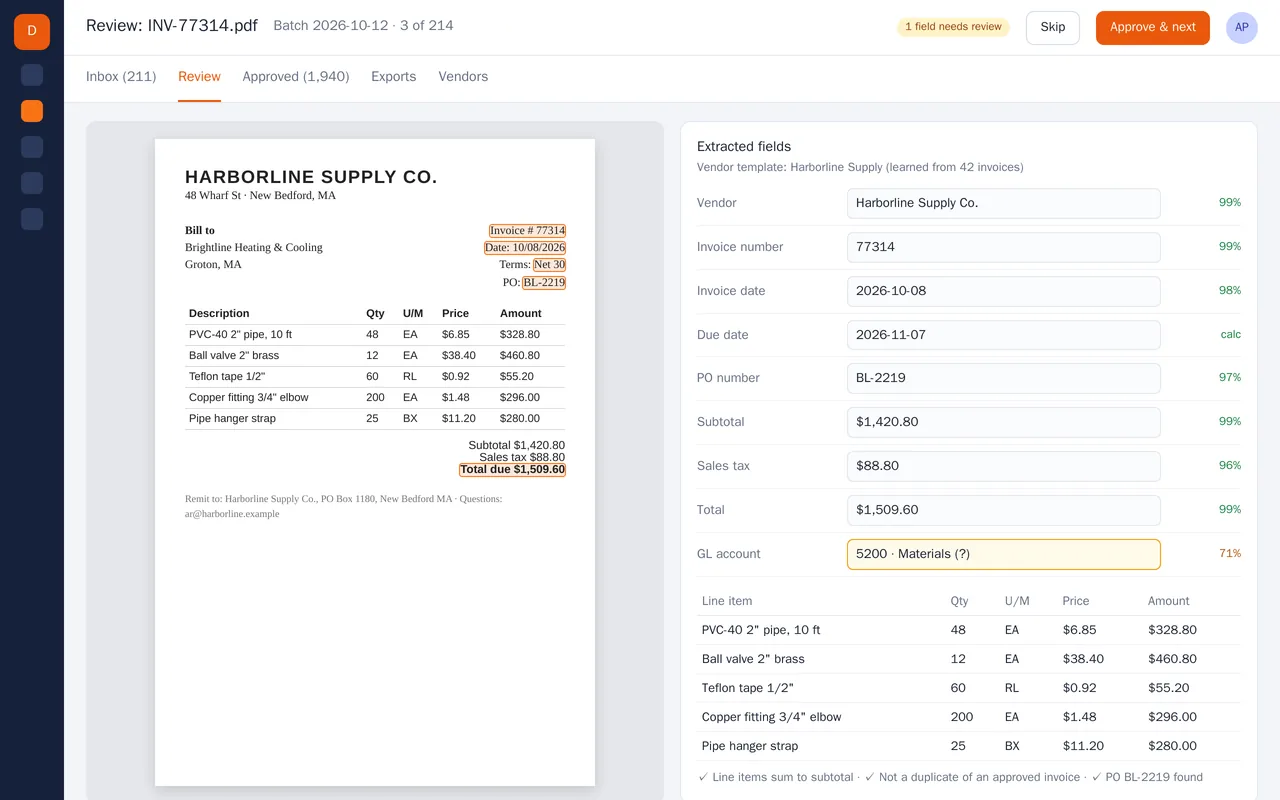
Supplier invoice extraction for an accounts-payable team (PDF to structured data)

Example build

Supplier invoice extraction for an accounts-payable team (PDF to structured data)

  • PDF and scan ingestion from a shared inbox and a watched folder
  • Header and line-item extraction with per-field confidence scores
  • Per-vendor templates that improve as invoices are approved
  • Checks: line items vs subtotal, duplicate detection, PO match, GL account suggestion

Python, OCR, layout-aware PDF parsing, LLM extraction with validation rules, PostgreSQL, React

Questions people ask first

Do we have to change our POS?

No. We work with the one you have, using its API or exports where it has them. If it can't provide something, we say so in the scope.

Can you build a site for ordering direct, without commission?

Yes. We would build it for your menu and your area, and agree up front how orders reach the kitchen and how card payments are handled.

Will it work on a busy service?

That is the design test. Anything the staff touch has to be quick on a phone or tablet, and we test with your real menu.

How do we start?

Tell us your POS and the task you repeat most. We reply with questions or a written scope.

Tell us what you need built.

Email a few lines about what you want and which tools you use, or call. We reply with questions or a written scope.

hello@pushbuild.com

(617) 299-8887