
Pushbuild

Software that takes the typing out of brokering freight.

We connect the tools a freight brokerage already runs on, so a load request in the inbox becomes a quote, a rate confirmation is read into the TMS, carrier paperwork is chased without a call, and the customer gets a status update without anyone writing it. The scope is written down and agreed before we start.

Tell us what you needSee example projects

Sound familiar?

What freight brokers tell us before a project starts.

  • Load requests arrive by email in ten formats and someone retypes each one into the TMS.
  • Carrier packets, insurance certificates and W-9s sit in inboxes and expire without anyone noticing.
  • Customers ask where their load is and a rep has to call the driver to find out.
  • Proof of delivery comes in as photos and PDFs and invoicing waits until someone files them.
  • We know our margin on a lane only after the month is closed.

What we build

Each one is a working piece you can open and check when it's done.

Load requests into the TMS

Emailed load requests and spreadsheets read on arrival, with pickup, drop, equipment and dates filled into a draft load for a rep to check.

PDF and document data extraction API integrations and data sync

Carrier onboarding and compliance

A carrier packet form, documents filed in one folder per carrier, and reminders when insurance or authority paperwork is about to expire.

n8n, Make and Zapier automation

Rate confirmations and bills of lading

Rate cons and BOLs read into structured fields, matched to the load, and flagged when the numbers do not agree.

PDF and document data extraction

Customer status updates

Check-call results and tracking events turned into a short update to the shipper by email or text, sent on a schedule you set.

n8n, Make and Zapier automation API integrations and data sync

Invoicing once the paperwork lands

When proof of delivery arrives, the invoice is drafted with the right documents attached and sent to accounting for approval.

QuickBooks, Xero and HubSpot integrations

Margin by lane and customer

Loads, carrier cost and customer rate pulled into one page, so you can see which lanes and accounts make money this week.

Dashboards and reporting

Freight brokers software we work with: McLeod, Aljex, Tai TMS, DAT, Truckstop, Samsara, Descartes.

And the general tools around it: Gmail, Outlook, Google Sheets, QuickBooks, Slack, Twilio, Zapier, Make, n8n.

Example projects

Illustrations of the shape of the work, not past clients. Yours gets its own written scope.

Example project

Load request email to draft load

Example: a small brokerage gets load requests as plain emails and spreadsheets. Each one is read when it arrives and a draft load is created for the rep to confirm.

Gmail, document extraction, the brokerage's TMS

Example project

Carrier insurance reminders

Example: a broker keeps carrier insurance certificates in a shared folder. A sheet tracks each expiry date and the carrier is emailed thirty days before, then again a week before.

Google Drive, Google Sheets, email

Example project

Proof of delivery to invoice

Example: a broker's drivers send POD photos by text. They are matched to the load, filed, and a draft invoice is sent to accounting with the document attached.

Twilio, Google Drive, QuickBooks
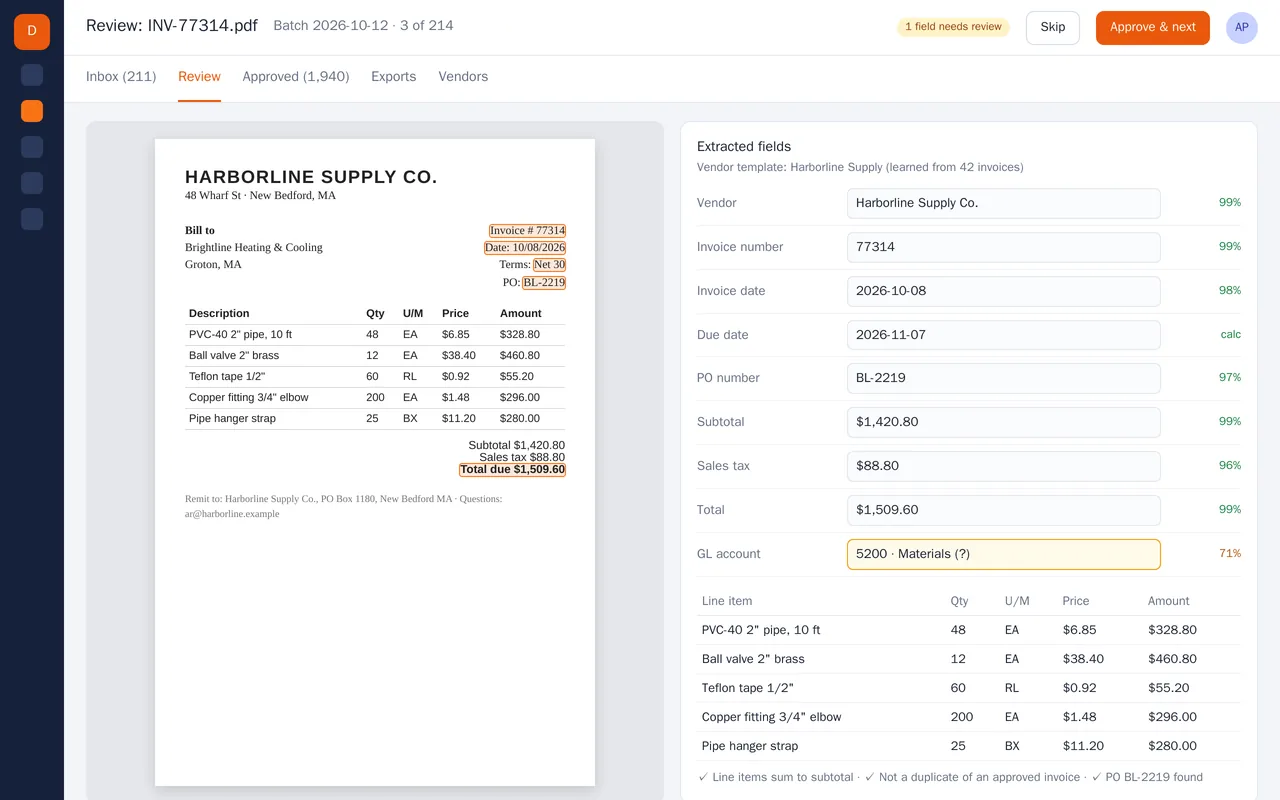
Supplier invoice extraction for an accounts-payable team (PDF to structured data)

Example build

Supplier invoice extraction for an accounts-payable team (PDF to structured data)

  • PDF and scan ingestion from a shared inbox and a watched folder
  • Header and line-item extraction with per-field confidence scores
  • Per-vendor templates that improve as invoices are approved
  • Checks: line items vs subtotal, duplicate detection, PO match, GL account suggestion

Python, OCR, layout-aware PDF parsing, LLM extraction with validation rules, PostgreSQL, React

Questions people ask first

Do we have to change our TMS?

No. We work with the one you have, through the integrations, exports or email notifications it supports. If it cannot do something we need, we say so in the scope and lay out the options.

Can this work with load boards?

Often yes, depending on what the board offers. We check what access your account has before writing the scope, and describe what is and is not possible.

Who owns what you build?

You do. It is built in your own accounts, and you get notes on how it works so your team can change it without us.

How do we start?

Tell us which TMS you use and the one task your reps retype most. We reply with questions or a written scope.

Tell us what you need built.

Email a few lines about what you want and which tools you use, or call. We reply with questions or a written scope.

hello@pushbuild.com

(617) 299-8887