
Pushbuild

Smartsheet that updates itself and talks to the rest of your tools.

Smartsheet is where a lot of teams keep projects, requests and schedules, and where a lot of retyping still happens. We connect it to your forms, email, files and finance tools, so rows get created, updated and reported on without someone copying them across. The scope is written down and agreed before we start.

Tell us what you needSee example projects

Sound familiar?

What teams running work in Smartsheet tell us before a project starts.

  • Requests come in by email and someone types each one into a sheet.
  • The same project status is kept in Smartsheet and in a second spreadsheet that nobody trusts.
  • Our automation rules hit their limits and we need something between two sheets or two workspaces.
  • Weekly reports are put together by hand from several sheets.
  • Finance and operations each have their own list and the numbers never match.

What we build

Each one is a working piece you can open and check when it's done.

Requests into the sheet

Emails, form answers and orders added as new rows with the right owner and due date, instead of being typed in.

API integrations and data sync n8n, Make and Zapier automation

Updates that flow both ways

A change in Smartsheet reaches your CRM, accounting tool or task list, and the reverse, with a log of what moved.

API integrations and data sync QuickBooks, Xero and HubSpot integrations

Cross-sheet and cross-workspace rules

Rows that meet a condition copied, moved or summarised into another sheet, for cases the built-in rules do not cover.

n8n, Make and Zapier automation Python scripts and utilities

Attachments and files in order

Files from a row saved to Drive, SharePoint or Dropbox under a consistent folder and name, with the link written back.

API integrations and data sync

Reminders and status messages

Owners and clients told when something is due, late or approved, through email or a chat message, and not before.

n8n, Make and Zapier automation

Reports outside Smartsheet

Progress, workload and budget pulled from your sheets into one page for people who do not have a licence.

Dashboards and reporting ETL and data pipelines

What we connect it to: Google Drive, Microsoft Teams, Slack, Gmail, Outlook, Zapier, Make, QuickBooks.

Industries that use it: Construction, Marketing agencies, Event planners, Manufacturing.

Example projects

Illustrations of the shape of the work, not past clients. Yours gets its own written scope.

Example project

Intake form to project row

Example: a marketing team gets design requests by email and form. Each one becomes a row with a requester, a due date and an owner, and the requester gets a confirmation with the row link.

Smartsheet, Gmail, Slack

Example project

Budget lines to the finance tool

Example: a construction office tracks change orders in a sheet. Approved rows are sent to the accounting tool as draft entries, and a weekly summary goes to the project managers.

Smartsheet, QuickBooks, email

Example project

Status page for clients

Example: an events team keeps vendor tasks in a workspace. Clients see a simple page with progress and next dates, built from the sheet without giving them a login.

Smartsheet, a hosted dashboard
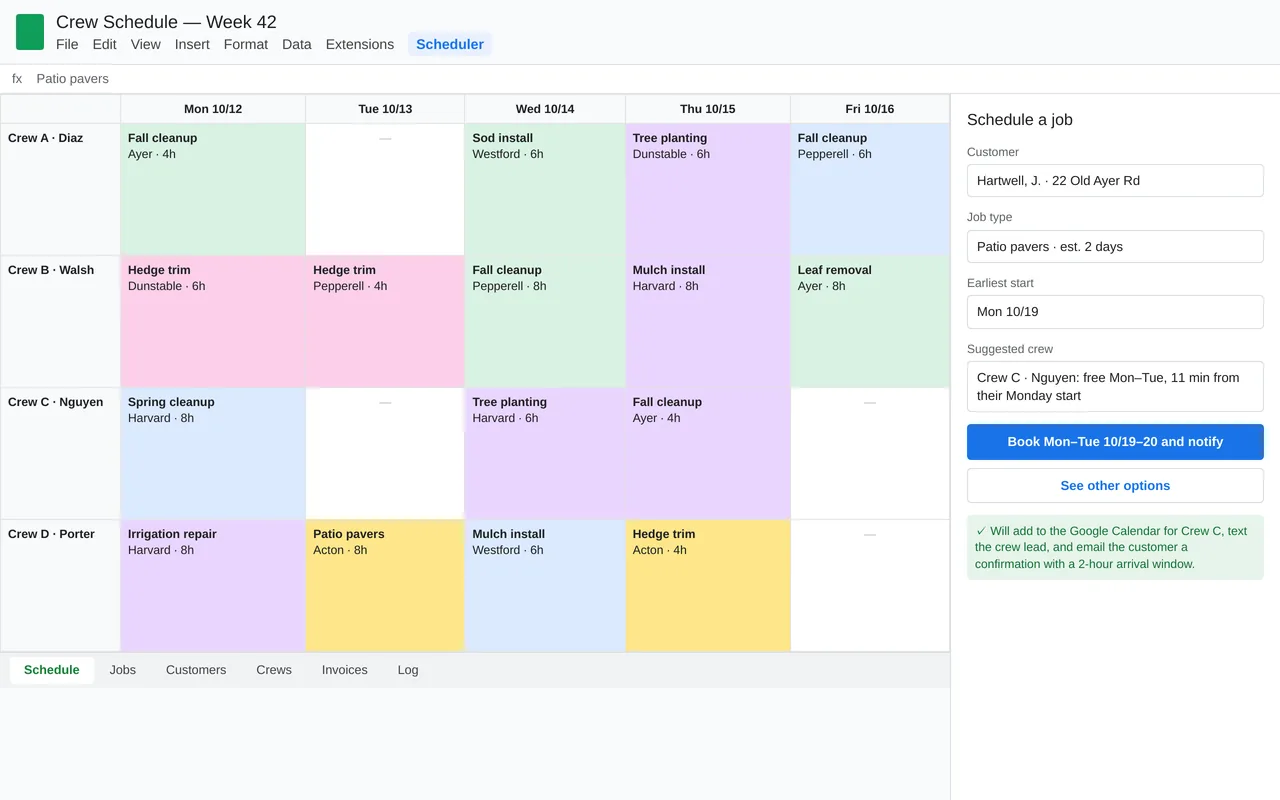
Crew scheduling in Google Sheets for a landscaping company (Apps Script)

Example build

Crew scheduling in Google Sheets for a landscaping company (Apps Script)

  • Custom Scheduler menu and booking sidebar in Google Sheets
  • Crew suggestion from availability and drive time
  • Sync to each crew's Google Calendar
  • Evening crew texts, customer arrival-window emails, and a weekly summary to the owner

Google Apps Script, Google Sheets, Calendar and Gmail APIs, Google Maps distance matrix, Twilio SMS, time-driven triggers

Questions people ask first

Do we have to leave Smartsheet?

No. We build around the sheets and workspaces you already have. If a task is better handled elsewhere we say so in the scope.

Can you work with our existing automation rules?

Yes. We leave the rules your team made alone and add the pieces that sit around them, and we document both.

Who owns what you build?

You do. It is built in your own accounts, and you get notes on how it works so your team can change it without us.

How do we start?

Tell us which tools you use and the one thing that wastes the most time each week. We reply with questions or a written scope.

Tell us what you need built.

Email a few lines about what you want and which tools you use, or call. We reply with questions or a written scope.

hello@pushbuild.com

(617) 299-8887