
This is the reference for the files Groove exports and imports and the tools it gives AI agents. Everything here is built to be read by an agent: hand this page, or the files linked below, to your agent along with a recording or groove.
1. Downloads
| file | what it is |
|---|---|
groove.schema.json | JSON Schema for a groove (format groove, version 1). Validate against it before you give a groove back. |
SKILL.md | Instructions for an agent: how to read a recording, find what to automate, write a groove, and change one. Works as a Claude skill. |
sample.groove.json | A small working groove: opens a Wikipedia article and copies its summary. |
Every recording bundle and groove pack Groove exports already contains the schema and SKILL.md, so an agent given one of those files needs nothing else.
2. Groove bundles (recordings)
A recording is a recording of real browser work. Download for an agent on a recording makes groove-<name>.zip:
| file | what it is |
|---|---|
README.md | Start here: when, which sites, and every step in plain words, with the person's notes. |
manifest.json | Format recording, label, time range, sites, and the person's note on the recording. |
steps.jsonl | One step per line: action, tab, frame, url, target, value, text, comment. |
context.json | Sites used, their pages, form fields filled, and the busiest network endpoints. |
network.jsonl | Network metadata (method, URL, status, timing). No bodies. |
events/*.json | Full page recordings (rrweb format), one per tab and frame. Large; use only when steps are not enough. |
groove.schema.json, skills/groove/SKILL.md | The format to write and how to write it. |
[REDACTED] or ••• were hidden on the person's computer before they were stored. They are not in the file. Never guess them: make them a variable with "secret": true.3. The groove format
A groove is one JSON object:
{
  "format": "groove", "version": 1,
  "name": "Add a customer note",
  "description": "What it does and why, in plain words.",
  "variables": [
    { "name": "customer", "label": "Customer name" },
    { "name": "note", "label": "Note", "default": "Called, no answer" },
    { "name": "region", "kind": "setting", "value": "east" }
  ],
  "steps": [
    { "action": "goto", "url": "https://crm.example.com/customers", "note": "Open customers" },
    { "action": "type", "target": { "role": "textbox", "name": "Search" }, "value": "{{customer}}" },
    { "action": "press", "key": "Enter" },
    { "action": "click", "target": { "role": "link", "name": "{{customer}}" } },
    { "action": "type", "target": { "role": "textbox", "name": "Note" }, "value": "{{note}}" },
    { "action": "click", "target": { "role": "button", "name": "Save" }, "confirm": true },
    { "action": "waitFor", "text": "Note saved" }
  ]
}
| field | meaning |
|---|---|
variables | Inputs (kind: "input", the default) are asked for each run, prefilled with the last value or default. Settings (kind: "setting") are saved with the groove as value. Names match ^[a-z][a-z0-9_]*$; steps use them as {{name}}. "secret": true values never leave the browser in an export. |
steps | Run in order. Up to 500. See the step reference below. |
schedule | { "every": "minutes" | "hour" | "day" | "weekdays", "n": 15, "at": "08:00" }. Scheduled runs use last values or defaults, so give every input a default. Approved grooves only. |
askInputs | false to skip the input form when a person runs it. |
lineage | Set by Groove on export. Leave it exactly as it is when you change a groove. |
4. Step reference
Targets. Elements are found by a target object. Groove tries testid, then role + name, then text, css and xpath. Copy targets from a recording's steps.jsonl rather than writing selectors by hand.
| action | fields | does |
|---|---|---|
goto | url | Open a page. Must be http(s), or start with a {{variable}}. |
click, check, uncheck | target | Click or set a checkbox. |
type, select | target, value | Fill a field or pick an option. |
press | key | Press a key, such as Enter. |
extract | target, saveAs | Read a value into a variable. Every saveAs is also an output of the run. |
extractAll | item, fields, saveAs, next, maxPages, onlyNew, key | Read every matching element into rows (field attr: text, href or src). Pages through with next; onlyNew keeps rows not seen before. |
waitFor, assert | text or target | Wait for, or require, proof a step worked. A failed check stops the run. |
notify | message, if | Send the person a notification, optionally only if a text shows or a list has rows. |
newTab, switchTab, closeTab | tab, url | Work across tabs. |
wait, scroll, back, reload, note | Pause, scroll, navigate, or leave a note for the person. |
Any step can carry confirm: true (the person approves it during the run: use it on anything that submits, sends, pays or deletes), frame (an iframe's CSS selector), note (shown to the person) and comment (why the step is there).
5. Groove packs: change a groove and give it back
Download for an agent on a groove makes <name>.groove.zip:
| file | what it is |
|---|---|
README.md | The groove in plain words: every step, input and setting, and how to give it back. |
groove.json | The groove, with lineage. Results, last values and secret values are removed. |
manifest.json | Format groove-pack, and the sites the groove visits. |
groove.schema.json, skills/groove/SKILL.md | The format and the instructions. |
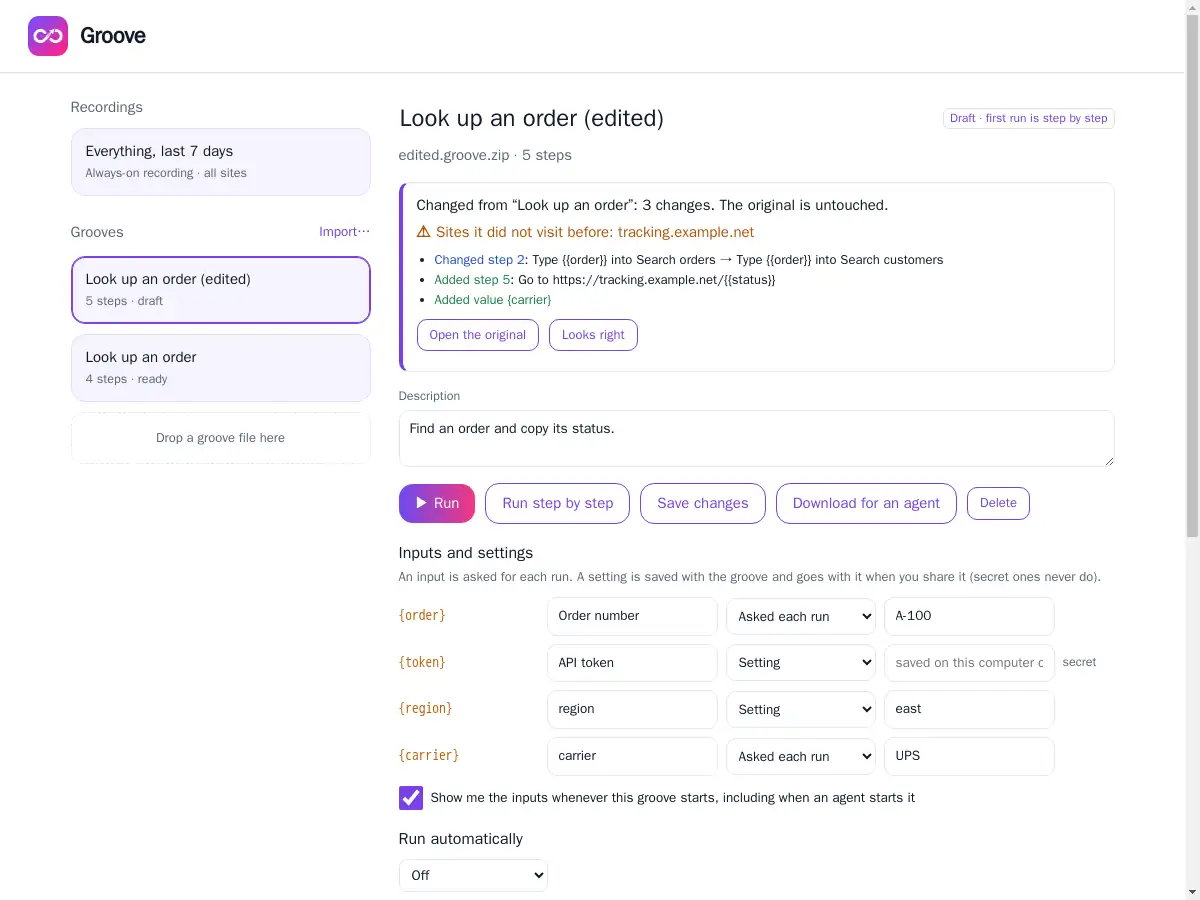
To change it, an agent edits groove.json, keeps lineage, and gives back either groove.json or the zip. The person imports it (Grooves → Import). Groove matches the lineage and adds the edit as a new draft beside the original, which is left untouched, then shows a review of every added, removed and changed step, variable and setting, plus any site the groove did not visit before. Nothing runs until the person approves it.
6. Connect an agent over MCP
In Groove, turn on Connect an agent and copy the link. Add it to your agent as an MCP server. For Claude Code:
claude mcp add --transport http recording https://groove.pushbuild.com/mcp/<your link>
Any client that supports remote MCP servers over HTTP works the same way. The relay at groove.pushbuild.com only passes messages between your agent and your browser, and stores nothing. Making a new link cuts every agent off the old one.
7. MCP tools
| tool | what it does |
|---|---|
search_history | Search what the person did (masked): step text, page URLs, element names. Filter by site and days. |
list_recordings | The recordings (labelled recordings) the person has made. |
get_recording | Read a recording, or a time range of the always-on history: steps with targets, sites and form fields. |
find_repeats | Routines the person repeats, how often, time spent, and which typed values change. Good groove candidates. |
read_page | The page open in the current tab: title, URL, interactive elements and visible text, masked. No screenshot. |
list_grooves | The person's grooves and whether each is approved to run. |
get_groove | One groove in the portable format, with lineage, to explain or change it. |
propose_groove | Give the person a new or changed groove. It arrives as a draft, with the review of changes and new sites. |
run_groove | Run an approved groove and get its outputs back. The person sees its input form first unless the groove turns that off. |
8. Safety rules agents work within
- Agents see masked data only. Passwords and card numbers are never recorded at all.
- A groove from an agent is always a draft. It cannot run until the person approves it and has run it once, step by step.
- Steps marked
confirmwait for the person every time. Keep them on anything that pays, sends or deletes. - Imports refuse non-web URLs (such as
javascript:) and grooves over 500 steps. - Exports never include secret values, past results or past inputs.
For using Groove itself, see the guide.