Example package
Connect two tools
One reliable workflow between two of your apps, with de-duplication and alerts.
You get
- Field mapping agreed in writing
- Workflow built in your account
- Tested with real sample records
- Failure alert to email or Slack

Forms into your CRM, orders into accounting: in n8n, Make, Zapier or code, handed over with notes.
We help your business run itself.
How it works
How we work, step by step · The 30-day fix window in our agreement (section 9)
What we hear from businesses before a project like this starts.
Automation
Forms handled
47
The requests that come up most often for this kind of work, and what each one takes to work properly.
Every submission creates or updates the right contact, tags the source and starts the right follow-up.
Stripe, Shopify or PayPal transactions written to QuickBooks or Xero with the right accounts, without duplicates.
Existing zaps documented, rebuilt one by one, run side by side and switched over only when the outputs match.
A direct API connection or webhook for the app that has no ready-made module.
An inventory of every running automation, with duplicates removed and the rest named, foldered and documented.
Error handling and a daily check, so a failed run is noticed the same day.
Drafts, invoices or messages wait for a yes in Slack or email and are sent only after it, with a record of who approved what.
Call transcripts, incoming emails or form answers sorted, labelled and entered in your CRM or Airtable, with a suggested next step for a person to approve.
Tools that come up most: n8n (cloud or self-hosted), Make, Zapier, webhooks, HubSpot, GoHighLevel, Airtable, Notion, Google Sheets, Slack, Stripe, Shopify, QuickBooks and Xero, Jotform, Constant Contact, Supabase, Retool, CallRail, LiveAgent.
Concrete pieces, each one something you can open and check when it's done.
Each automation built in your chosen tool, named clearly and grouped so your team can find it.
n8n, Make, ZapierDirect connections for the apps with no ready-made module, with authentication stored safely.
REST APIs, webhooks, OAuthRetries, a failure branch and an alert to email or Slack when a run cannot complete.
Error workflows, alertsRules so the same customer or order is never created twice.
Lookups, unique keysA simple record of what ran and what it did, so questions can be answered without guessing.
Google Sheets or database logA one-page map of every automation, what triggers it and what it changes.
Written map, walkthroughA hold on anything customer-facing until a named person approves it in Slack or email.
Slack or email approvals, wait stepsEach workflow is built and tested against test data or a sandbox before it touches live records, and the test log is handed over.
Test accounts, sandbox APIs, test logWhat this kind of build looks like when it's done.
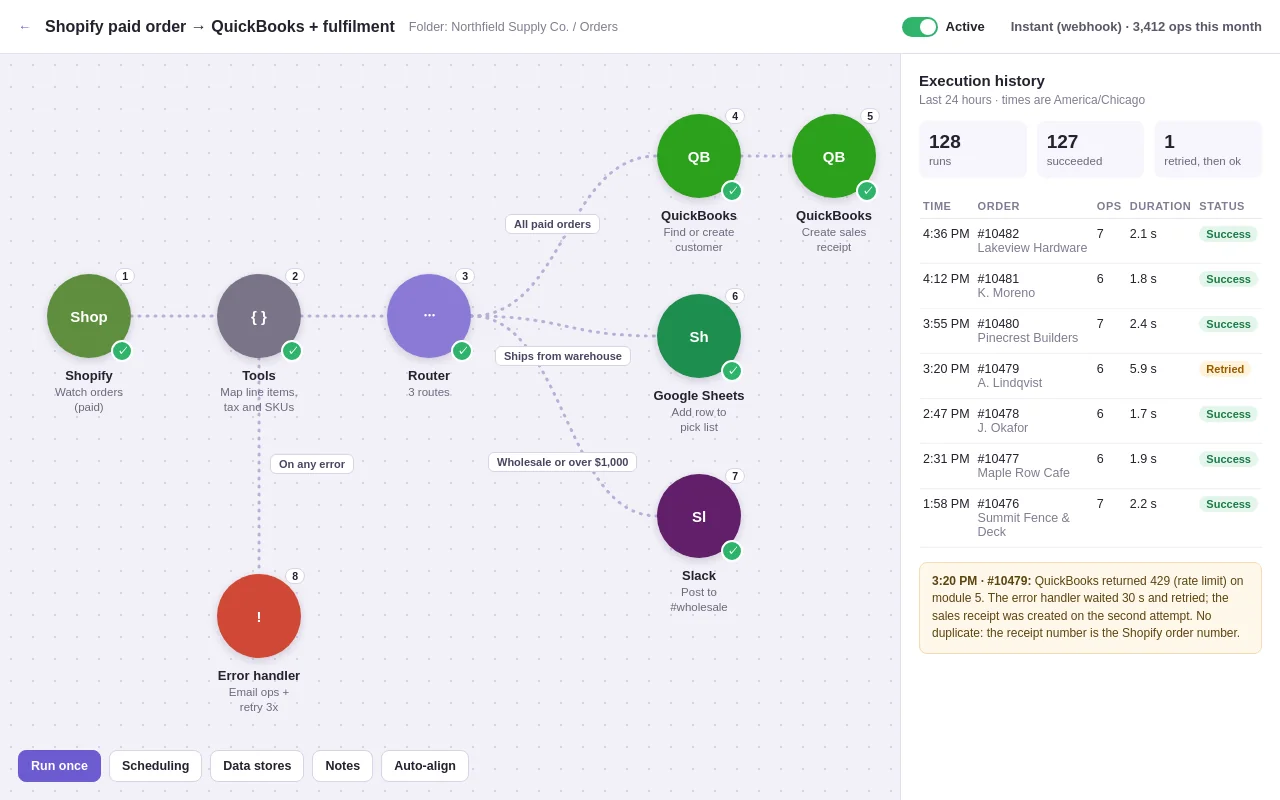
Example build
Each paid Shopify order becomes a QuickBooks sales receipt, warehouse orders get a pick-list row and wholesale orders are posted to Slack. An error handler retries rate limits, and the order number is used as the receipt number so a retry cannot create a duplicate.
Make, Shopify, QuickBooks Online, Google Sheets, Slack
Example packages to show the shape of the work. These are examples, not past clients; yours gets its own written scope.
Example package
One reliable workflow between two of your apps, with de-duplication and alerts.
You get
Example package
Sales from Stripe, Shopify or PayPal recorded in QuickBooks or Xero automatically.
You get
Example package
Your existing zaps rebuilt in n8n or Make and switched over safely.
You get
Example package
An audit of everything currently running, with the mess tidied and documented.
You get
Weighing a move off Zapier? See the yearly cost against n8n or Make, and how risky the move is, with our free Zapier cost check.
You know what you're getting before work begins, and you see it working at every milestone.
Tell us what you need in your own words, and which tools you already use. A few lines is plenty to start.
We reply with a short written scope: what gets built, what is out of scope, which accounts we need, and how we'll both know it works. You know what you're getting before work begins.
The work is split into milestones. At each one you see it working in your own account and sign it off before we go on.
You get the working system, its documentation and a walkthrough. If anything we built breaks in the next 30 days, we fix it at no charge.
Pushbuild has built software for businesses since 2010, for more than 40 clients. Every project is led by a former public-company CTO, based in Massachusetts. See example builds.
The habits that keep this kind of project from going wrong.
We write down every trigger and every field before building, so nothing is guessed.
Each workflow is run with real sample data, including the awkward cases like missing fields and duplicates.
Every workflow has an error path and an alert, because a silent automation is worse than none.
Everything lives in your own n8n, Make or Zapier account, so it keeps running if we're not involved.
Industries: Accounting, Agriculture, Appliance repair, Architects, Auto body, Auto dealers, Auto repair, Bakeries, Barbershops, Bars, Bookkeepers, Boutiques, Breweries and wineries, Call centers, Car wash and detailing, Catering, Childcare, Chiropractic, Churches, Cleaning, Coaches and consultants, Coffee shops, Concrete, Construction, Couriers, Coworking, Credit unions, Dental, Dog daycare, Ecommerce, Electricians, Engineering firms, Event planners, Fencing, Financial advisors, Fitness, Flooring, Florists, Food trucks, Freight brokers, Funeral homes, Furniture stores, Garage doors, General contractors, Grocery stores, Handyman, Home builders, Home health, Home inspectors, Hotels, HVAC, Insurance, Interior design, IT / MSP, Jewelry stores, Junk removal, Landscaping, Law firms, Locksmiths, Logistics, Manufacturing, Marketing agencies, Martial arts, Massage therapy, Med spas, Medical practices, Mental health, Mortgage, Moving, Nail salons, Nonprofits, Online courses, Optometry, Painting, Pest control, Pet grooming, Pharmacy, Photography, Physical therapy, Plumbing, Pool service, Print and signage, Property management, Real estate, Recruiting, Remodeling, Restaurants, Restoration, Retail, SaaS startups, Salons, Schools and tutoring, Security, Self-storage, Senior living, Septic, Short-term rentals, Solar, Subscription boxes, Tattoo studios, Tax preparers, Title companies, Towing, Travel agencies, Tree service, Trucking, Veterinary, Wedding venues, Wholesale, Windows and doors, Yoga studios.
More tools: Asana, BigCommerce, Bill.com, Booksy, Boulevard, Buildertrend, Buildium, Bullhorn, Calendly, Canopy, CCC ONE, Claude, ClickUp, Cliniko, Clio, Clover, CompanyCam, Constant Contact, Dentrix, DocuSign, DoorLoop, Drake Tax, Dropbox, Dynamics 365, eBay, ElevenLabs, Entrata, Etsy, EZLynx, ezyVet, FieldEdge, FieldPulse, FieldRoutes, Filevine, Firebase, Follow Up Boss, FreshBooks, Gingr, Glofox, GlossGenius, Gmail, GoDaddy, Google Ads, Google Drive, Google Sheets, Google Workspace, Gorgias, GorillaDesk, Guesty, Gusto, HawkSoft, Homebase, Hostaway, Housecall Pro, HubSpot, Innago, Instantly, Intercom, Jane, Jira, Jobber, JobNimbus, Jotform, Kajabi, Karbon, Kickserv, Klaviyo, Lawmatics, Lightspeed, LinkedIn, Mailchimp, Make, Mangomint, MarginEdge, MassageBook, Meevo, Meta Ads, Microsoft Teams, Mindbody, Mitchell 1, monday.com, MyCase, n8n, NetSuite, Notion, Open Dental, OpenAI and ChatGPT, OpenTable, Outlook, PandaDoc, PayPal, PestPac, Pipedrive, Power Automate, Power BI, Practice Better, PracticePanther, Procore, Propertyware, PushPress, Qualia, Rent Manager, Rentec Direct, Restaurant365, Resy, Retell, RingCentral, Roofr, Salesforce, Samsara, Service Fusion, ServiceM8, ServiceTitan, ServiceTrade, SevenRooms, SharePoint, ShipStation, Shopmonkey, SimplePractice, Skool, Slack, Smartsheet, Smokeball, Square Appointments, Square, Squarespace, Squire, storEDGE, Stripe, Tableau, TaxDome, Tekmetric, Telegram, TenantCloud, Time To Pet, Toast, Trello, Twilio, Typeform, Vagaro, Vapi, Weave, Webflow, Weebly, WhatsApp, Wix, Wodify, Workiz, Xero, Yardi, Zapier, Zen Planner, Zendesk, Zenoti, Zoho.
Zapier is simplest for a few light workflows; Make handles more complex logic for less; n8n is cheapest at volume and can run on your own server. We recommend one in the scope based on your volume and team.
Yes, on a small server in your own cloud account, with backups and updates explained in the handover notes.
No. We ask to be added as a user, or we use API keys you create and can revoke at any time.
The alert tells you a run failed. Within the 30 days after handover we repair it at no charge; after that it is a short, separately scoped job.
Most projects take one to two weeks from the signed scope; migrations depend on how many workflows there are.
For 30 days we repair anything we built that does not work as the scope describes, at no charge. After that, further work is scoped the same way and agreed with you before we start.
Yes. A short screen recording of you doing the job by hand, with a few spoken notes, is often the quickest brief. We turn it into a written scope for you to check before we build.
Every workflow gets an error alert and a short run log, so a stopped run is noticed the same day. Anything we built that stops working in the 30 days after handover is repaired at no charge.
Do it once, we automate it. Show us the job one time and it runs on its own after that, in the tools you already use. Not sure where to start? Start with an Automation Audit.
Email a few lines about what you want and which tools you use, or call. We reply with questions or a written scope.
hello@pushbuild.comWhich apps connect through Zapier, Make, n8n or a direct API? See our automation integrations table.
 QuickBooks, Xero and HubSpot integrations
 GoHighLevel setup